

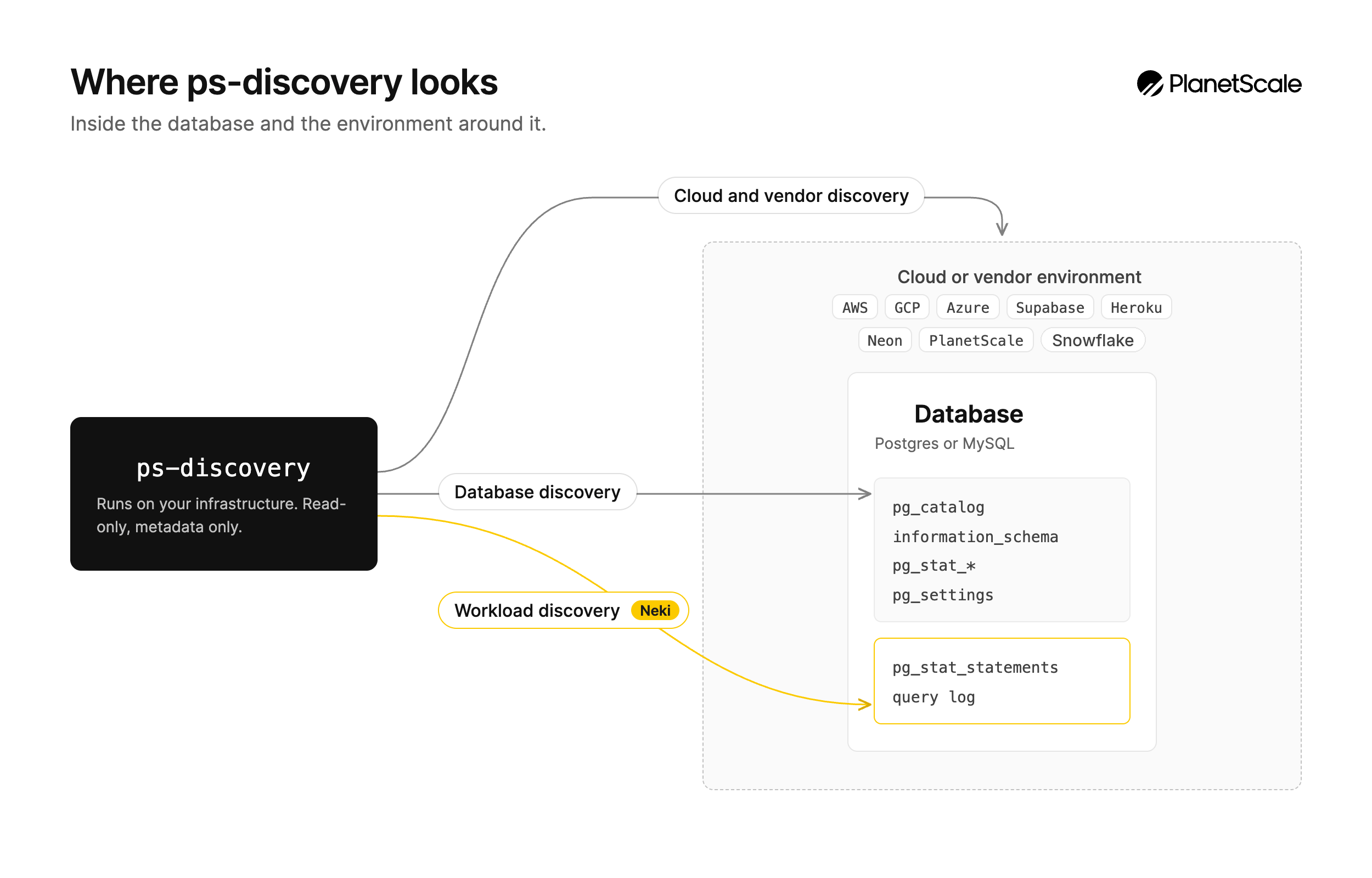
The discovery tool is open source and available on GitHub. Essential setup steps are below. Advanced usage, troubleshooting, and detailed reference are available in the full documentation.
What it discovers
Database analysis:- PostgreSQL version, configuration, and installed extensions
- Schema structure, including schemas, tables, columns, indexes, constraints, and sizes
- Performance statistics such as cache hit ratios, table/index usage, and active locks
- Security configuration: roles, permissions, and SSL settings
- Feature usage: foreign data wrappers, partitioning, PostGIS, and more
- Database instances, clusters, and their configurations
- Azure Database for PostgreSQL Flexible Servers
- Snowflake Postgres instances
- Supabase, Heroku Postgres, and Neon project metadata
- VPC networking, subnets, security groups, and firewall rules
- Performance metrics from cloud monitoring services
- High availability and replica configurations
Installation
The discovery tool requires Python 3.10 or later.1
Download and extract
Download the latest release from GitHub and extract it:
2
Run setup
The setup script verifies your Python version, creates a virtual environment, installs dependencies, and writes a starter
config.yaml:3
Configure credentials
Edit the generated configuration file to include your database and cloud provider credentials:At a minimum, configure your database connection. See Configuration below for the full format.
Database user setup
Create a dedicated read-only user for the discovery tool. Connect to your PostgreSQL database as a superuser or privileged role and run the following:If your database has additional schemas beyond
public, repeat the GRANT USAGE ON SCHEMA and GRANT SELECT ON ALL TABLES IN SCHEMA statements for each schema you want analyzed.PostgreSQL cleanup
Configuration
The discovery tool uses a YAML configuration file. Running./ps-discovery loads ./config.yaml by default. Configure the database block for database discovery and enable any cloud providers you want included:
Running discovery
Run discovery with the generatedconfig.yaml:
planetscale_discovery_results_20260708T072229.json. Upload this report to the migration assessment tool for instant feedback, or share it with PlanetScale for migration planning assistance.
Once PostgreSQL discovery is complete, remember to clean up the
planetscale_discovery user you created on your source database.Cloud provider setup
Each cloud provider requires specific credentials and permissions. Below is a summary of what you need for each. For detailed instructions including IAM policies and API enablement steps, see the provider documentation. For third-party hosted Postgres providers, the discovery tool supports Snowflake, Supabase, Heroku, and Neon.AWS (RDS / Aurora)
The tool discovers RDS instances, Aurora clusters, VPC networking, security groups, and CloudWatch metrics. Authentication (choose one):- IAM instance profile (recommended when running on EC2)
- Access key and secret key
- IAM role assumption (for cross-account access)
- RDS:
DescribeDBInstances,DescribeDBClusters,DescribeDBSubnetGroups - EC2:
DescribeVpcs,DescribeSubnets,DescribeSecurityGroups,DescribeRouteTables - CloudWatch:
GetMetricData,ListMetrics
Google Cloud (Cloud SQL / AlloyDB)
The tool discovers Cloud SQL instances, AlloyDB clusters, VPC networks, firewall rules, and Cloud Monitoring metrics. Authentication (choose one):- Application Default Credentials (recommended)
- Service account key file
- Cloud SQL Admin API
- Compute Engine API
- Cloud Monitoring API
- AlloyDB API (if using AlloyDB)
Azure (Database for PostgreSQL)
The tool discovers Azure Database for PostgreSQL Flexible Servers, virtual networks, network security groups, and firewall rules. Authentication (choose one):- Service principal with the Reader role (recommended)
- Azure CLI (
az login) or a managed identity AZURE_CLIENT_ID,AZURE_CLIENT_SECRET,AZURE_TENANT_ID, andAZURE_SUBSCRIPTION_IDenvironment variables
- Built-in Reader role at subscription or resource-group scope
- Resource providers registered on the subscription:
Microsoft.DBforPostgreSQLandMicrosoft.Network
az login and omit the credentials block, or focus discovery on specific servers:
Supabase
The tool discovers project metadata, database configuration, PgBouncer settings, and connection details. Authentication:- Personal Access Token (recommended, read-only)
Neon
The tool discovers Neon project metadata, branch topology, compute endpoints, autoscaling configuration, connection pooling, and database names. Authentication:- API key from Neon. See Manage API keys in the Neon docs.
- Or the
NEON_API_KEYenvironment variable
Heroku
The tool discovers Heroku Postgres add-ons across all your apps, including plan details, database sizes, replica configurations, and connection pooling. Authentication:- API key from the Heroku dashboard
- Or a Heroku CLI authorization token
Snowflake
The tool inventories Snowflake Postgres instances withSHOW POSTGRES INSTANCES and DESCRIBE POSTGRES INSTANCE. Results land under cloud_results.providers.snowflake. Full setup is in the Snowflake provider guide.
Authentication (choose one):
These are Snowflake account credentials, not the Postgres instance password.
- Key pair on a
TYPE = SERVICEuser (recommended) - SSO (
authentication: sso) for an interactive one-off run - Password via the
SNOWFLAKE_PASSWORDenvironment variable if the account still allows it. Do not put the password in the config file. Snowflake is retiring password-only sign-in.
OPERATEon each Snowflake Postgres instance, including read replicas. Replicas do not inherit grants from their primary.
OPERATE can also suspend, resume, and change Postgres settings. Grant it to a dedicated PS_DISCOVERY role, run discovery, then drop that role and user.providers.aws or providers.gcp for Snowflake-hosted hostnames. Those tokens in the hostname are location labels. The inventory provider is Snowflake.
You can also focus inventory on specific instances:
Performance and safety
The default database analyzers are safe to run against production databases. They use read-only queries against system catalogs and statistics views, with very low performance impact.Privacy and security
The discovery tool runs entirely on your infrastructure. No data is sent to external services during analysis. Collected: Schema metadata, database configuration, usage statistics, infrastructure topology, and role names. Not collected: Table contents, row data, application queries, passwords, or secrets. Passwords are used only to establish the database connection and are never included in the output.Get an instant migration assessment
Once you have your discovery report, upload it to our migration assessment tool for immediate feedback. The tool analyzes your report and provides:- An overview of your existing database and optionally hosting provider
- Extension compatibility issues, schema defects, and any migration blockers
- A recommended migration path with main steps involved and the estimated duration
Liftoff needs both the database and cloud sections. A cloud-only file cannot be reviewed. If you will upload the output to Liftoff, put a
database block and an enabled cloud provider in the same config, or run the both subcommand.