

During Platform Preview, MoveTables and Reshard are not managed in the
PlanetScale dashboard and have no separate CLI workflow. Create, inspect, and
operate them with Neki metafunctions on a SQL connection to a Neki router.
Mutation functions require
neki_operator; status and report functions
require neki_viewer. The default postgres role is broader than this
workflow authorization contract. Connect to a router that serves primary
traffic.How workflows are managed
The router is the management entry point for a Neki data-movement workflow. Create, status, start, stop, differ, traffic switch, cancel, and complete are Neki metafunctions. Usereshard_create for Reshard and move_tables_create
for MoveTables. After create, the shared workflow_* metafunctions operate
either workflow.
There is no dashboard or CLI fallback during Platform Preview. A workflow
created through the router continues running after the SQL session that created
it disconnects. Later sessions use the workflow name to inspect it or request
its next operation.
The sections below explain the lifecycle and the checks required before each
operation. They describe Neki workflows for data that is already inside Neki.
Router metafunctions
Workflows start when created unless the create options include
"create_stopped": true. Review a stopped workflow, then call
workflow_start.
Workflow options
Create options are a JSON object. Unknown values are rejected. The most useful correctness and load controls are:dry_run, publication_name, import_cluster_auth, and
skip_existing_roles are MoveTables-only. ON_DDL_ACTION_STOP requires
PostgreSQL 14 or later and a superuser source login because Neki must create an
event trigger. Many managed external sources do not grant that privilege.
Only copy_batch_size and copy_phase_duration can be changed on a running
workflow:
What a migration workflow moves
Neki has two workflows for changing where existing data lives:
Workflows start by default. They can instead be created in a stopped state,
reviewed, and started later. Throughout the move, the data
topology determines which target shard receives each row.
Before creating a Reshard workflow, declare every physical base table that
resolves to the source group in the data topology. A declared table can inherit
its shard group from a database, schema, or cluster default. Neki refuses to
start if a physical table uses that default but has no table entry in the data
topology.
At cutover, database and schema defaults that point to the source group move to
the target group. If the database used the cluster default, Neki adds an
explicit database default for the target group.
A Reshard workflow can split the initial authoritative shard group. When its
target contains multiple shards, table placement moves to the target group but
cluster authority remains on the original single-shard group. The original
group continues to provide database authority and hold system tables and
sequences that cannot move to the multi-shard target. The original shard does
not become one of the data shards in the split. A two-way split of existing
data therefore uses three shards.
Reshard existing tables
The example redistributespublic.events by tenant_id from one unsharded
source shard onto two new shards. Replace shard UIDs, the database name, and
the table list with values from your branch.
You do not need to shard every table. Bind only the tables that must move, and
the tables that must stay colocated with them, to the source group. Leave
tables that should stay unsharded on the authoritative shard
group.
Declare every physical base table that resolves to the source group, including
tables that inherit that group from a database, schema, or cluster default.
Put related foreign-key tables in the same group. Reshard does not
automatically repoint dependent views.
Add destination shards
Add two new shards for a two-way split. Wait until each destination shard has a ready primary. Do not reuse the source shard as a target.- Dashboard
- CLI
Open the database, go to Clusters, select the configuration profile,
open the Shards tab, and select Create new shards. Enter
2,
review the estimated cost, and add the shards.Declare the source group
Creating shards does not move existing rows. Apply a topology that keeps serving the current shard and binds the tables you will reshard to a named source group on that same shard. Declare the shard index the target group will use. A topology update is a complete replacement. You can edit the document in Clusters > Data topology, or apply it with SQL; see Data topology.Create, copy, switch, and complete
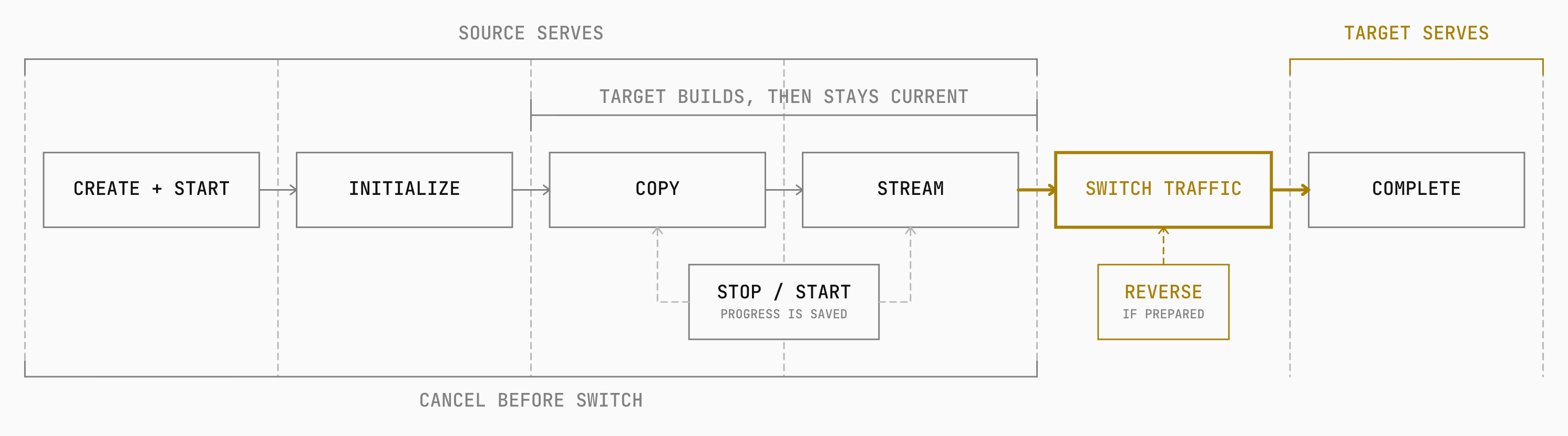
Workflows start when created unless you pass"create_stopped": true. The
target group’s shard_uid values must be the two new shards only.
running in the streaming phase. Then
create a differ, review the report, and switch traffic. Confirm streams are
streaming again after the differ; cutover refuses streams that are not.
From copy to streaming
A migration first copies rows that already exist. Neki works in batches while continuing to incorporate changes committed on the source. Once the initial copy is finished, the workflow entersstreaming and continues applying new
source changes to the target.
Reaching streaming means the target is being kept current. Reads and writes
still go to the source until traffic switches to the target.
Copying with an iteration key
Each table needs an iteration key: a stable, unique order in which Neki can copy its rows. Neki prefers the primary key. If a table has no primary key, a suitable non-nullable unique key can serve instead. The iteration key controls copy order and resumption. The shard key determines where a row belongs.public.events is sharded by tenant_id and has a primary key named
event_id. Neki can copy the table in event_id order while using tenant_id
to choose the target shard. When a batch commits, its rows and copy progress are
saved together. Later batches continue from that committed point while source
changes affecting earlier rows are incorporated into the target.
Because the migration stream does not apply DDL, source and target schemas must
be kept compatible through separate schema changes.
See Schema changes for Online DDL and direct
schema-change workflows.
Durable progress and resumption
Neki saves copy progress with the rows in each committed batch. It also saves streaming progress with the changes applied on the target. If the workflow is interrupted, it resumes from durable progress rather than recopying the entire table.Reading migration progress
Inspect one workflow or list every workflow:
A stream also reports whether it is running, stopped, or in error. The traffic
state shows whether the source or target serves application traffic.
Status is reported for each stream and target shard. Before traffic can move,
every expected stream must be running and in the
streaming phase.
Copy progress ends at streaming. Cutover and completion are separate,
explicitly requested stages.
Stop and Start preserve progress
Stop pauses a workflow without abandoning the migration. Its saved phase and progress remain in place. Start resumes the workflow from that state. A stopped workflow stays stopped until it is started again. Use Stop when the migration should continue later. Cancel removes the workflow. By default, Cancel also cleans up data created or copied on the target. You can choose to keep that data.Validate before cutover
A differ compares the source and target rows for a workflow. Creating a differ starts it. Its report shows mismatched rows and rows found only on the source or target.- The top-level report has
completeset totrue. mismatchisfalse.- Shard errors are empty or absent.
- Every expected table is present in
table_results. - Every table has
completedset totrue. - The report finds no missing, extra, or mismatched rows.
complete is false or a table’s completed field is
false. rows_compared of 0 does not prove that an unfinished table is empty.
Do not treat a complete differ without mismatches as the only proof that a
migration is ready. Confirm that every expected table and stream was included,
review the compared and unmatched row counts, and perform an independent
application-level check of critical tables before cutover.
After the differ finishes, confirm every stream is running in streaming
again before switching traffic. The differ can restart streams, and cutover
refuses streams that are not streaming.
Moving traffic
Traffic can move all at once or in stages. A staged switch moves non-primary reads (replica and rdonly) first while primary reads and writes stay on the
source. Writes move in a separate step after the target has served read traffic.
Cancel or Complete
Choose the operation from the current traffic state and the intended outcome:{"keep_data": true} to retain target data.
Complete is separate from the traffic switch. It removes the workflow’s
temporary migration resources after the target has become final. Source data
is retained by default for safety.
_<table>_old, so
events becomes _events_old. If you choose source cleanup, Neki truncates
tables that keep the same database, schema, and name. It drops old source tables
that moved to a different database, schema, or name. You cannot both rename and
remove the old source data.
Reshard keeps table identifiers unchanged, so its source tables cannot be
renamed. Neki does not drop these tables during Complete. If you choose source
cleanup, it truncates their rows on the old source shards. You can remove an old
source shard later if it no longer holds other data and it is not the
authoritative shard group.