> ## Documentation Index
> Fetch the complete documentation index at: https://planetscale.com/docs/llms.txt
> Use this file to discover all available pages before exploring further.
# Connect a MySQL GUI to PlanetScale
## Introduction
In this tutorial, you'll learn how to connect to a PlanetScale database using a MySQL GUI. While this tutorial uses Sequel Ace as a demonstration, many applications that connect to MySQL databases will support connecting to and querying a PlanetScale database as long as the applicaton supports connecting over SSL.
## Gather the credentials
To connect to a PlanetScale database, you'll need four pieces of information:
* The database name
* Host name
* Username
* Password
The easiest way to gather this information is by selecting the **Connect** button from the **Dashboard** tab. Then, on the **Connect** page, select the branch that you wish to connect to and click the **Create password** button. Within the **Select a language or framework** section, select "Other" to display the connection details as a list instead of a language or framework-specific connection string.
As a security best practice, passwords are only displayed when they are created.
## Connect to the database
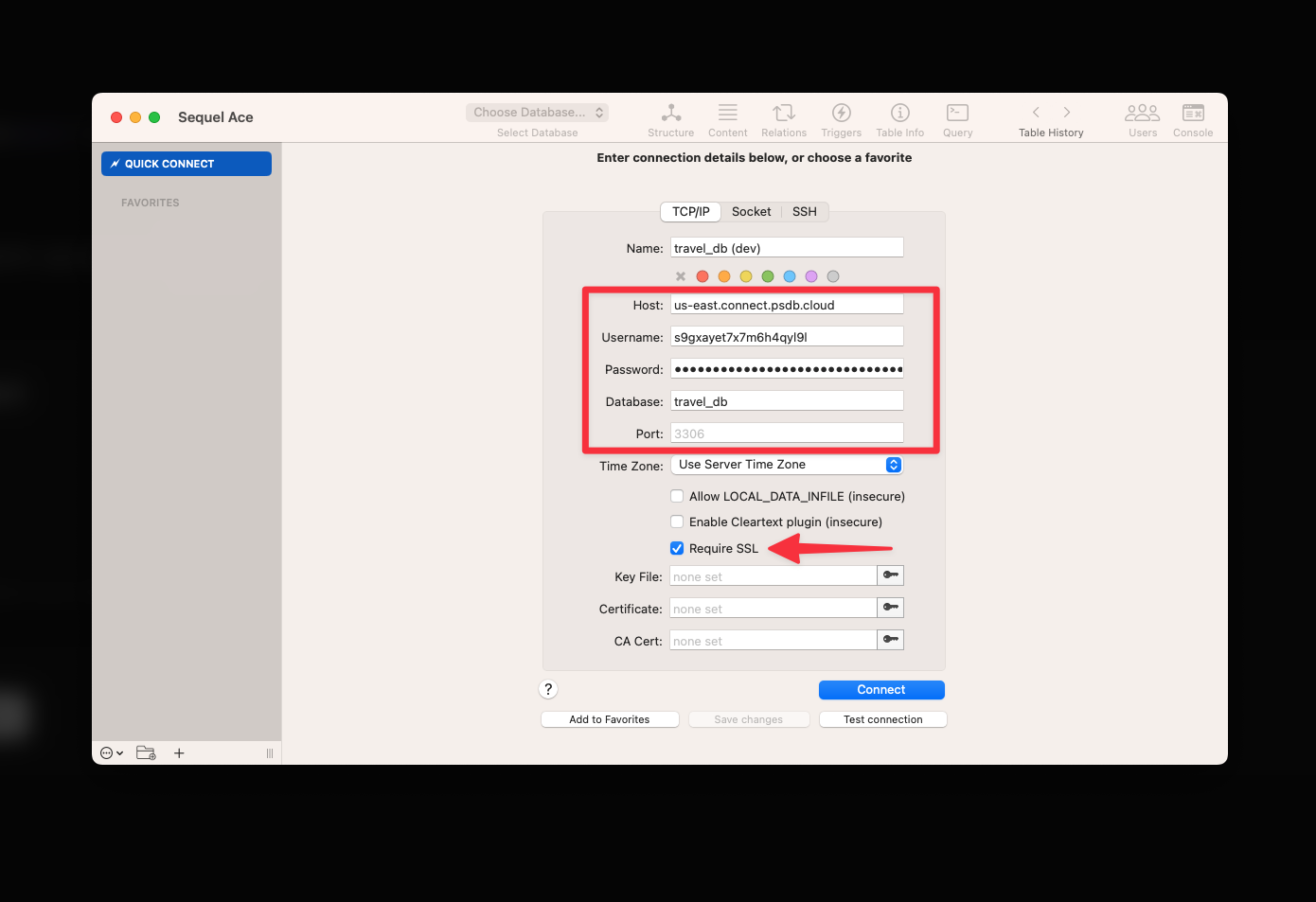
In the application you are using, enter the access information you gathered in the previous step into the appropriate fields. Make sure to check **"Require SSL"** as SSL is required to connect to a PlanetScale database. Click **"Connect"** once you are finished.
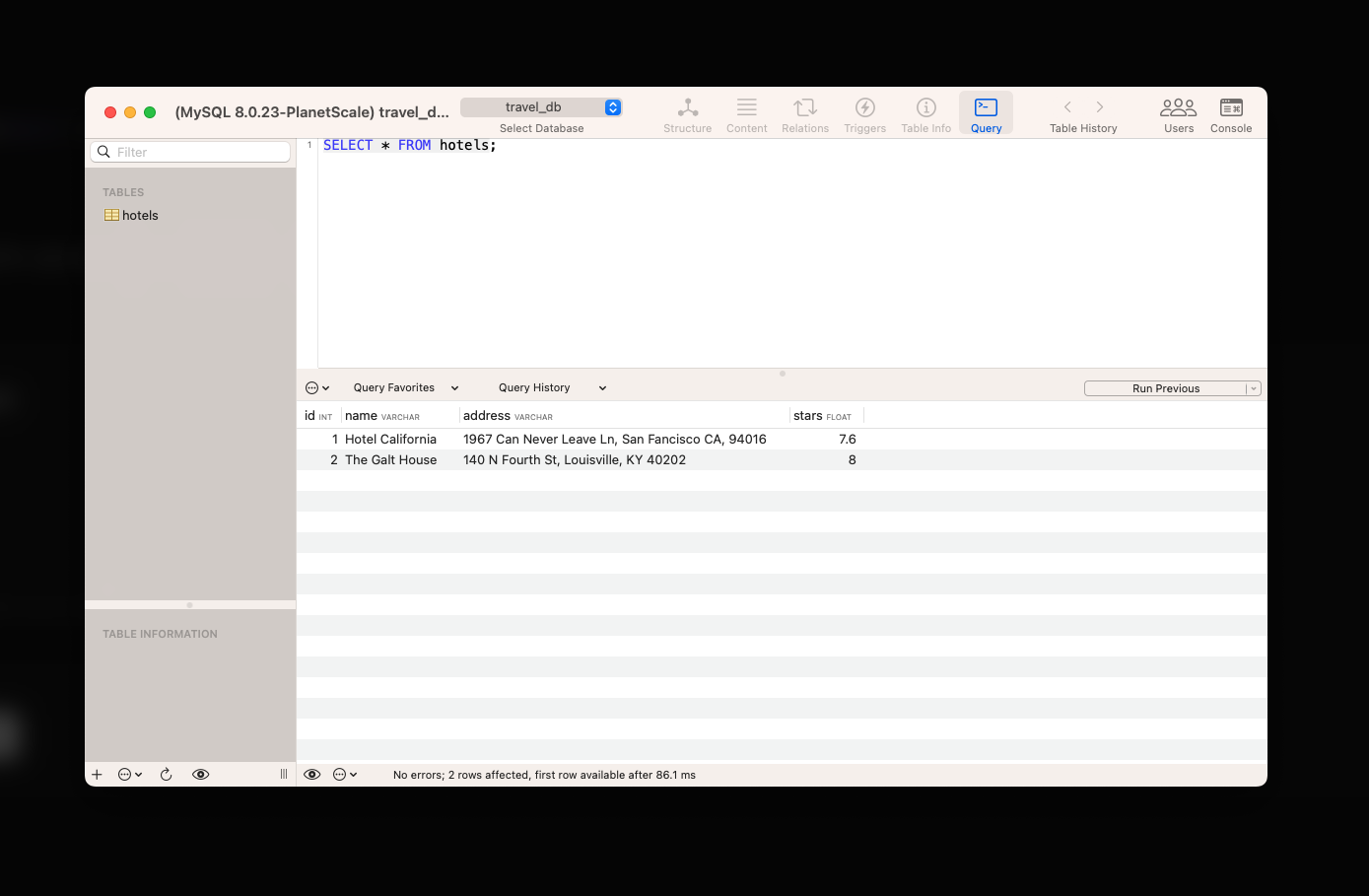
 If the connection is successful, you should be able to query your database and perform other [supported operations](/vitess/troubleshooting/mysql-compatibility).
 ## Caveats
While many standard MySQL statements are supported, there are a few caveats worth calling out:
Each branch of a PlanetScale database is considered an isolated MySQL database. You'll need separate connection details per branch.
Production branches with [safe migrations](/vitess/schema-changes/safe-migrations) enforce the use of [branching](/vitess/schema-changes/branching) and [deploy requests](/vitess/schema-changes/deploy-requests) to safely make schema changes and do not support direct DDL as a result. However, DDL is supported on development branches and production branches without safe migrations enabled (not recommended).
Creating new databases is not supported using any GUI tool.
## Tested GUIs
The following MySQL GUI applications have been tested and confirmed to work with PlanetScale databases:
## Need help?
Get help from [the PlanetScale Support team](https://planetscale.com/contact?initial=support), or join our [Discord community](https://pscale.link/community) to see how others are using PlanetScale.
## Caveats
While many standard MySQL statements are supported, there are a few caveats worth calling out:
Each branch of a PlanetScale database is considered an isolated MySQL database. You'll need separate connection details per branch.
Production branches with [safe migrations](/vitess/schema-changes/safe-migrations) enforce the use of [branching](/vitess/schema-changes/branching) and [deploy requests](/vitess/schema-changes/deploy-requests) to safely make schema changes and do not support direct DDL as a result. However, DDL is supported on development branches and production branches without safe migrations enabled (not recommended).
Creating new databases is not supported using any GUI tool.
## Tested GUIs
The following MySQL GUI applications have been tested and confirmed to work with PlanetScale databases:
## Need help?
Get help from [the PlanetScale Support team](https://planetscale.com/contact?initial=support), or join our [Discord community](https://pscale.link/community) to see how others are using PlanetScale.