> ## Documentation Index
> Fetch the complete documentation index at: https://planetscale.com/docs/llms.txt
> Use this file to discover all available pages before exploring further.
# Connect a Go application to PlanetScale
export const VimeoEmbed = ({id, title}) => {
return
;
};
## Introduction
In this guide, you’ll learn how to connect to a PlanetScale MySQL database with Go by exploring a sample API built using the Gin routing framework.
**Prerequisites:**
* [Go](https://go.dev/doc/install)
* [A PlanetScale account](https://auth.planetscale.com/sign-up)
* [VS Code](https://code.visualstudio.com/download) (optional)
* The [VS Code Rest Client plugin](https://marketplace.visualstudio.com/items?itemName=humao.rest-client) (optional)
Already have a Go application and just want to connect to PlanetScale? Check out the [Go quick connect repo](https://github.com/planetscale/connection-examples/tree/main/go).
## Create the database
Start in PlanetScale by creating a new database. From the dashboard, click "**New Database**", then "**Create new database**". Name the database `products_db`, select the desired [Plan type](/planetscale-plans), and click "**Create database**".
By default, web console access to production branches is disabled to prevent accidental deletion. From your database's dashboard page, click on the "**Settings**" tab, check the box labelled "**Allow web console access to production branches**", and click "**Save database settings**".
Then, click on the **"Console"** tab, then "**Connect**".
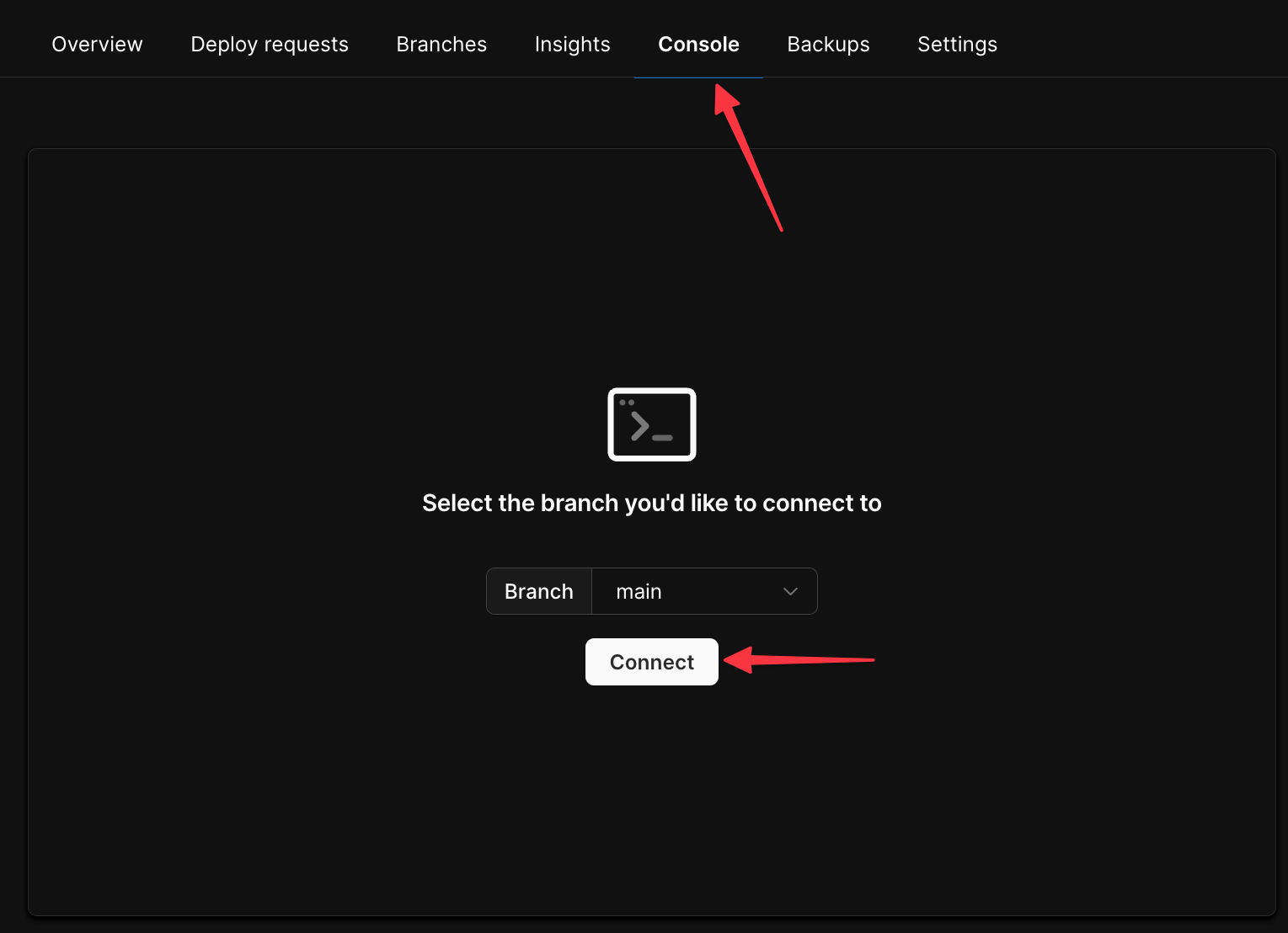 Run the following two commands to create a sample table and insert some data:
```sql theme={null}
CREATE TABLE `products` (
`id` int PRIMARY KEY AUTO_INCREMENT,
`name` varchar(100) NOT NULL,
`price` int NOT NULL
);
INSERT INTO `products` (name, price) VALUES
('Cyberfreak 2076', 40),
('Destination 2: Shining Decline', 20),
('Edge Properties 3', 15);
```
Finally, head to the **"Dashboard"** tab and click **"Connect"**.
Run the following two commands to create a sample table and insert some data:
```sql theme={null}
CREATE TABLE `products` (
`id` int PRIMARY KEY AUTO_INCREMENT,
`name` varchar(100) NOT NULL,
`price` int NOT NULL
);
INSERT INTO `products` (name, price) VALUES
('Cyberfreak 2076', 40),
('Destination 2: Shining Decline', 20),
('Edge Properties 3', 15);
```
Finally, head to the **"Dashboard"** tab and click **"Connect"**.
 On the following page, click **"Create password"** to generate a new password for your database. Then click **Go** in the **Select your language or framework** section, and copy the contents of the `.env` file. You'll need it for the next section.
## Run the demo project
Start by opening a terminal on your workstation and clone the sample repository provided.
```bash theme={null}
git clone https://github.com/planetscale/golang-example-gin.git
```
Open the project in VS Code and add a new file in the root of the project named `.env`, Populate the file with the contents taken from the Connect modal in the previous section.
```sql theme={null}
DSN=****************:************@tcp(us-east.connect.psdb.cloud)/products_db?tls=true&interpolateParams=true
```
Now open an integrated terminal in VS Code and run the project using the following commands:
```bash theme={null}
go mod tidy
go run .
```
The terminal should update with the following output.
On the following page, click **"Create password"** to generate a new password for your database. Then click **Go** in the **Select your language or framework** section, and copy the contents of the `.env` file. You'll need it for the next section.
## Run the demo project
Start by opening a terminal on your workstation and clone the sample repository provided.
```bash theme={null}
git clone https://github.com/planetscale/golang-example-gin.git
```
Open the project in VS Code and add a new file in the root of the project named `.env`, Populate the file with the contents taken from the Connect modal in the previous section.
```sql theme={null}
DSN=****************:************@tcp(us-east.connect.psdb.cloud)/products_db?tls=true&interpolateParams=true
```
Now open an integrated terminal in VS Code and run the project using the following commands:
```bash theme={null}
go mod tidy
go run .
```
The terminal should update with the following output.
 ## Exploring the code
Now that the project is running, let’s explore the code to see how everything works. All of the code is stored in `main.go`, with each of the core SQL operations mapped by HTTP method in the `main` function:
| HTTP Method Name | Query Type |
| :--------------- | :--------- |
| get | SELECT |
| post | INSERT |
| put | UPDATE |
| delete | DELETE |
```go theme={null}
func main() {
// Load in the `.env` file
err := godotenv.Load()
if err != nil {
log.Fatal("failed to load env", err)
}
// Open a connection to the database
db, err = sql.Open("mysql", os.Getenv("DSN"))
if err != nil {
log.Fatal("failed to open db connection", err)
}
// Build router & define routes
router := gin.Default()
router.GET("/products", GetProducts)
router.GET("/products/:productId", GetSingleProduct)
router.POST("/products", CreateProduct)
router.PUT("/products/:productId", UpdateProduct)
router.DELETE("/products/:productId", DeleteProduct)
// Run the router
router.Run()
}
```
Open the `tests.http` file, which contains HTTP requests that can be sent to test the API. Running the `get {{hostname}}/products` test is the equivalent of running `SELECT * FROM products` in SQL and returning the results as JSON.
If you do not wish to use VS Code with the Rest Client plugin, you may use `tests.http` as a reference for your preferred IDE and API testing software.
This is the `GetProducts` function defined in `main.go`. Notice how the `query` variable is the `SELECT` statement, which is passed into `db.Query` before being scanned into a slice of `Product` structs.
```go expandable theme={null}
func GetProducts(c *gin.Context) {
query := "SELECT * FROM products"
res, err := db.Query(query)
defer res.Close()
if err != nil {
log.Fatal("(GetProducts) db.Query", err)
}
products := []Product{}
for res.Next() {
var product Product
err := res.Scan(&product.Id, &product.Name, &product.Price)
if err != nil {
log.Fatal("(GetProducts) res.Scan", err)
}
products = append(products, product)
}
c.JSON(http.StatusOK, products)
}
```
To pass parameters into queries, you may use a `?` as a placeholder for the parameter. For example, `GetSingleProduct` uses a query with a `WHERE` clause that is passed into the `db.QueryRow` function along with the query string.
```go expandable theme={null}
func GetSingleProduct(c *gin.Context) {
productId := c.Param("productId")
productId = strings.ReplaceAll(productId, "/", "")
productIdInt, err := strconv.Atoi(productId)
if err != nil {
log.Fatal("(GetSingleProduct) strconv.Atoi", err)
}
var product Product
// `?` is a placeholder for the parameter
query := `SELECT * FROM products WHERE id = ?`
// `productIdInt` is passed in with the query
err = db.QueryRow(query, productIdInt).Scan(&product.Id, &product.Name, &product.Price)
if err != nil {
log.Fatal("(GetSingleProduct) db.Exec", err)
}
c.JSON(http.StatusOK, product)
}
```
Parameters in queries are populated in the order they are passed into the respective `db` function, as demonstrated in `CreateProduct`.
```go expandable theme={null}
func CreateProduct(c *gin.Context) {
var newProduct Product
err := c.BindJSON(&newProduct)
if err != nil {
log.Fatal("(CreateProduct) c.BindJSON", err)
}
// This query has multiple `?` parameter placeholders
query := `INSERT INTO products (name, price) VALUES (?, ?)`
// The `Exec` function takes in a query, as well as the values for
// the parameters in the order they are defined
res, err := db.Exec(query, newProduct.Name, newProduct.Price)
if err != nil {
log.Fatal("(CreateProduct) db.Exec", err)
}
newProduct.Id, err = res.LastInsertId()
if err != nil {
log.Fatal("(CreateProduct) res.LastInsertId", err)
}
c.JSON(http.StatusOK, newProduct)
}
```
## Need help?
Get help from [the PlanetScale Support team](https://planetscale.com/contact?initial=support), or join our [Discord community](https://pscale.link/community) to see how others are using PlanetScale.
## Exploring the code
Now that the project is running, let’s explore the code to see how everything works. All of the code is stored in `main.go`, with each of the core SQL operations mapped by HTTP method in the `main` function:
| HTTP Method Name | Query Type |
| :--------------- | :--------- |
| get | SELECT |
| post | INSERT |
| put | UPDATE |
| delete | DELETE |
```go theme={null}
func main() {
// Load in the `.env` file
err := godotenv.Load()
if err != nil {
log.Fatal("failed to load env", err)
}
// Open a connection to the database
db, err = sql.Open("mysql", os.Getenv("DSN"))
if err != nil {
log.Fatal("failed to open db connection", err)
}
// Build router & define routes
router := gin.Default()
router.GET("/products", GetProducts)
router.GET("/products/:productId", GetSingleProduct)
router.POST("/products", CreateProduct)
router.PUT("/products/:productId", UpdateProduct)
router.DELETE("/products/:productId", DeleteProduct)
// Run the router
router.Run()
}
```
Open the `tests.http` file, which contains HTTP requests that can be sent to test the API. Running the `get {{hostname}}/products` test is the equivalent of running `SELECT * FROM products` in SQL and returning the results as JSON.
If you do not wish to use VS Code with the Rest Client plugin, you may use `tests.http` as a reference for your preferred IDE and API testing software.
This is the `GetProducts` function defined in `main.go`. Notice how the `query` variable is the `SELECT` statement, which is passed into `db.Query` before being scanned into a slice of `Product` structs.
```go expandable theme={null}
func GetProducts(c *gin.Context) {
query := "SELECT * FROM products"
res, err := db.Query(query)
defer res.Close()
if err != nil {
log.Fatal("(GetProducts) db.Query", err)
}
products := []Product{}
for res.Next() {
var product Product
err := res.Scan(&product.Id, &product.Name, &product.Price)
if err != nil {
log.Fatal("(GetProducts) res.Scan", err)
}
products = append(products, product)
}
c.JSON(http.StatusOK, products)
}
```
To pass parameters into queries, you may use a `?` as a placeholder for the parameter. For example, `GetSingleProduct` uses a query with a `WHERE` clause that is passed into the `db.QueryRow` function along with the query string.
```go expandable theme={null}
func GetSingleProduct(c *gin.Context) {
productId := c.Param("productId")
productId = strings.ReplaceAll(productId, "/", "")
productIdInt, err := strconv.Atoi(productId)
if err != nil {
log.Fatal("(GetSingleProduct) strconv.Atoi", err)
}
var product Product
// `?` is a placeholder for the parameter
query := `SELECT * FROM products WHERE id = ?`
// `productIdInt` is passed in with the query
err = db.QueryRow(query, productIdInt).Scan(&product.Id, &product.Name, &product.Price)
if err != nil {
log.Fatal("(GetSingleProduct) db.Exec", err)
}
c.JSON(http.StatusOK, product)
}
```
Parameters in queries are populated in the order they are passed into the respective `db` function, as demonstrated in `CreateProduct`.
```go expandable theme={null}
func CreateProduct(c *gin.Context) {
var newProduct Product
err := c.BindJSON(&newProduct)
if err != nil {
log.Fatal("(CreateProduct) c.BindJSON", err)
}
// This query has multiple `?` parameter placeholders
query := `INSERT INTO products (name, price) VALUES (?, ?)`
// The `Exec` function takes in a query, as well as the values for
// the parameters in the order they are defined
res, err := db.Exec(query, newProduct.Name, newProduct.Price)
if err != nil {
log.Fatal("(CreateProduct) db.Exec", err)
}
newProduct.Id, err = res.LastInsertId()
if err != nil {
log.Fatal("(CreateProduct) res.LastInsertId", err)
}
c.JSON(http.StatusOK, newProduct)
}
```
## Need help?
Get help from [the PlanetScale Support team](https://planetscale.com/contact?initial=support), or join our [Discord community](https://pscale.link/community) to see how others are using PlanetScale.