> ## Documentation Index
> Fetch the complete documentation index at: https://planetscale.com/docs/llms.txt
> Use this file to discover all available pages before exploring further.
# Avoiding cross-shard queries
export const YouTubeEmbed = ({id, title}) => {
return
;
};
When designing your database sharding scheme, it's important to think about your common query patterns with the goal of avoiding cross-shard queries.
You might start this exercise by deciding which table(s) you wish to shard. You probably already have some good candidates in mind which you know need to be sharded. Once you have these base table(s) down that you need to shard, the next step is to think about what tables you frequently `JOIN` with these sharded tables.
Let's run through an example. If you prefer video content, you can watch the video on avoiding cross-shard queries here:
## Sharding design example
I have an unsharded database, `metal`, in a single [keyspace](/vitess/sharding/keyspaces). This is the database for our gym tracker application. The database schema looks like this:
**`users` table:**
Stores the users that sign up to track their gym sessions. There are currently 200,000 users.
```
-- users
+--------------------+-----------------+------+-----+---------+----------------+
| Field | Type | Null | Key | Default | Extra |
+--------------------+-----------------+------+-----+---------+----------------+
| id | bigint unsigned | NO | PRI | NULL | auto\_increment |
| name | varchar(255) | NO | | NULL | |
| email | varchar(255) | NO | | | |
| created_at | datetime(6) | NO | | NULL | |
| encrypted_password | varchar(255) | NO | | | |
| username | varchar(255) | NO | | NULL | |
+--------------------+-----------------+------+-----+---------+----------------+
```
**`exercises` table:**
Stores all of the exercises that our users can track. This table is managed by the application owners. Users cannot add their own exercises. There are currently 200 exercises in the database.
```
-- exercises
+-------------+-----------------+------+------+---------+----------------+
| Field | Type | Null | Key | Default | Extra |
+-------------+-----------------+------+------+---------+----------------+
| id | bigint unsigned | NO | PRI | NULL | auto_increment |
| name | varchar(255) | NO | NULL | | |
| created_at | datetime(6) | NO | NULL | | |
| description | varchar(1000) | YES | NULL | | |
+-------------+-----------------+------+------+---------+----------------+
```
**`exercise_logs` table:**
Stores all of the exercises that a user completes. Each `exercise_log` record holds all of the sets and reps you do for a single exercise at a specific weight. For example, if you do 5 sets of 3 reps of squats at a weight of 225 lbs, that is stored in a single `exercise_log`. If you do some warmup sets of squats at a weight of 135 lbs, that's stored in a new `exercise_log`.
There are currently 65,155,000 exercise logs.
```
-- exercise_logs
+-------------+-------------------+------+-----+---------+----------------+
| Field | Type | Null | Key | Default | Extra |
+-------------+-------------------+------+-----+---------+----------------+
| id | bigint | NO | PRI | NULL | auto_increment |
| created_at | datetime(6) | NO | | NULL | |
| user_id | bigint unsigned | NO | MUL | NULL | |
| exercise_id | bigint unsigned | NO | MUL | NULL | |
| reps | smallint unsigned | YES | | NULL | |
| sets | smallint unsigned | YES | | NULL | |
| notes | varchar(1024) | YES | | NULL | |
| weight | smallint unsigned | YES | | NULL | |
+-------------+-------------------+------+-----+---------+----------------+
```
**`programs` table:**
Stores the available pre-created gym programs that a user can optionally choose. These are created by the application owners. A user cannot create their own programs. There are currently 23 programs.
```
-- programs
+---------------+------------------+------+-----+---------+----------------+
| Field | Type | Null | Key | Default | Extra |
+---------------+------------------+------+-----+---------+----------------+
| id | bigint unsigned | NO | PRI | NULL | auto_increment |
| weeks | tinyint | YES | | NULL | |
| days_per_week | tinyint unsigned | YES | | NULL | |
| name | varchar(255) | NO | | NULL | |
| description | varchar(255) | YES | | NULL | |
+---------------+------------------+------+-----+---------+----------------+
```
## Selecting candidate(s) for sharding
Based on the information above, you can see that `exercise_logs` will be the first natural candidate for sharding. Each user adds several `exercise_logs` records every time they track a workout, so this table grows much faster than the other three tables.
We have decided to shard this table to spread the data across two shards/clusters.
## Common query pattern analysis
Now that we've identified the table (or in some cases, tables) we want to shard, the next step is to look at our common query patterns to see if we frequently join this table to other tables. Again, here is the schema for `exercise_logs`:
```
-- exercise_logs
+-------------+-------------------+------+-----+---------+----------------+
| Field | Type | Null | Key | Default | Extra |
+-------------+-------------------+------+-----+---------+----------------+
| id | bigint | NO | PRI | NULL | auto_increment |
| created_at | datetime(6) | NO | | NULL | |
| user_id | bigint unsigned | NO | MUL | NULL | |
| exercise_id | bigint unsigned | NO | MUL | NULL | |
| reps | smallint unsigned | YES | | NULL | |
| sets | smallint unsigned | YES | | NULL | |
| notes | varchar(1024) | YES | | NULL | |
| weight | smallint | YES | | NULL | |
+-------------+-------------------+------+-----+---------+----------------+
```
Given that this table has two referential ids: `user_id` and `exercise_id`, it is likely that we often join this table to both `users` and `exercises`. In fact, some of our most executed queries involve joining all of these tables.
The `programs` table, however, is never joined with `exercise_logs`.
Given this information, we now must decide how to architect our sharding scheme such that we can avoid cross-shard queries as often as possible.
## A closer look at our sharded table
Before we dive into the other tables, let's look a little closer at `exercise_logs`. Here is an example of a common query we run to display all of the exercises a user has completed today:
```sql theme={null}
SELECT exercise_log.*, users.name AS user_name, users.email, exercises.name AS exercise_name
FROM exercise_log
JOIN users ON exercise_log.user_id = users.id
JOIN exercises ON exercise_log.exercise_id = exercises.id
WHERE exercise_log.user_id = 5
AND DATE(exercise_log.created_at) = CURDATE();
```
This joins both the `exercises` table and the `users` table on `exercise_logs`. For the sake of this example, let's assume this is the most commonly executed query in our application.
Now, we know we are going to shard `exercise_logs`, which means we need to choose a sharding key, or [primary Vindex](/vitess/sharding/vindexes), for this table.
## Choosing a Vindex for `exercise_logs`
Using the primary key as the primary Vindex can sometimes be the most natural choice to shard on. Let's start by considering `id` as the shard key for `exercise_logs`. For every row in the table, the `id` will be hashed with [xxHash64](https://vitess.io/docs/reference/features/vindexes/), resulting in some hexadecimal value between `0x00000000000000000` and `0xFFFFFFFFFFFFFFFF`. These values will be evenly distributed across all shards.
With this solution, if we run the above query to get all of the exercises done by a particular user in a given day, we'll have to look across all shards because there's no guarantee that the user's exercise logs all ended up on the same shard.
Instead, we might want to consider sharding on `exercise_logs.user_id`. If we do this, every `exercise_log` record with the same `exercise_logs.user_id` will hash to the same value. So let's say the hashed `user_id` of `2` comes out to `0x30F419900AA88B20`. Every `exercise_log` for our user with `id`=`2` will have a Vindex value of `0x30F419900AA88B20`. When Vitess distributes this data across our 2 shards, the distrubtion might look like this:
**Shard 1**: Vindexes with values `0x0000000000000000` through `0x7FFFFFFFFFFFFFFF` **Shard 2**: Vindexes with values `0x8000000000000000` through `0xFFFFFFFFFFFFFFFF`
In this case, our user whose `id` hashes to `0x30F419900AA88B20` will always end up on Shard 1. This means that ultimately, with this primary Vindex, there will not be a case where a user's `exercise_logs` records live on two different shards. When a request comes in to grab all of the exercise logs for a particular user on a given day, we only have to access a single shard. This is exactly what we want.
## Handling frequently `JOIN`ed tables
With that out of the way, let's again look at how we handle joining the other relevant tables.
With our current setup, we have `exercises`, `users`, and `programs` on the unsharded keyspace and the `exercise_logs` table on the sharded keyspace, as shown below:
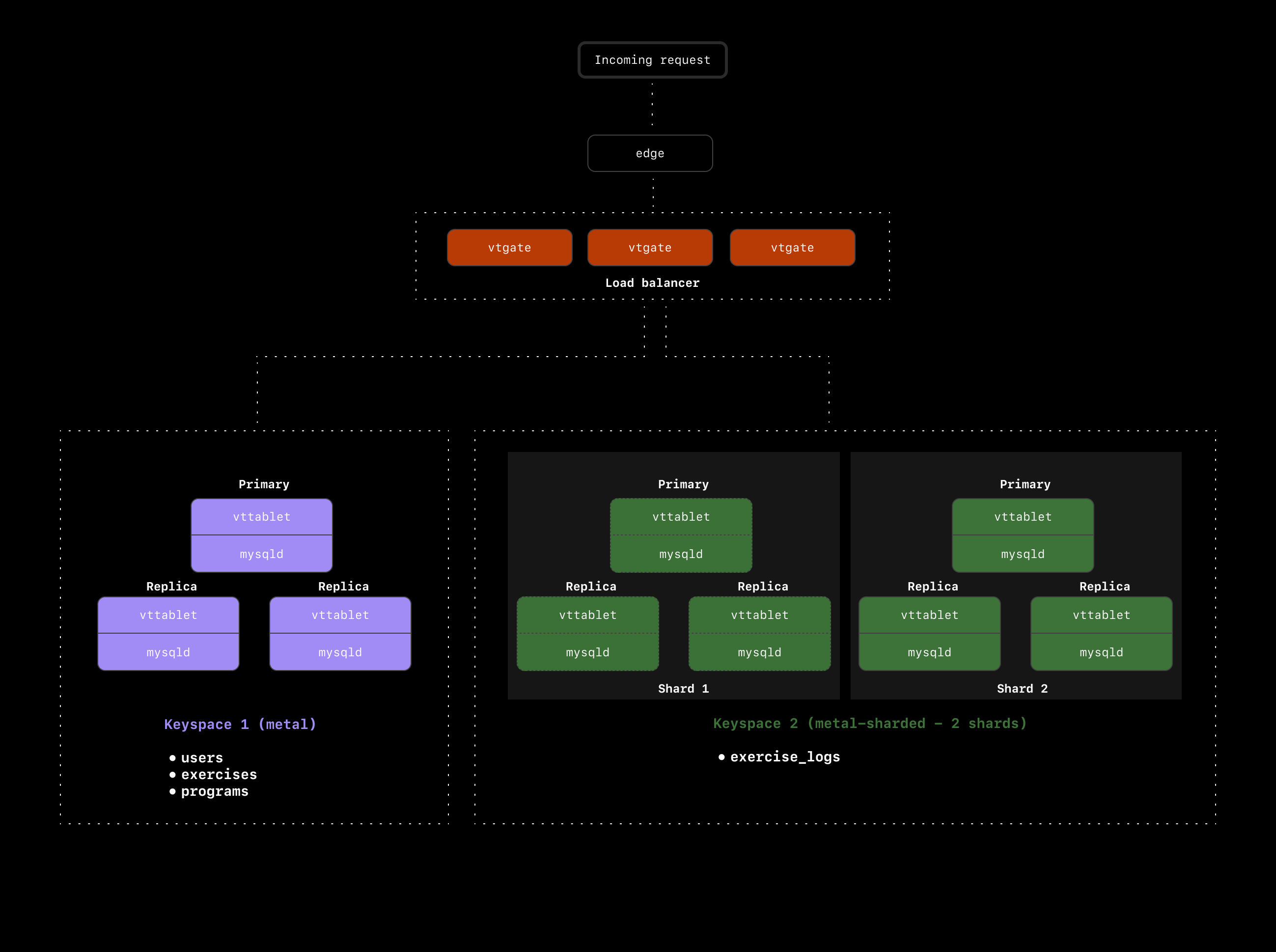 This means that every time we run the above query, we're doing cross-keyspace `JOIN`s. In this case, we'll see a massive hit to performance, and application speed will feel slow to the end user.
Now that we have a good grasp on what we'd like to avoid, let's come up with some solutions. The main thing we need to solve is how to avoid cross-keyspace / cross-shard joins between `exercise_logs`, `users`, and `exercises`.
### The `users` table
Let's start by looking at the `users` table. We already know we're using `exercise_logs.user_id` as the primary Vindex, so all exercise logs for a particular user will end up on the same shard. However, when we join that `user_id` on the `users` table, we have to jump back over to the `metal` keyspace to access the `users` table.
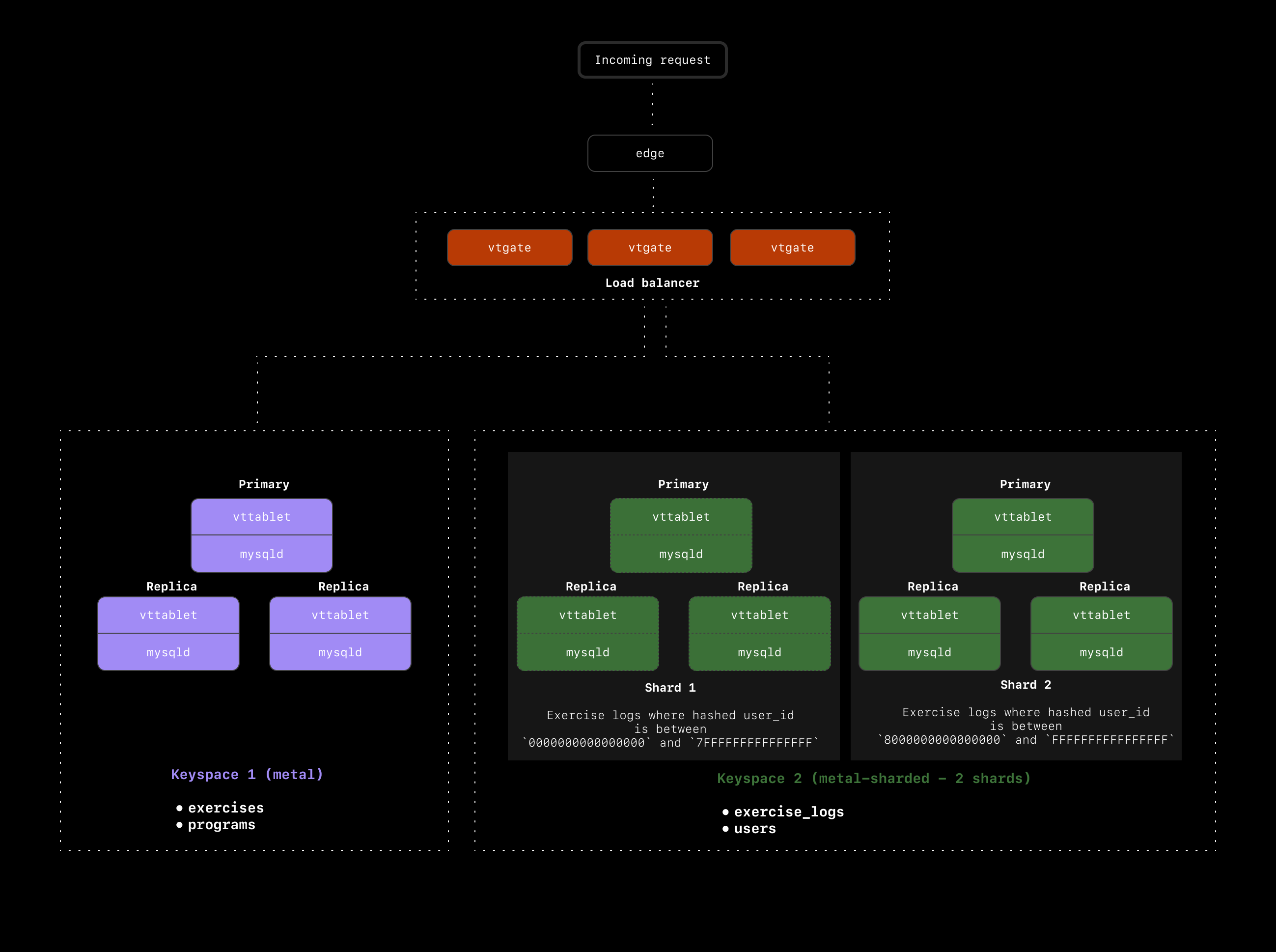
To avoid this, we should move the `users` table to the `metal-sharded` keyspace and shard that as well. We'll need to choose a primary Vindex for `users` in order to shard it. Because we sharded `exercise_logs` on the `user_id`, we now have a great option for the `users` primary vindex: `users.id`. Hashing on `users.id` will guarantee that for every user, both their user record and exercise logs all end up on the same shard.
Our cluster now looks like this:
This means that every time we run the above query, we're doing cross-keyspace `JOIN`s. In this case, we'll see a massive hit to performance, and application speed will feel slow to the end user.
Now that we have a good grasp on what we'd like to avoid, let's come up with some solutions. The main thing we need to solve is how to avoid cross-keyspace / cross-shard joins between `exercise_logs`, `users`, and `exercises`.
### The `users` table
Let's start by looking at the `users` table. We already know we're using `exercise_logs.user_id` as the primary Vindex, so all exercise logs for a particular user will end up on the same shard. However, when we join that `user_id` on the `users` table, we have to jump back over to the `metal` keyspace to access the `users` table.
To avoid this, we should move the `users` table to the `metal-sharded` keyspace and shard that as well. We'll need to choose a primary Vindex for `users` in order to shard it. Because we sharded `exercise_logs` on the `user_id`, we now have a great option for the `users` primary vindex: `users.id`. Hashing on `users.id` will guarantee that for every user, both their user record and exercise logs all end up on the same shard.
Our cluster now looks like this:
 ### The `exercises` table
The final table we need to deal with is the `exercises` table. This is a very small table with only 200 records. Users are not allowed to modify this table, so we have a predictable and slow growth rate with this one. Let's say we expect it to never exceed 1000 records.
We could shard this table, but given that each record here could be associated with any user or any exercise log, we don't have a great path to ensure there won't be any cross-shard queries.
An alternative option in this case is to use a [reference table](https://vitess.io/docs/reference/vreplication/reference_tables/) to make a copy of this table on every shard. This way, any time you want to join `exercise_logs` to the `exercises` table, the entire table already exists on the same shard as the exercise log.
Reference tables can be extremely useful in scenarios like this where the table is small and not frequently updated. If, however, this table frequently modified, this could be a poor solution. Every time a record is updated in the table, it must be updated across all shards as well. This is not a problem in our scenario, but keep this tradeoff in mind when choosing to use reference tables.
## A look at our final cluster setup
Here is a recap of what we've chosen for our `metal` database cluster:
* Sharded `exercise_logs` and `users`
* Used `exercise_logs.user_id` as the primary Vindex for `exercise_logs`
* Used `users.id` as the primary Vindex for `users`
* Used a reference table to copy `exercises` to every shard in our `sharded-metal` keyspace
### The `exercises` table
The final table we need to deal with is the `exercises` table. This is a very small table with only 200 records. Users are not allowed to modify this table, so we have a predictable and slow growth rate with this one. Let's say we expect it to never exceed 1000 records.
We could shard this table, but given that each record here could be associated with any user or any exercise log, we don't have a great path to ensure there won't be any cross-shard queries.
An alternative option in this case is to use a [reference table](https://vitess.io/docs/reference/vreplication/reference_tables/) to make a copy of this table on every shard. This way, any time you want to join `exercise_logs` to the `exercises` table, the entire table already exists on the same shard as the exercise log.
Reference tables can be extremely useful in scenarios like this where the table is small and not frequently updated. If, however, this table frequently modified, this could be a poor solution. Every time a record is updated in the table, it must be updated across all shards as well. This is not a problem in our scenario, but keep this tradeoff in mind when choosing to use reference tables.
## A look at our final cluster setup
Here is a recap of what we've chosen for our `metal` database cluster:
* Sharded `exercise_logs` and `users`
* Used `exercise_logs.user_id` as the primary Vindex for `exercise_logs`
* Used `users.id` as the primary Vindex for `users`
* Used a reference table to copy `exercises` to every shard in our `sharded-metal` keyspace
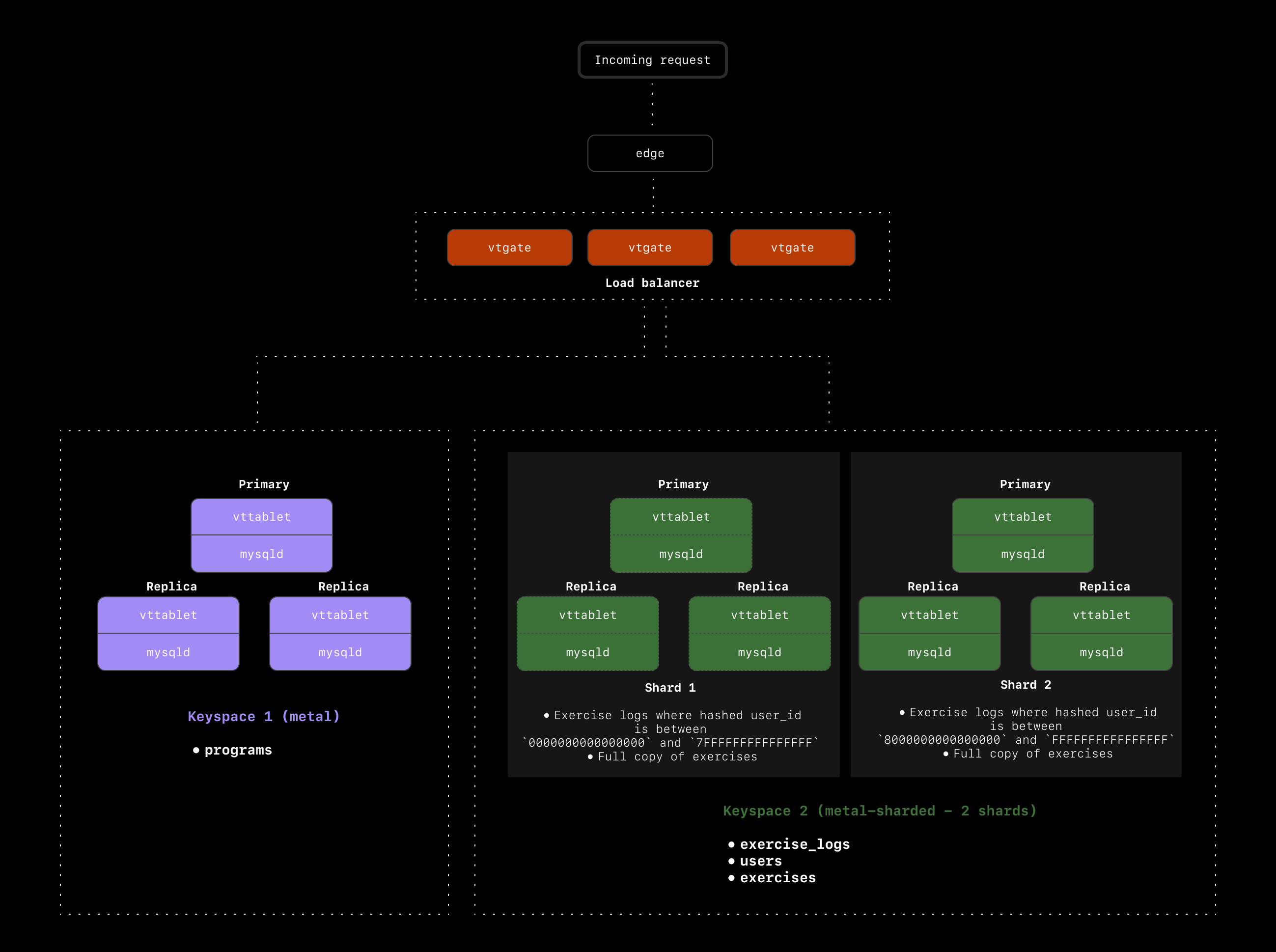 With this setup, running our most common query does not involve any cross-keyspace or cross-shard queries:
```sql theme={null}
SELECT exercise_log.\*, users.name AS user_name, users.email, exercises.name AS exercise_name
FROM exercise_log
JOIN users ON exercise_log.user_id = users.id
JOIN exercises ON exercise_log.exercise_id = exercises.id
WHERE exercise_log.user_id = 5
AND DATE(exercise_log.created_at) = CURDATE();
```
## What next?
This was a simple example meant to get you thinking about how to design your sharding scheme. You likely have several commonly executed queries. It's of course nearly impossible to optimize for every single query, so what you want to do is optimize for the **most common** queries with the goal of avoiding cross-shard and cross-keyspace queries.
If you're on the PlanetScale Enterprise Support plan, we do some of this query analysis alongside you to come up with the best sharding scheme for your database. You can learn more about that process in our [Proof of concept documentation](/plans/managed/proof-of-concept).
If you'd like more information about our Enterprise Support, don't hesitate to [reach out](https://planetscale.com/contact).
## Need help?
Get help from [the PlanetScale Support team](https://planetscale.com/contact?initial=support), or join our [Discord community](https://pscale.link/community) to see how others are using PlanetScale.
With this setup, running our most common query does not involve any cross-keyspace or cross-shard queries:
```sql theme={null}
SELECT exercise_log.\*, users.name AS user_name, users.email, exercises.name AS exercise_name
FROM exercise_log
JOIN users ON exercise_log.user_id = users.id
JOIN exercises ON exercise_log.exercise_id = exercises.id
WHERE exercise_log.user_id = 5
AND DATE(exercise_log.created_at) = CURDATE();
```
## What next?
This was a simple example meant to get you thinking about how to design your sharding scheme. You likely have several commonly executed queries. It's of course nearly impossible to optimize for every single query, so what you want to do is optimize for the **most common** queries with the goal of avoiding cross-shard and cross-keyspace queries.
If you're on the PlanetScale Enterprise Support plan, we do some of this query analysis alongside you to come up with the best sharding scheme for your database. You can learn more about that process in our [Proof of concept documentation](/plans/managed/proof-of-concept).
If you'd like more information about our Enterprise Support, don't hesitate to [reach out](https://planetscale.com/contact).
## Need help?
Get help from [the PlanetScale Support team](https://planetscale.com/contact?initial=support), or join our [Discord community](https://pscale.link/community) to see how others are using PlanetScale.