> ## Documentation Index
> Fetch the complete documentation index at: https://planetscale.com/docs/llms.txt
> Use this file to discover all available pages before exploring further.
# Password roles
> PlanetScale allows you to [create and manage passwords](/docs/vitess/connecting/connection-strings) for each branch of your database.
## Overview
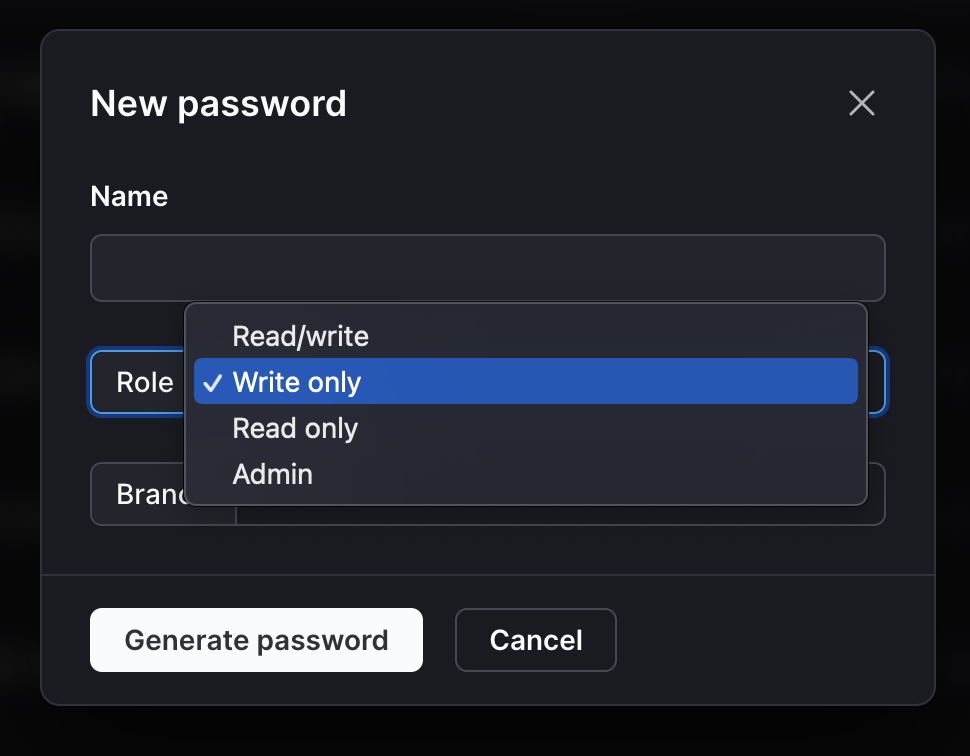
PlanetScale passwords can be created with one of four roles:
* **Read-only** — Can query rows
* **Write-only** — Can modify rows
* **Read/Write** — Can query and modify rows
* **Admin** — All read/write permissions and can modify schema\*
\* *This does not apply to production branches with [safe migrations](/vitess/schema-changes/safe-migrations) enabled, as we [do not allow direct DDL](/vitess/schema-changes/how-online-schema-change-tools-work) on those branches, even if your password has the `Admin` role.*
## Create a password with custom role
Go to your database settings page.
Click "**Passwords**" > "**New password**".
Give it a name, select the role from the dropdown, select the branch, and click "**Generate password**".
 Once a password is created, **its role cannot be changed**.
The access level available to these roles is shown in the table below.
| Role name | Can create/edit schema | Can insert/update/delete rows | Can query rows |
| :--------- | :--------------------------------- | :--------------------------------- | :--------------------------------- |
| Read-only | | | |
| Write-only | | | |
| Read/write | | | |
| Admin | | | |
The default role for all passwords created by the **Connect** button is `Administrator`. Passwords with custom roles
must be created from your database settings page.
## Troubleshooting
The following errors indicate that you do not have the permissions needed to perform an action. You must create a new password with a more privileged role to proceed.
**SELECT DENIED**
`Select command denied to user ‘planetscale-writer-only for table ‘customers’ (ACL check error) (CallerID: planetscale-writer-only)`
**INSERT DENIED**
`Insert command denied to user ‘planetscale-reader’ for table ‘customers’ (ACL check error) (CallerID: planetscale-reader)`
**DELETE DENIED**
`Delete command denied to user ‘planetscale-reader’ for table ‘customers’ (ACL check error) (CallerID: planetscale-reader)`
**DDL DENIED**
`DDL command denied to user ‘planetscale-writer' for table my-new-table’ (ACL check error) (CallerID: planetscale-writer)`
If your pscale CLI version is less than 0.94.0, please upgrade your installation by following [this
document](/cli/planetscale-environment-setup)
## Need help?
Get help from [the PlanetScale Support team](https://planetscale.com/contact?initial=support), or join our [Discord community](https://pscale.link/community) to see how others are using PlanetScale.
Once a password is created, **its role cannot be changed**.
The access level available to these roles is shown in the table below.
| Role name | Can create/edit schema | Can insert/update/delete rows | Can query rows |
| :--------- | :--------------------------------- | :--------------------------------- | :--------------------------------- |
| Read-only | | | |
| Write-only | | | |
| Read/write | | | |
| Admin | | | |
The default role for all passwords created by the **Connect** button is `Administrator`. Passwords with custom roles
must be created from your database settings page.
## Troubleshooting
The following errors indicate that you do not have the permissions needed to perform an action. You must create a new password with a more privileged role to proceed.
**SELECT DENIED**
`Select command denied to user ‘planetscale-writer-only for table ‘customers’ (ACL check error) (CallerID: planetscale-writer-only)`
**INSERT DENIED**
`Insert command denied to user ‘planetscale-reader’ for table ‘customers’ (ACL check error) (CallerID: planetscale-reader)`
**DELETE DENIED**
`Delete command denied to user ‘planetscale-reader’ for table ‘customers’ (ACL check error) (CallerID: planetscale-reader)`
**DDL DENIED**
`DDL command denied to user ‘planetscale-writer' for table my-new-table’ (ACL check error) (CallerID: planetscale-writer)`
If your pscale CLI version is less than 0.94.0, please upgrade your installation by following [this
document](/cli/planetscale-environment-setup)
## Need help?
Get help from [the PlanetScale Support team](https://planetscale.com/contact?initial=support), or join our [Discord community](https://pscale.link/community) to see how others are using PlanetScale.