> ## Documentation Index
> Fetch the complete documentation index at: https://planetscale.com/docs/llms.txt
> Use this file to discover all available pages before exploring further.
# Tags
> Attach key-value metadata to SQL statements to filter performance data in Insights.
 ## Overview
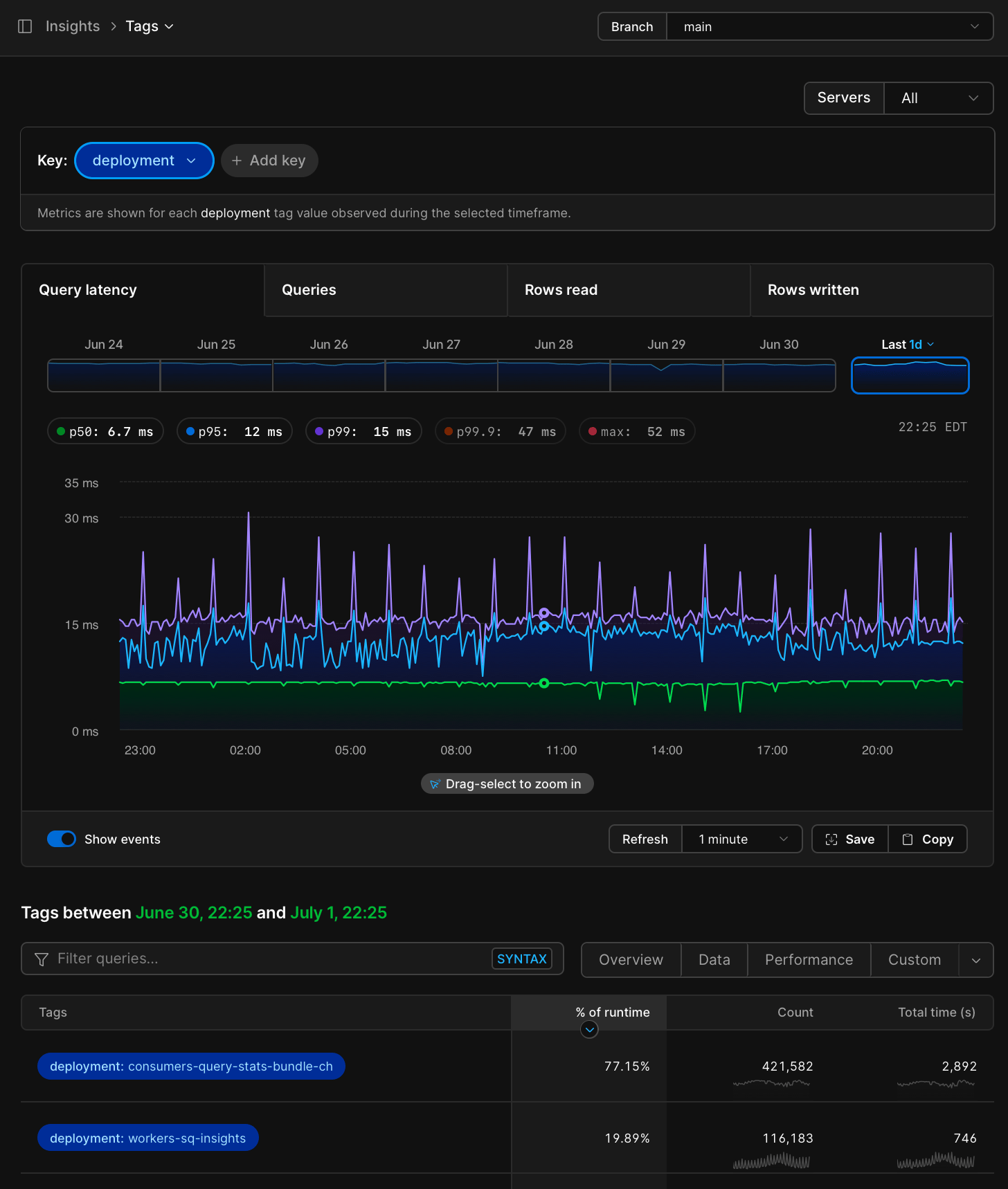
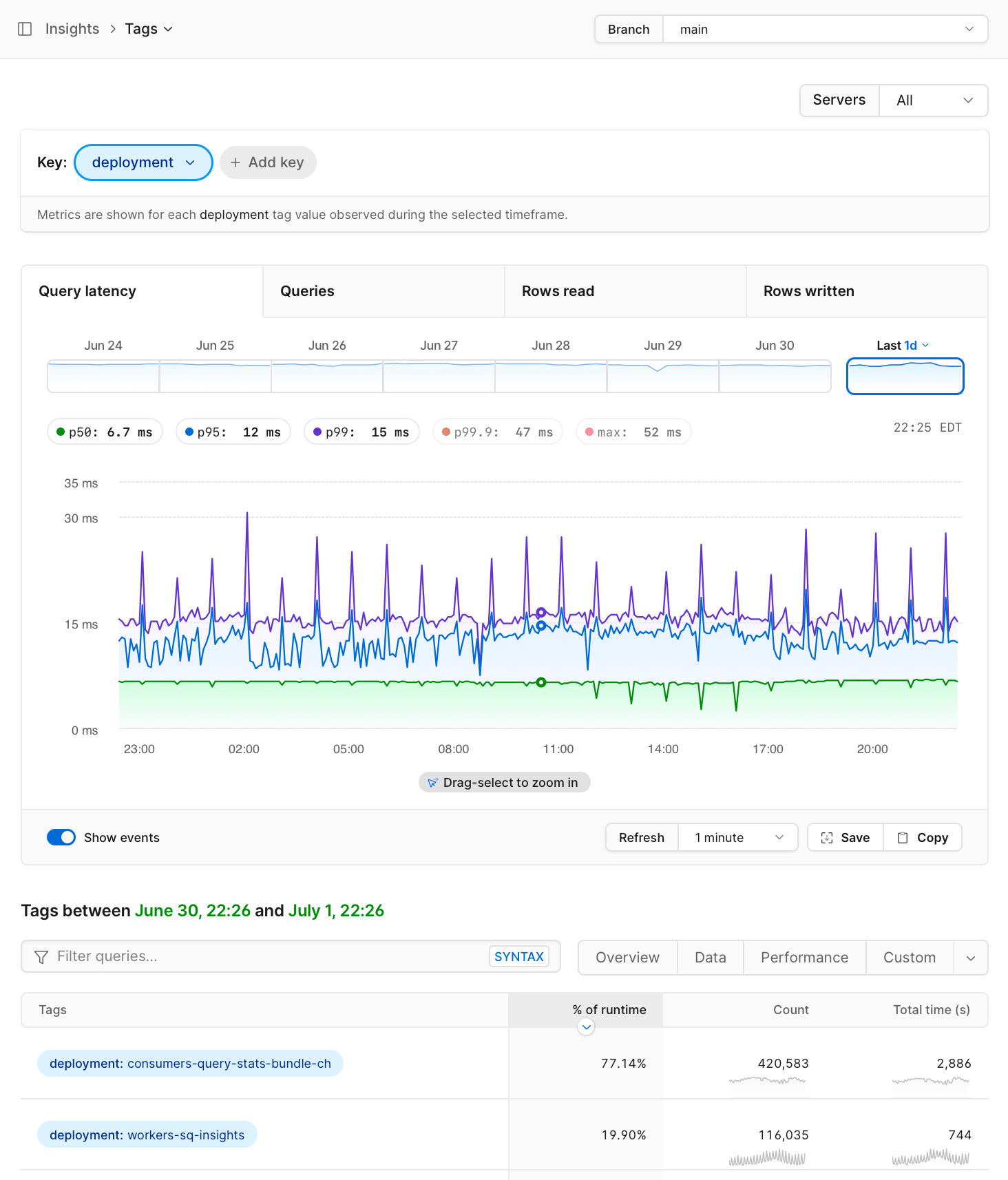
Query tags are key-value pairs embedded in SQL comments written into each statement to the database. PlanetScale parses these tags automatically and uses them to show filtered tag-based performance data alongside individual query executions in [Insights](/vitess/monitoring/query-insights).
Tags follow the [SQLCommenter](https://google.github.io/sqlcommenter/) specification, an open standard created by Google for attaching metadata to SQL statements as comments.
## Tag format
A tag comment is appended to the SQL statement inside `/* */` delimiters. Each tag is a `key='value'` pair, and multiple tags are separated by commas:
```sql theme={null}
SELECT *
FROM orders
WHERE status = 'pending'
/*app='web',route='api-export'*/;
```
This example would create the following tags in the PlanetScale dashboard:
* **app:** `web`
* **route:** `api-export`
Values are URL-encoded and wrapped in single quotes, following the [SQLCommenter specification](https://google.github.io/sqlcommenter/spec/).
Tags must appear **before** the semicolon that ends the SQL statement. Tags placed after the semicolon are not recognized by PlanetScale.
```sql theme={null}
-- Correct: tag before semicolon
SELECT 1 /*category='analytics'*/;
-- Incorrect: tag after semicolon
SELECT 1; /*category='analytics'*/
```
When a tag appears after the semicolon, the database treats it as a separate statement (a no-op comment), so Insights sees only the original query without any tags.
If you're sending queries with comments using the MySQL shell, make sure you have [enabled comments with the `-c` flag](https://dev.mysql.com/doc/refman/en/mysql-command-options.html#option_mysql_comments).
## Where tags appear in PlanetScale
### Insights
Queries in the Insights page can be filtered by tags by using the search bar. For example, to filter for queries with the tag `action='analytics'`, use the following syntax:
```
tag:action:analytics
```
### Insights → Tags
"Tags" is a top-level item under [Insights](/vitess/monitoring/query-insights). Select one or many key/value pairs to filter the performance data. Or see the tags of all queries within the currently selected time range.
You can also see the tags associated with a query on the query details page (click on the query text from the list in Insights).
### Tag cardinality limits
You can attach tags with any cardinality. When a tag produces too many distinct values, PlanetScale may collapse the value to keep tag data usable in Insights.
Tag values may be collapsed when either of these limits is exceeded:
* Any query pattern has more than 20 values for the tag
* Any query pattern has more than 50 distinct combinations of tag values within a 15-second period
When a tag value is collapsed, PlanetScale removes the original value and reports it as `Collapsed` in the query details page.
If you search for a tag with collapsed values, or open the Tags view for a tag with collapsed values, PlanetScale shows a warning with the percentage of results affected by collapsing.
## Adding tags to your queries
There are two approaches to tagging queries: using an SQLCommenter integration that adds tags automatically, or appending tag comments manually.
### SQLCommenter integrations
The [SQLCommenter project](https://google.github.io/sqlcommenter/) provides middleware and plugins for several frameworks and ORMs that automatically attach tags to every query:
| Language | Supported frameworks / ORMs |
| -------- | --------------------------------------- |
| Python | Django, SQLAlchemy, Flask |
| Java | Hibernate, Spring |
| Node.js | Knex.js, Sequelize.js, Express.js |
| Go | `database/sql`, gorilla/mux, `net/http` |
| PHP | Laravel |
| Ruby | Ruby on Rails |
[Drizzle](https://orm.drizzle.team/docs/sql-comments) and Prisma support SQLCommenter natively.
These integrations typically inject framework-level context like the route, controller, and framework version. Some support adding custom key-value pairs.
Several popular ORMs and query builders used with PlanetScale do not have official SQLCommenter support, including **Bun** and **Kysely**. If you use one of these, see [manual tagging](#manual-tagging) below.
### Manual tagging
If your ORM or query builder does not have an SQLCommenter plugin, you can append the tag comment directly to your SQL statements. The format is straightforward: add `/*key='value'*/` before the semicolon.
#### Raw SQL
```sql theme={null}
SELECT *
FROM orders
WHERE user_id = ?
/*app='checkout',feature='order-history'*/;
```
#### With a query builder
```typescript theme={null}
// Example using Kysely
const result = await db
.selectFrom('orders')
.where('user_id', '=', userId)
.selectAll()
.execute({
// Append the tag comment to the generated SQL
queryId: "/*app='checkout',feature='order-history'*/"
});
```
The exact mechanism for appending a comment varies by library. Some query builders support a comment or annotation option, while others require you to modify the SQL string directly. Check your library's documentation for the best approach.
#### Encoding rules
When adding tags manually, follow these rules from the SQLCommenter specification:
* **URL-encode** values that contain special characters. For example, `/api/export` becomes `%2Fapi%2Fexport`.
* **Escape** single quotes within values with a backslash: `name='O\'Brien'`.
* **Sort** key-value pairs lexicographically by key if you want to match the specification exactly, though PlanetScale does not require a specific order.
## Troubleshooting
### Tags are not appearing in Insights
The most common cause is **tag placement**. Tags must appear before the semicolon. See the [warning above](#tag-format) for the correct format.
If your tags are correctly placed and still not appearing:
* Verify that your queries are being executed and appear in the [Insights queries table](/vitess/monitoring/query-insights)
* Check that you are searching with the correct syntax: `tag:key:value` (for example, `tag:category:analytics`)
* If you're using the MySQL shell, confirm you have [enabled comments with the `-c` flag](https://dev.mysql.com/doc/refman/en/mysql-command-options.html#option_mysql_comments)
### ORM is stripping comments
Some ORMs and connection poolers may strip SQL comments before sending queries to the database. If you have added tags but they are not appearing:
* Check whether your ORM has a setting to preserve SQL comments
* If you use a connection pooler, verify that it is not configured to strip comments
## Need help?
Get help from [the PlanetScale Support team](https://planetscale.com/contact?initial=support), or join our [Discord community](https://pscale.link/community) to see how others are using PlanetScale.
## Overview
Query tags are key-value pairs embedded in SQL comments written into each statement to the database. PlanetScale parses these tags automatically and uses them to show filtered tag-based performance data alongside individual query executions in [Insights](/vitess/monitoring/query-insights).
Tags follow the [SQLCommenter](https://google.github.io/sqlcommenter/) specification, an open standard created by Google for attaching metadata to SQL statements as comments.
## Tag format
A tag comment is appended to the SQL statement inside `/* */` delimiters. Each tag is a `key='value'` pair, and multiple tags are separated by commas:
```sql theme={null}
SELECT *
FROM orders
WHERE status = 'pending'
/*app='web',route='api-export'*/;
```
This example would create the following tags in the PlanetScale dashboard:
* **app:** `web`
* **route:** `api-export`
Values are URL-encoded and wrapped in single quotes, following the [SQLCommenter specification](https://google.github.io/sqlcommenter/spec/).
Tags must appear **before** the semicolon that ends the SQL statement. Tags placed after the semicolon are not recognized by PlanetScale.
```sql theme={null}
-- Correct: tag before semicolon
SELECT 1 /*category='analytics'*/;
-- Incorrect: tag after semicolon
SELECT 1; /*category='analytics'*/
```
When a tag appears after the semicolon, the database treats it as a separate statement (a no-op comment), so Insights sees only the original query without any tags.
If you're sending queries with comments using the MySQL shell, make sure you have [enabled comments with the `-c` flag](https://dev.mysql.com/doc/refman/en/mysql-command-options.html#option_mysql_comments).
## Where tags appear in PlanetScale
### Insights
Queries in the Insights page can be filtered by tags by using the search bar. For example, to filter for queries with the tag `action='analytics'`, use the following syntax:
```
tag:action:analytics
```
### Insights → Tags
"Tags" is a top-level item under [Insights](/vitess/monitoring/query-insights). Select one or many key/value pairs to filter the performance data. Or see the tags of all queries within the currently selected time range.
You can also see the tags associated with a query on the query details page (click on the query text from the list in Insights).
### Tag cardinality limits
You can attach tags with any cardinality. When a tag produces too many distinct values, PlanetScale may collapse the value to keep tag data usable in Insights.
Tag values may be collapsed when either of these limits is exceeded:
* Any query pattern has more than 20 values for the tag
* Any query pattern has more than 50 distinct combinations of tag values within a 15-second period
When a tag value is collapsed, PlanetScale removes the original value and reports it as `Collapsed` in the query details page.
If you search for a tag with collapsed values, or open the Tags view for a tag with collapsed values, PlanetScale shows a warning with the percentage of results affected by collapsing.
## Adding tags to your queries
There are two approaches to tagging queries: using an SQLCommenter integration that adds tags automatically, or appending tag comments manually.
### SQLCommenter integrations
The [SQLCommenter project](https://google.github.io/sqlcommenter/) provides middleware and plugins for several frameworks and ORMs that automatically attach tags to every query:
| Language | Supported frameworks / ORMs |
| -------- | --------------------------------------- |
| Python | Django, SQLAlchemy, Flask |
| Java | Hibernate, Spring |
| Node.js | Knex.js, Sequelize.js, Express.js |
| Go | `database/sql`, gorilla/mux, `net/http` |
| PHP | Laravel |
| Ruby | Ruby on Rails |
[Drizzle](https://orm.drizzle.team/docs/sql-comments) and Prisma support SQLCommenter natively.
These integrations typically inject framework-level context like the route, controller, and framework version. Some support adding custom key-value pairs.
Several popular ORMs and query builders used with PlanetScale do not have official SQLCommenter support, including **Bun** and **Kysely**. If you use one of these, see [manual tagging](#manual-tagging) below.
### Manual tagging
If your ORM or query builder does not have an SQLCommenter plugin, you can append the tag comment directly to your SQL statements. The format is straightforward: add `/*key='value'*/` before the semicolon.
#### Raw SQL
```sql theme={null}
SELECT *
FROM orders
WHERE user_id = ?
/*app='checkout',feature='order-history'*/;
```
#### With a query builder
```typescript theme={null}
// Example using Kysely
const result = await db
.selectFrom('orders')
.where('user_id', '=', userId)
.selectAll()
.execute({
// Append the tag comment to the generated SQL
queryId: "/*app='checkout',feature='order-history'*/"
});
```
The exact mechanism for appending a comment varies by library. Some query builders support a comment or annotation option, while others require you to modify the SQL string directly. Check your library's documentation for the best approach.
#### Encoding rules
When adding tags manually, follow these rules from the SQLCommenter specification:
* **URL-encode** values that contain special characters. For example, `/api/export` becomes `%2Fapi%2Fexport`.
* **Escape** single quotes within values with a backslash: `name='O\'Brien'`.
* **Sort** key-value pairs lexicographically by key if you want to match the specification exactly, though PlanetScale does not require a specific order.
## Troubleshooting
### Tags are not appearing in Insights
The most common cause is **tag placement**. Tags must appear before the semicolon. See the [warning above](#tag-format) for the correct format.
If your tags are correctly placed and still not appearing:
* Verify that your queries are being executed and appear in the [Insights queries table](/vitess/monitoring/query-insights)
* Check that you are searching with the correct syntax: `tag:key:value` (for example, `tag:category:analytics`)
* If you're using the MySQL shell, confirm you have [enabled comments with the `-c` flag](https://dev.mysql.com/doc/refman/en/mysql-command-options.html#option_mysql_comments)
### ORM is stripping comments
Some ORMs and connection poolers may strip SQL comments before sending queries to the database. If you have added tags but they are not appearing:
* Check whether your ORM has a setting to preserve SQL comments
* If you use a connection pooler, verify that it is not configured to strip comments
## Need help?
Get help from [the PlanetScale Support team](https://planetscale.com/contact?initial=support), or join our [Discord community](https://pscale.link/community) to see how others are using PlanetScale.