> ## Documentation Index
> Fetch the complete documentation index at: https://planetscale.com/docs/llms.txt
> Use this file to discover all available pages before exploring further.
# Concepts
> Terminology and core concepts: resource budgets, rules, limits, and modes.
## Resource budgets
A **resource budget** is the primary Database Traffic Control™ configuration mechanism. It defines how much database resource a specific slice of traffic is allowed to consume.
A resource budget:
* Applies to traffic that matches one or more **rules**, which can be a specific query, a system attribute, or a combination of SQLCommenter tags.
* Defines [**limits**](#resource-budget-limits) on resource consumption (capacity, rate, burst, concurrency)
* Handles responses in a [**mode**](#modes-enforce-warn-off) (Enforce, Warn, Off)
* Is scoped to a specific [database branch](/postgres/branching)
## Resource budget limits
When a query to the database arrives, Database Traffic Control first checks whether it matches any resource budget **rules**. If a match is found, the cost of executing the query is estimated, and the **limits** in that resource budget determine whether the query is allowed, warned, or blocked.
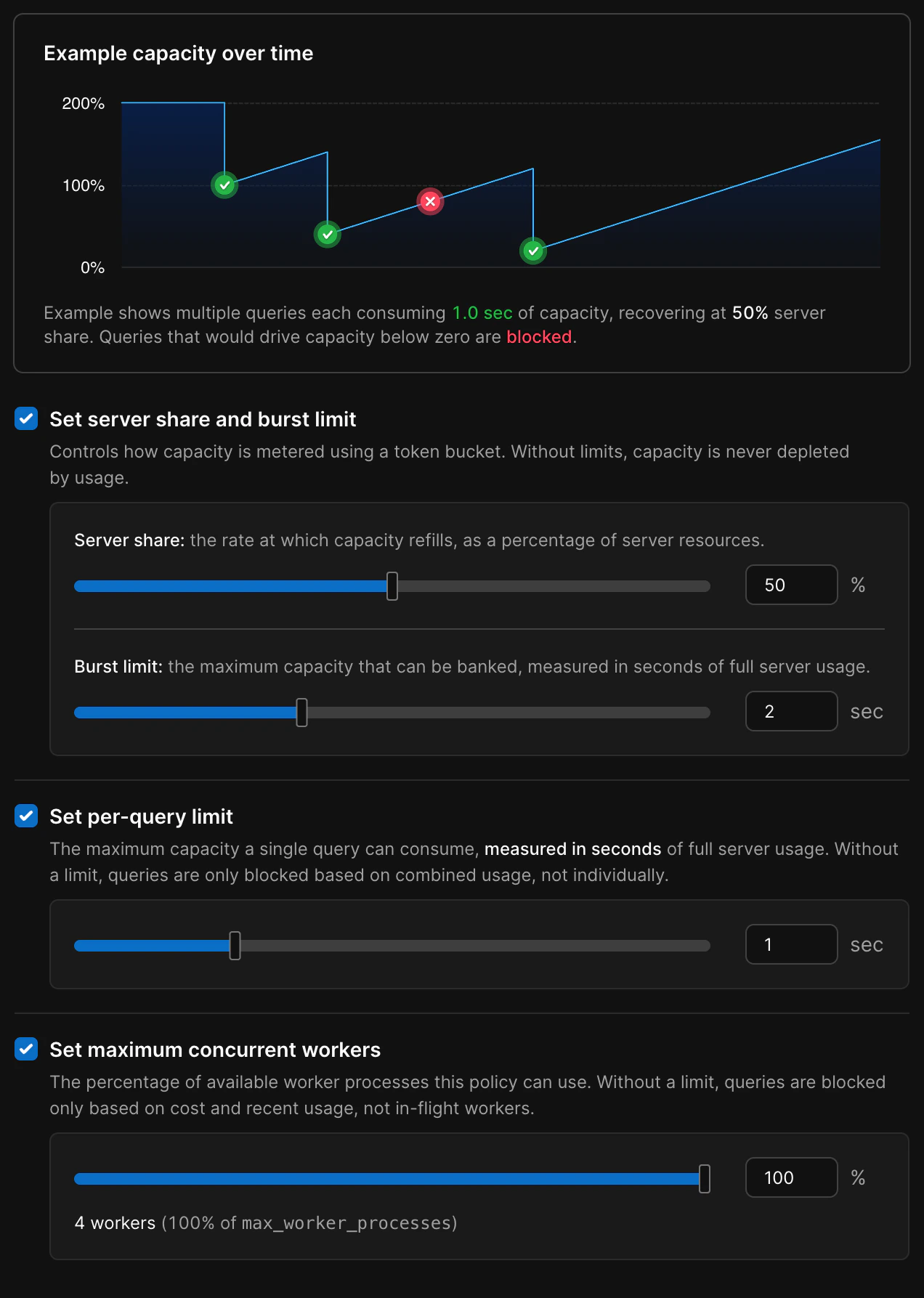
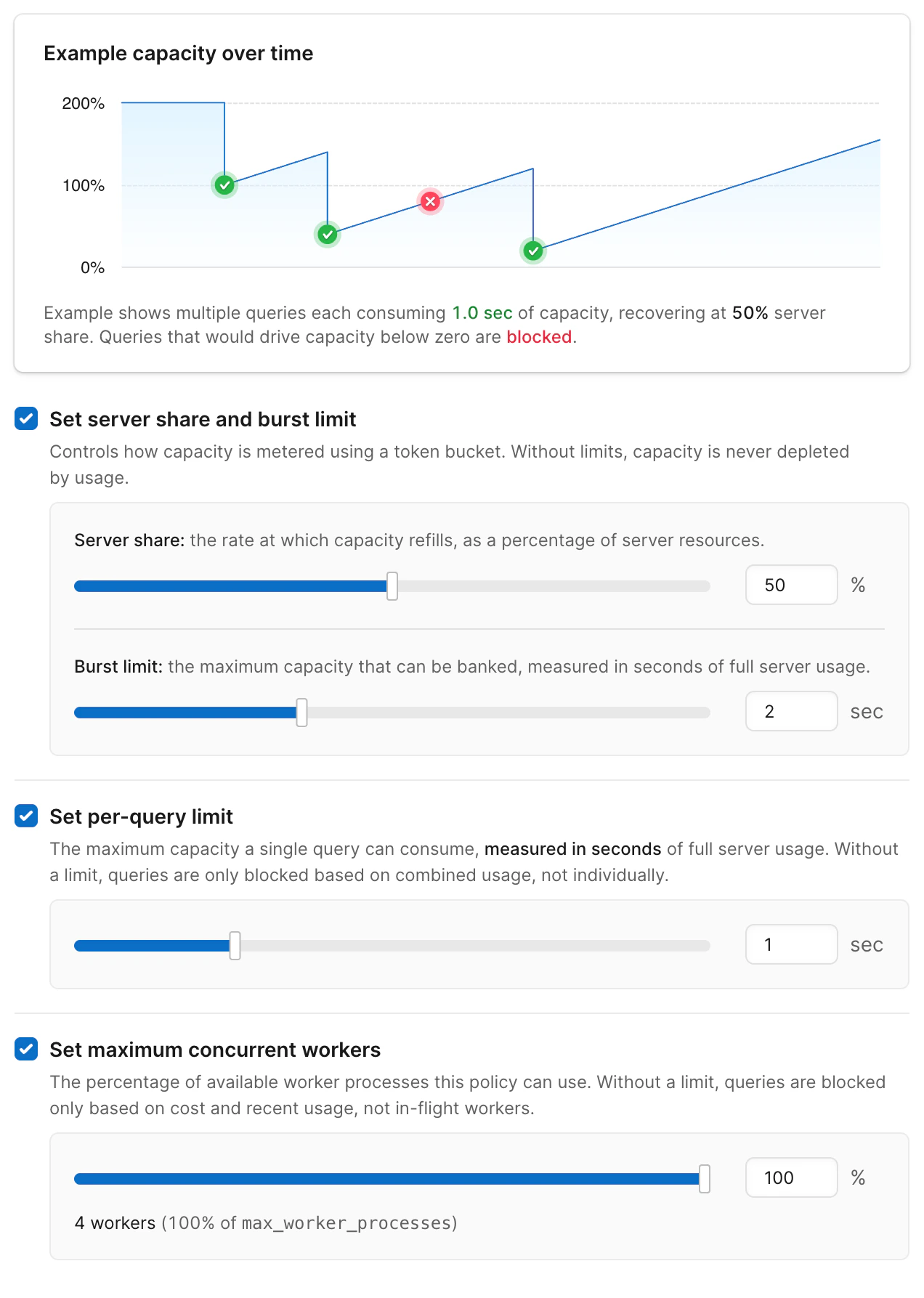 Each resource budget has four optional, configurable limits:
* **Server share** - The max percentage of overall system resources available to queries managed by this budget.
* **Burst limit** - Burst limit is the maximum short-term CPU burst your server can use above its steady share, measured in whole-server seconds and refilled gradually over time.
* **Per-query limit** - The maximum resources any individual query can use, as a percentage of server resources in the first second.
* **Maximum concurrent queries** - Percentage of available worker processes this policy can use
### How resource budgets are estimated
Database Traffic Control estimates the cost of the query based on the recent behavior of similar queries. If the estimated cost exceeds the resource budget limits, the decision to block is enforced or a warning is issued, depending on the **mode** setting.
* There is insufficient capacity to handle the query: `fill_level + estimated_cost > capacity`
* The query is too expensive on its own: `estimated_cost > burst`
These estimates are not precise, real-time measurements. Database Traffic Control uses recent query behavior to make fast decisions about whether to allow, warn, or block a query before it runs. Each unique query pattern learns its own cost model over time, so estimates improve as the system observes more executions of the same query shape.
Under normal usage, queries flow through without noticeable impact. When a workload exceeds its configured limits, and the mode is set to **Enforce**, queries are blocked to keep other workloads healthy.
## Modes: Enforce, Warn, Off
Each resource budget has a **mode** that controls how strictly it is applied.
Each resource budget has four optional, configurable limits:
* **Server share** - The max percentage of overall system resources available to queries managed by this budget.
* **Burst limit** - Burst limit is the maximum short-term CPU burst your server can use above its steady share, measured in whole-server seconds and refilled gradually over time.
* **Per-query limit** - The maximum resources any individual query can use, as a percentage of server resources in the first second.
* **Maximum concurrent queries** - Percentage of available worker processes this policy can use
### How resource budgets are estimated
Database Traffic Control estimates the cost of the query based on the recent behavior of similar queries. If the estimated cost exceeds the resource budget limits, the decision to block is enforced or a warning is issued, depending on the **mode** setting.
* There is insufficient capacity to handle the query: `fill_level + estimated_cost > capacity`
* The query is too expensive on its own: `estimated_cost > burst`
These estimates are not precise, real-time measurements. Database Traffic Control uses recent query behavior to make fast decisions about whether to allow, warn, or block a query before it runs. Each unique query pattern learns its own cost model over time, so estimates improve as the system observes more executions of the same query shape.
Under normal usage, queries flow through without noticeable impact. When a workload exceeds its configured limits, and the mode is set to **Enforce**, queries are blocked to keep other workloads healthy.
## Modes: Enforce, Warn, Off
Each resource budget has a **mode** that controls how strictly it is applied.

 * **Enforce**
* Limits are active
* Queries that exceed limits are blocked
* Violation counts are recorded and visible in the UI
* Best choice for stabilizing workloads
* Blocked queries return with the code **`53000`** and a message from `[PGINSIGHTS] Traffic Control:` and, the ID of the resource budget that blocked the query and the limit that was exceeded
* **Warn**
* Limits are evaluated, but not enforced
* Queries always continue
* Violation counts are recorded and visible in the UI
* Best choice for initial rollout or tuning
* Query response contains a message indicating the query would have been blocked by Database Traffic Control, and which limit was exceeded
* **Off**
* The resource budget does not participate in matching
* No violations are recorded
It is best practice to roll out a new resource budget in stages:
1. Create a resource budget in **Warn** mode
2. Observe violation patterns and adjust limits
3. Switch to **Enforce** once you are confident in the configuration
### Warning thresholds on enforced budgets
Enforced resource budgets can also emit warnings before queries are blocked. You can set a separate **warning threshold** as a percentage of the burst limit, per-query limit, or concurrency limit. When a query's estimated cost crosses the warning threshold but stays below the enforced limit, the query runs normally and the client receives a SQL notice with the `[PGINSIGHTS] Traffic Control:` prefix — the same format used in Warn mode.
This gives you early visibility into workloads that are approaching their limits, so you can investigate and adjust before queries start getting blocked.
Warning thresholds are optional. If not set, only the enforced limits apply.
## Response messages
Resource budgets in **Warn** or **Enforce** mode attach a message to the SQL response when a limit would be or was exceeded.
Messages use the prefix **`[PGINSIGHTS] Traffic Control:`**, followed by the ID of the resource budget that blocked the query and the limit that was exceeded.
* **Enforce** — The query is blocked. The client receives a **SQL error** with **SQLSTATE `53000`** and a message that includes `[PGINSIGHTS] Traffic Control:` and the reason. Treat this as a failed statement and use retry or fallback logic as needed.
* **Warn** — The query still runs and returns a normal result. The client also receives a **SQL notice** (warning) whose text includes `[PGINSIGHTS] Traffic Control:` and the reason. Log or surface these notices for observability while tuning limits before enforcement.
Applications can detect Traffic Control specifically by **SQLSTATE `53000`** on blocked queries, by matching this prefix in error or notice text, or both.
## Rules
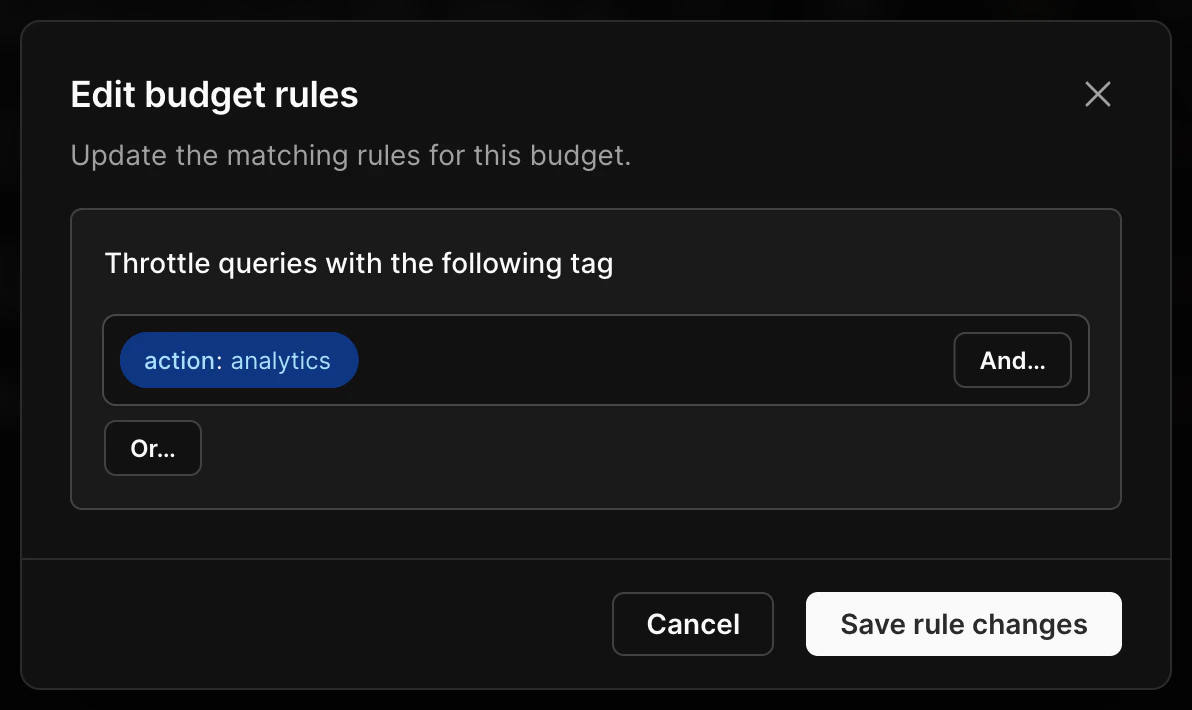
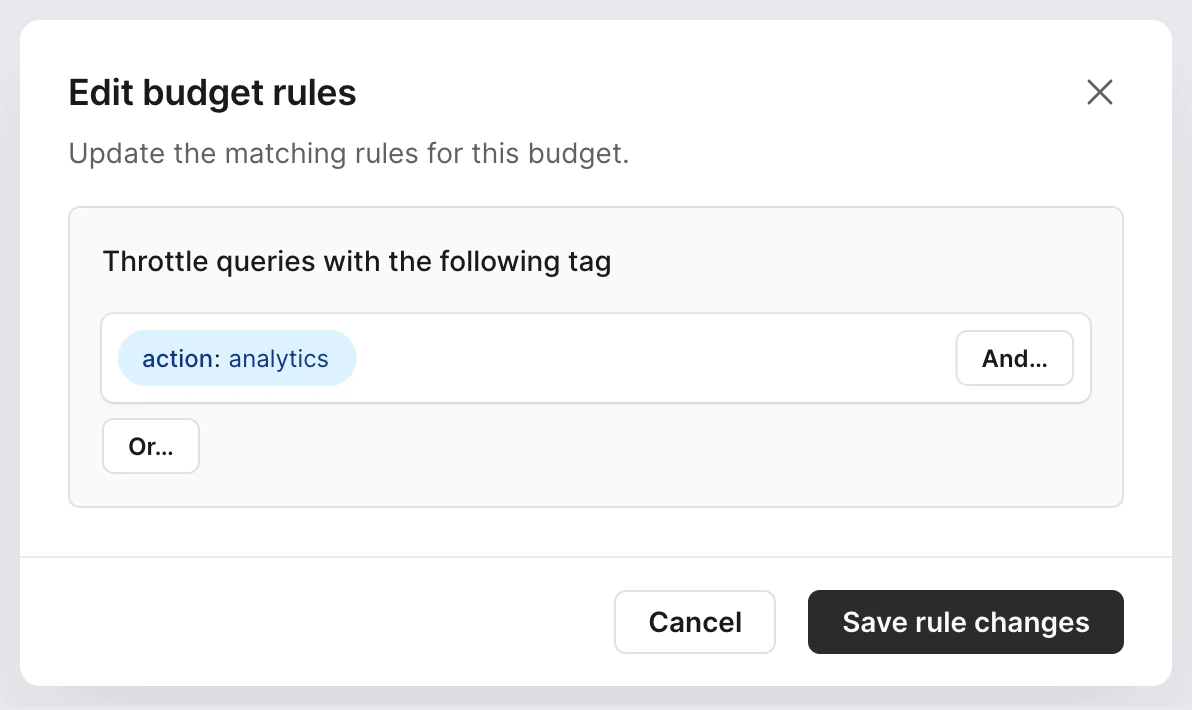
Resource budgets apply to specific traffic based on matching against a **rule**. Rules can be individual **queries**, **system attributes**, or **tags**.
System attributes and tags are matched on key-value pairs. System attributes are created automatically when using Postgres, while tags must be added to your queries.
You can combine rules with `AND` logic so that multiple rules must match, or `OR` logic so that any one of the rules must match, for the resource budget to apply.
* **Enforce**
* Limits are active
* Queries that exceed limits are blocked
* Violation counts are recorded and visible in the UI
* Best choice for stabilizing workloads
* Blocked queries return with the code **`53000`** and a message from `[PGINSIGHTS] Traffic Control:` and, the ID of the resource budget that blocked the query and the limit that was exceeded
* **Warn**
* Limits are evaluated, but not enforced
* Queries always continue
* Violation counts are recorded and visible in the UI
* Best choice for initial rollout or tuning
* Query response contains a message indicating the query would have been blocked by Database Traffic Control, and which limit was exceeded
* **Off**
* The resource budget does not participate in matching
* No violations are recorded
It is best practice to roll out a new resource budget in stages:
1. Create a resource budget in **Warn** mode
2. Observe violation patterns and adjust limits
3. Switch to **Enforce** once you are confident in the configuration
### Warning thresholds on enforced budgets
Enforced resource budgets can also emit warnings before queries are blocked. You can set a separate **warning threshold** as a percentage of the burst limit, per-query limit, or concurrency limit. When a query's estimated cost crosses the warning threshold but stays below the enforced limit, the query runs normally and the client receives a SQL notice with the `[PGINSIGHTS] Traffic Control:` prefix — the same format used in Warn mode.
This gives you early visibility into workloads that are approaching their limits, so you can investigate and adjust before queries start getting blocked.
Warning thresholds are optional. If not set, only the enforced limits apply.
## Response messages
Resource budgets in **Warn** or **Enforce** mode attach a message to the SQL response when a limit would be or was exceeded.
Messages use the prefix **`[PGINSIGHTS] Traffic Control:`**, followed by the ID of the resource budget that blocked the query and the limit that was exceeded.
* **Enforce** — The query is blocked. The client receives a **SQL error** with **SQLSTATE `53000`** and a message that includes `[PGINSIGHTS] Traffic Control:` and the reason. Treat this as a failed statement and use retry or fallback logic as needed.
* **Warn** — The query still runs and returns a normal result. The client also receives a **SQL notice** (warning) whose text includes `[PGINSIGHTS] Traffic Control:` and the reason. Log or surface these notices for observability while tuning limits before enforcement.
Applications can detect Traffic Control specifically by **SQLSTATE `53000`** on blocked queries, by matching this prefix in error or notice text, or both.
## Rules
Resource budgets apply to specific traffic based on matching against a **rule**. Rules can be individual **queries**, **system attributes**, or **tags**.
System attributes and tags are matched on key-value pairs. System attributes are created automatically when using Postgres, while tags must be added to your queries.
You can combine rules with `AND` logic so that multiple rules must match, or `OR` logic so that any one of the rules must match, for the resource budget to apply.
 ### System attribute rules
System attribute rules match key-value pairs that Postgres automatically provides for each connection. You can write rules that match against any of the following:
| Attribute | Description |
| ------------------ | ------------------------------------------------- |
| `username` | The database role or user executing the query |
| `remote_address` | The client IP address of the connection |
| `application_name` | The application name set by the connecting client |
To create a system attribute rule, traffic matching that attribute must have recently executed queries.
Usage examples include:
* Limit analytics queries by having them connect as a dedicated database user, like `analytics_user` and matching `username = analytics_user`
* Isolate traffic from a known internal service that connects from a fixed IP range by matching `remote_address`
* Target a specific service without creating separate database users by matching `application_name`
### Tag-based rules
Tag rules match against key-value pairs that your application attaches to queries using the [SQLCommenter](/postgres/monitoring/query-tags) format. A tag rule targets one or many queries that share the same tag.
To create a tag-based rule, recently executed queries must have included the tag.
Tag rules can also match each unique value for a selected tag key. This creates separate active budget tracking for each tag value, such as each application, worker pool, user, or tenant, without creating a separate rule for every value.
Rules that match each tag value use shared memory for every active value. The active values are stored in an LRU cache controlled by [`traffic_control.shm_size`](/postgres/extensions/pginsights#database-traffic-control-shared-memory-size). The default `64kB` size tracks about 600 active budget entries at once, while the maximum `1MB` size tracks about 10,000.
You can use this with more total tag values than fit in the cache, as long as the number of recently active values stays within the configured size for the time window Traffic Control needs to remember.
Usage examples include:
* Feature flags or code paths, such as `feature='beta_checkout'`
* Application tags, such as `app='web'`
* Route-level targeting, such as `route='api-export'`
For details on the tag format, how to add tags to your queries, and framework support, see [Query tags](/postgres/monitoring/query-tags).
### Query-based rules
Target a specific query by using the query itself as the rule.
You can create query-based rules by finding the query in the [Insights](/postgres/monitoring/query-insights) page and clicking **Create resource budget**.
### System attribute rules
System attribute rules match key-value pairs that Postgres automatically provides for each connection. You can write rules that match against any of the following:
| Attribute | Description |
| ------------------ | ------------------------------------------------- |
| `username` | The database role or user executing the query |
| `remote_address` | The client IP address of the connection |
| `application_name` | The application name set by the connecting client |
To create a system attribute rule, traffic matching that attribute must have recently executed queries.
Usage examples include:
* Limit analytics queries by having them connect as a dedicated database user, like `analytics_user` and matching `username = analytics_user`
* Isolate traffic from a known internal service that connects from a fixed IP range by matching `remote_address`
* Target a specific service without creating separate database users by matching `application_name`
### Tag-based rules
Tag rules match against key-value pairs that your application attaches to queries using the [SQLCommenter](/postgres/monitoring/query-tags) format. A tag rule targets one or many queries that share the same tag.
To create a tag-based rule, recently executed queries must have included the tag.
Tag rules can also match each unique value for a selected tag key. This creates separate active budget tracking for each tag value, such as each application, worker pool, user, or tenant, without creating a separate rule for every value.
Rules that match each tag value use shared memory for every active value. The active values are stored in an LRU cache controlled by [`traffic_control.shm_size`](/postgres/extensions/pginsights#database-traffic-control-shared-memory-size). The default `64kB` size tracks about 600 active budget entries at once, while the maximum `1MB` size tracks about 10,000.
You can use this with more total tag values than fit in the cache, as long as the number of recently active values stays within the configured size for the time window Traffic Control needs to remember.
Usage examples include:
* Feature flags or code paths, such as `feature='beta_checkout'`
* Application tags, such as `app='web'`
* Route-level targeting, such as `route='api-export'`
For details on the tag format, how to add tags to your queries, and framework support, see [Query tags](/postgres/monitoring/query-tags).
### Query-based rules
Target a specific query by using the query itself as the rule.
You can create query-based rules by finding the query in the [Insights](/postgres/monitoring/query-insights) page and clicking **Create resource budget**.

 This is recommended only for temporary cases where you need to test or limit the resources allocated to a specific query. Such as an emergency situation. Prefer system attribute or tag-based rules.
## Matching multiple rules
Resource budget rules may contain several attributes combined with `AND` or `OR` logic.
A query may also match more than one resource budget. For example, a query might match one resource budget based on its system attribute username and another based on an application tag.
When a query matches multiple resource budgets, it must satisfy **all** of them. If any matching resource budget would block the query, the query is blocked. Multiple resource budgets are combined with `AND` logic, not `OR`.
## Need help?
Get help from [the PlanetScale Support team](https://planetscale.com/contact?initial=support), or join our [Discord community](https://pscale.link/community) to see how others are using PlanetScale.
This is recommended only for temporary cases where you need to test or limit the resources allocated to a specific query. Such as an emergency situation. Prefer system attribute or tag-based rules.
## Matching multiple rules
Resource budget rules may contain several attributes combined with `AND` or `OR` logic.
A query may also match more than one resource budget. For example, a query might match one resource budget based on its system attribute username and another based on an application tag.
When a query matches multiple resource budgets, it must satisfy **all** of them. If any matching resource budget would block the query, the query is blocked. Multiple resource budgets are combined with `AND` logic, not `OR`.
## Need help?
Get help from [the PlanetScale Support team](https://planetscale.com/contact?initial=support), or join our [Discord community](https://pscale.link/community) to see how others are using PlanetScale.