> ## Documentation Index
> Fetch the complete documentation index at: https://planetscale.com/docs/llms.txt
> Use this file to discover all available pages before exploring further.
# Database Traffic Control
> Define and enforce limits on how many resources specific operations can use.
export const YouTubeEmbed = ({id, title}) => {
return
;
};
Database Traffic Control for PlanetScale Postgres introduces **resource budgets**, giving you control over the resources allocated to specific traffic slices.
Your database faces two categories of threat: external actors who abuse or overload your system, and your own application code under unexpected conditions. A single runaway query, a traffic spike from a viral feature, or a misbehaving integration can overwhelm your database just as effectively as a deliberate attack. Database Traffic Control protects against both.
Instead of all queries competing equally for CPU and connections, you can:
* Ensure critical application paths stay alive even when the database is under pressure
* Isolate noisy analytics or reporting workloads from user-facing traffic
* Put guardrails around third‑party integrations and batch jobs
* Gradually introduce new features without risking the stability of production
Database Traffic Control operates at the [database branch](/postgres/branching) level and lives inside [Insights](/postgres/monitoring/query-insights), next to the metrics you already use to understand performance.
## Why this matters
When a database becomes overwhelmed, the typical outcome is a complete outage. Every query fails. Every user is affected. The entire application goes down.
Database Traffic Control changes the failure mode. Instead of total collapse, you define which workloads are allowed to be shed under pressure and which should have higher limits. You choose which non-critical queries fail while higher priority workloads like checkout and authentication continue to function.
This is the difference between a **degraded experience** and a **site-wide incident**. Database Traffic Control gives you the ability to keep your application running—even when something has gone wrong.
## When should I use it?
Instances where Database Traffic Control is useful include:
* **Emergency situations to stop out-of-control queries**
Immediately apply resource budgets to a single runaway query to prevent it from running again.
* **Running OLTP and OLAP workloads on the same database**
For example, user‑facing application traffic shares a cluster with heavy analytics queries.
* **Extract, transform, load (ETL) jobs that you do not fully control**
An external tool or script might periodically generate high QPS or expensive queries.
* **Launching new features with unknown query patterns**
You want to ship to production, but be confident that mistakes are contained.
* **Supporting multiple tenants on the same cluster**
You want to ensure that no single tenant can consume all resources at the expense of others.
If you never see contention between workloads and your queries are well understood, you may not need Database Traffic Control today. But as usage grows, more teams access the same database, and the cost of availability issues increases, any overload condition could result in a total-failure outcome.
## Key capabilities
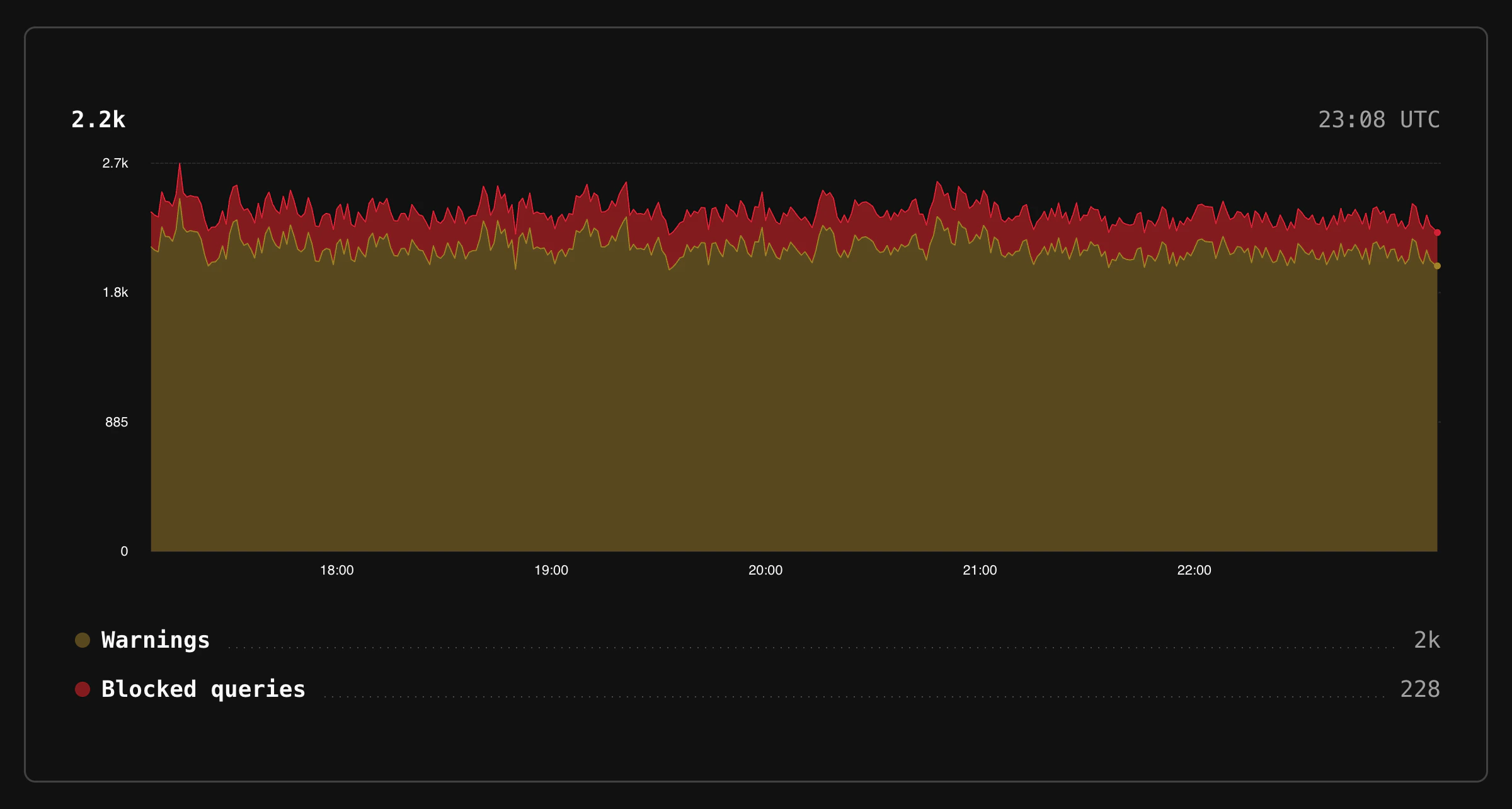
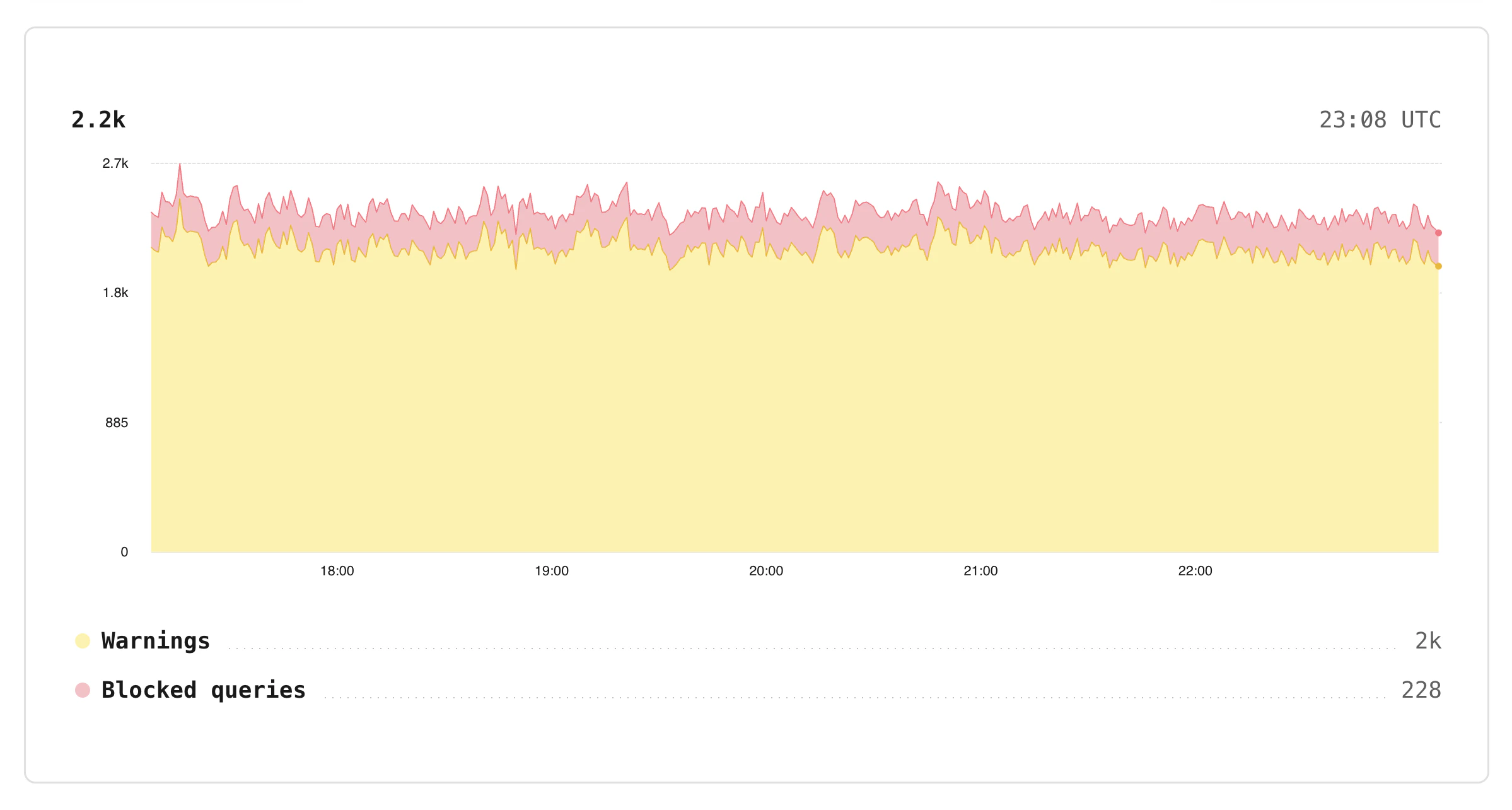 See [Concepts](/postgres/traffic-control/concepts) for detailed definitions of **resource budgets**, **rules**, and **modes**.
* **Configure limits for query traffic**
Resource budgets define how much specific traffic can use within the configured limits.
* **Write rules to target queries, system attributes, and tags**
Resource budgets can apply to one or many queries matching against one or more rules, including each unique value for a selected tag.
* **Define resource budgets per branch**
Resource budgets are unique to each Postgres branch, so you can experiment in staging before enforcing in production.
* **Enforce, warn, or disable**
Dry‑run resource budgets before they block traffic by running in warning mode and inspecting logs.
* **Warning thresholds on enforced budgets**
Set separate warning thresholds as a percentage of burst, per-query, or concurrency limits. Get early notice when workloads approach their limits, before queries are blocked.
## How Database Traffic Control fits with Insights
Insights tracks performance at a per-query-pattern level and provides you with data to take action and improve overall performance. Database Traffic Control allows you to control which queries are allowed to execute by attaching limits to the same query activity that Insights observes.
### Database Traffic Control and pg\_strict
Database Traffic Control and [pg\_strict](/postgres/extensions/pg_strict) are separate features that address different concerns:
* **pg\_strict** controls **which query shapes** a role is allowed to run (for example, preventing queries without appropriate predicates).
* **Database Traffic Control** limits **how many resources** a workload can consume over time.
These features operate independently. You can use either one on its own, or both if your needs require it.
## Manage via CLI
You can manage Database Traffic Control budgets and rules using the PlanetScale CLI:
```bash theme={null}
pscale traffic-control budget create [flags]
pscale traffic-control rule create [flags]
```
See the [`traffic-control` CLI reference](/cli/traffic-control) for the full list of sub-commands and flags.
## What Database Traffic Control is not
To set expectations clearly, Database Traffic Control is **not**:
* A full **web application firewall (WAF)**. It does not inspect HTTP‑level details or replace application‑side validation.
* A substitute for **indexing, schema design, or query tuning**.
* A global, cross‑cluster rate limiter.
* A replacement for application‑level rate limiting. It protects the database, but your application may still need to shape traffic earlier in the stack.
* A guarantee that queries will be given the resources they need. Traffic control rules are limits, not capacities.
Think of Database Traffic Control as the last line of defense for your database. Application logic, query safety, and good schema design all help prevent problems—but when something slips through, Database Traffic Control helps your database stay alive.
## Need help?
Get help from [the PlanetScale Support team](https://planetscale.com/contact?initial=support), or join our [Discord community](https://pscale.link/community) to see how others are using PlanetScale.
See [Concepts](/postgres/traffic-control/concepts) for detailed definitions of **resource budgets**, **rules**, and **modes**.
* **Configure limits for query traffic**
Resource budgets define how much specific traffic can use within the configured limits.
* **Write rules to target queries, system attributes, and tags**
Resource budgets can apply to one or many queries matching against one or more rules, including each unique value for a selected tag.
* **Define resource budgets per branch**
Resource budgets are unique to each Postgres branch, so you can experiment in staging before enforcing in production.
* **Enforce, warn, or disable**
Dry‑run resource budgets before they block traffic by running in warning mode and inspecting logs.
* **Warning thresholds on enforced budgets**
Set separate warning thresholds as a percentage of burst, per-query, or concurrency limits. Get early notice when workloads approach their limits, before queries are blocked.
## How Database Traffic Control fits with Insights
Insights tracks performance at a per-query-pattern level and provides you with data to take action and improve overall performance. Database Traffic Control allows you to control which queries are allowed to execute by attaching limits to the same query activity that Insights observes.
### Database Traffic Control and pg\_strict
Database Traffic Control and [pg\_strict](/postgres/extensions/pg_strict) are separate features that address different concerns:
* **pg\_strict** controls **which query shapes** a role is allowed to run (for example, preventing queries without appropriate predicates).
* **Database Traffic Control** limits **how many resources** a workload can consume over time.
These features operate independently. You can use either one on its own, or both if your needs require it.
## Manage via CLI
You can manage Database Traffic Control budgets and rules using the PlanetScale CLI:
```bash theme={null}
pscale traffic-control budget create [flags]
pscale traffic-control rule create [flags]
```
See the [`traffic-control` CLI reference](/cli/traffic-control) for the full list of sub-commands and flags.
## What Database Traffic Control is not
To set expectations clearly, Database Traffic Control is **not**:
* A full **web application firewall (WAF)**. It does not inspect HTTP‑level details or replace application‑side validation.
* A substitute for **indexing, schema design, or query tuning**.
* A global, cross‑cluster rate limiter.
* A replacement for application‑level rate limiting. It protects the database, but your application may still need to shape traffic earlier in the stack.
* A guarantee that queries will be given the resources they need. Traffic control rules are limits, not capacities.
Think of Database Traffic Control as the last line of defense for your database. Application logic, query safety, and good schema design all help prevent problems—but when something slips through, Database Traffic Control helps your database stay alive.
## Need help?
Get help from [the PlanetScale Support team](https://planetscale.com/contact?initial=support), or join our [Discord community](https://pscale.link/community) to see how others are using PlanetScale.