> ## Documentation Index
> Fetch the complete documentation index at: https://planetscale.com/docs/llms.txt
> Use this file to discover all available pages before exploring further.
# PgBouncer
> PgBouncer provides connection pooling for your Postgres database.
## When to use PgBouncer
PgBouncer is generally recommended for OLTP workloads. All application connections should be routed through PgBouncer whenever possible. Learn more about the pros and cons of the different connection methods on the [connections overview page](/postgres/connecting).
PlanetScale provides several options for using PgBouncer, including local PgBouncers, dedicated primary PgBouncers, and dedicated replica PgBouncers.
PgBouncer connections operate in transaction mode, which means pooled server connections are assigned to client connections on a per-transaction level. This provides excellent performance for OLTP workloads but limits certain PostgreSQL features that require persistent connections. Learn more at the [PgBouncer documentation](https://www.pgbouncer.org/features.html).
## When to NOT use PgBouncer
For use cases that require long-running operations, direct connections on port `5432` are recommended. For example:
* Schema changes and DDL
* OLAP, analytics, reporting, or batch processing
* Session-specific features: Custom session variables, temporary tables
* ETL processes and data streaming
* Long-running transactions or queries that span multiple transactions
* Creating a local backup with `pg_dump`
## Local PgBouncer
Every PlanetScale Postgres database includes an instance of PgBouncer running on the same node as the primary Postgres database (local PgBouncer). To connect to PgBouncer, use the same credentials as a direct connection, but use port `6432` instead of the Postgres default of `5432`. For example:
```bash theme={null}
psql 'host=xxxxxxxxxx-useast1-1.horizon.psdb.cloud port=6432 user=postgres.xxxxxxxxxx password=pscale_pw_xxxxxxxxxxxxxxxxxx dbname=my_database sslnegotiation=direct sslmode=verify-full sslrootcert=system'
```
The local PgBouncer does not support routing queries to replicas. All connections through the local PgBouncer are automatically routed to the primary database, regardless of the username specification. Use a [dedicated replica PgBouncer](#dedicated-replica-pgbouncers) for replica access.
## Dedicated replica PgBouncers
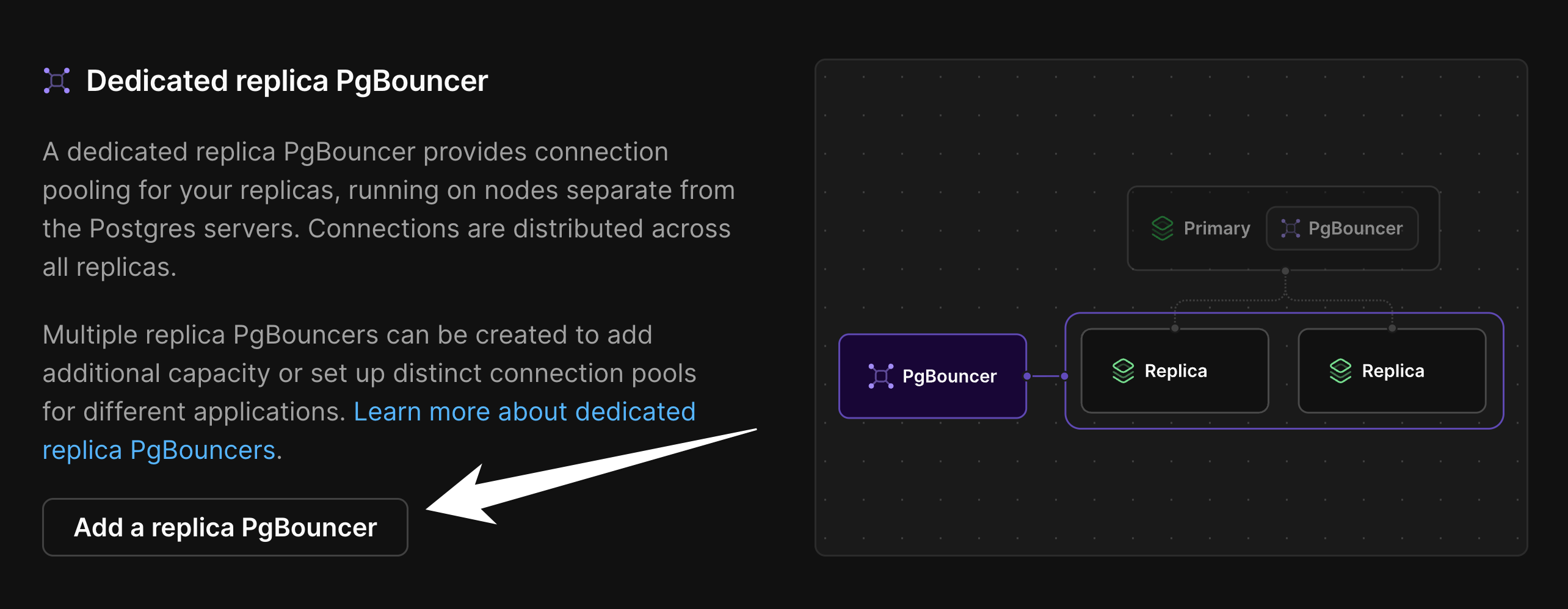
Dedicated replica PgBouncers can be created to run on nodes separate from the Postgres servers. This is useful for applications that send significant read traffic to replicas and need connection pooling. This offers similar high-availability benefits as the local PgBouncer but is used for read-only replica traffic.
### Creating a dedicated replica PgBouncer
You must be a database or organization administrator to create PgBouncers.
1. From the PlanetScale organization dashboard, select the desired database
2. Navigate to the **Clusters** page from the menu on the left
3. Choose the branch where you want to add a PgBouncer in the "**Branch**" dropdown
4. Select the **PgBouncers** tab
5. Scroll down to the "**Dedicated replica PgBouncers**" section
6. Click the "**Add a replica PgBouncer**" button
 7. In the pop-up dialog, give the new PgBouncer a descriptive name. Note that names can not be modified after creation.
8. Select a size based on your connection pooling needs (see [PgBouncer pricing](/postgres/pricing#pgbouncer-pricing) for available sizes)
7. In the pop-up dialog, give the new PgBouncer a descriptive name. Note that names can not be modified after creation.
8. Select a size based on your connection pooling needs (see [PgBouncer pricing](/postgres/pricing#pgbouncer-pricing) for available sizes)
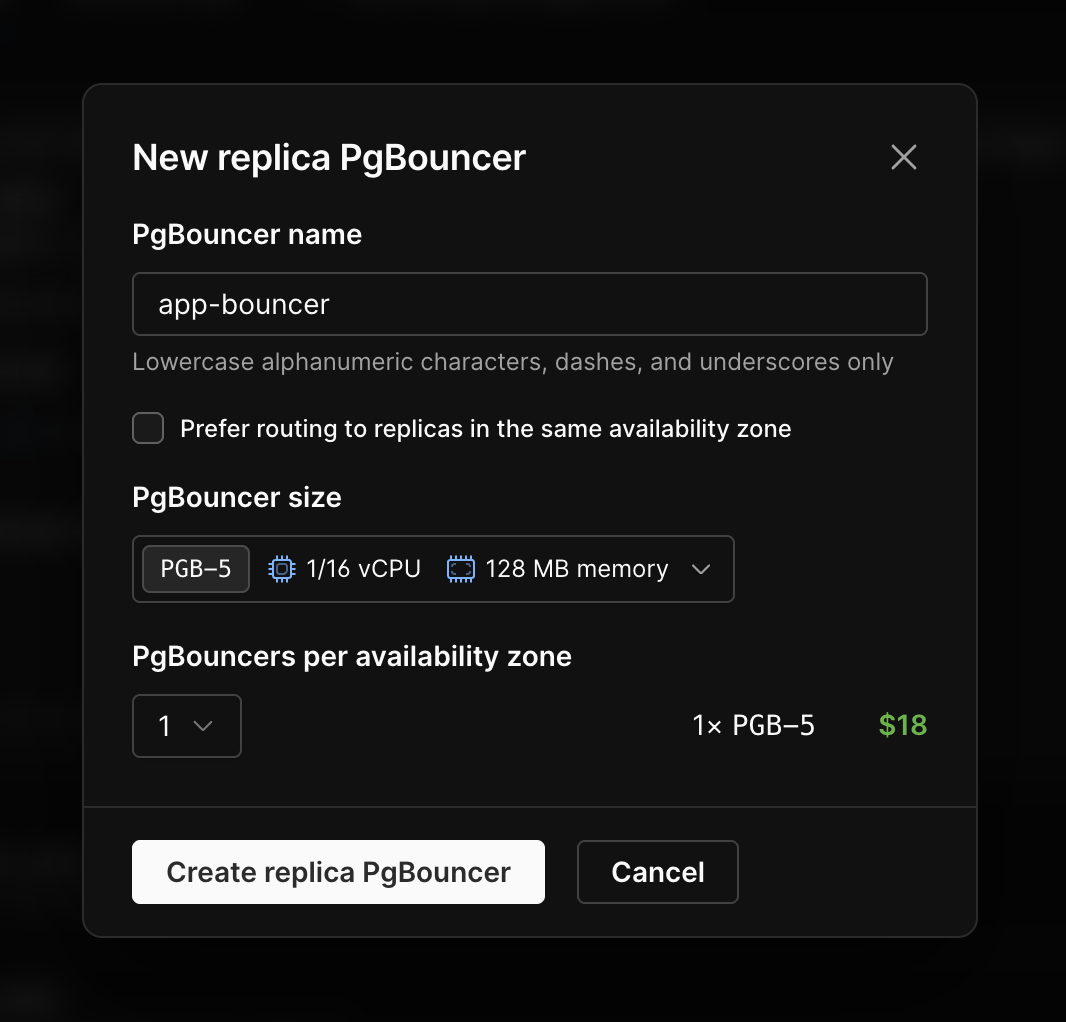 9. Click "**Create PgBouncer**"
10. Wait a few minutes for the creation to complete
A new entry for the PgBouncer will appear in the Dedicated replica PgBouncers section once provisioning is complete.
Multiple replica PgBouncers can be created if needed. This is useful for adding additional PgBouncer capacity or for having distinct bouncers for different client applications to manage connection pooling with more precision.
#### Availability zone affinity
Dedicated replica PgBouncers can be configured to prefer routing to the Postgres replica servers inside their own availability zone. Applications deployed across several zones can benefit from lower replica query latency in this configuration. However, if your application is deployed to a single zone, this mode may direct most queries to one replica server while replicas in other zones receive little traffic. Allowing the bouncer to load balance across availability zones, without preferring its own zone, will spread the query volume across the replica servers for single-zone applications.
Select the **Prefer routing to replicas in the same availability zone** checkbox to enable affinity.
### Connecting to dedicated replica PgBouncers
Connect to dedicated replica PgBouncers by appending `|pgbouncer-name` to the username of any [role you have created](/postgres/connecting/roles). For example, if your username is `user1.abcdefghi` and the dedicated replica PgBouncer is named `read-bouncer`, the connection username should be `user1.abcdefghi|read-bouncer`.
The hostname and password remain the same. Use port `6432` for dedicated PgBouncer connections:
```bash theme={null}
psql 'host=xxxxxxxxxx-useast1-1.horizon.psdb.cloud \
port=6432 \
user=postgres.xxxxxxxxxx|read-bouncer \
password=pscale_pw_xxxxxxxxxxxxxxxxxx \
dbname=my_database \
sslnegotiation=direct \
sslmode=verify-full \
sslrootcert=system'
```
## Dedicated primary PgBouncers
A dedicated primary PgBouncer provides connection pooling for your primary database while running on nodes separate from the Postgres servers. Traffic flows from the dedicated primary PgBouncer to the local PgBouncer on the primary node, and then to Postgres. This extra layer lets client connections persist through cluster resizes, upgrades, and most failover scenarios, providing improved high availability. Primary bouncers are configured in the same way as replica bouncers.
For production OLTP workloads requiring maximum availability, see the [connection resilience guide](/postgres/connection-resilience).
A dedicated pool runs multiple PgBouncers spread across availability zones for resiliency (configured with **PgBouncers per availability zone**). Connection-count settings such as `max_client_conn` and `default_pool_size` apply to each PgBouncer in the pool, so the pool's effective totals are the sum across all of them: the client-connection ceiling shown in the dashboard is the total across every PgBouncer (for example, three PgBouncers each with `max_client_conn = 100` give a ceiling of 300), and total server connections to Postgres are likewise the sum of each PgBouncer's `default_pool_size`. See [Configuring PgBouncers](#configuring-pgbouncers).
### Connecting to dedicated primary PgBouncers
Connect to dedicated primary PgBouncers by appending `|pgbouncer-name` to the username of any [role you have created](/postgres/connecting/roles). For example, if your username is `user1.abcdefghi` and the dedicated primary PgBouncer is named `write-pool`, the connection username should be `user1.abcdefghi|write-pool`.
The hostname and password remain the same. Use port `6432` for dedicated PgBouncer connections. For dedicated primary PgBouncers, requests route through the dedicated primary PgBouncer first, then the local PgBouncer, and finally Postgres:
```bash theme={null}
psql 'host=xxxxxxxxxx-useast1-1.horizon.psdb.cloud \
port=6432 \
user=postgres.xxxxxxxxxx|write-pool \
password=pscale_pw_xxxxxxxxxxxxxxxxxx \
dbname=my_database \
sslnegotiation=direct \
sslmode=verify-full \
sslrootcert=system'
```
## Configuring PgBouncers
Each PgBouncer on the "PgBouncers" tab can be individually configured with a section like this under each PgBouncer:
9. Click "**Create PgBouncer**"
10. Wait a few minutes for the creation to complete
A new entry for the PgBouncer will appear in the Dedicated replica PgBouncers section once provisioning is complete.
Multiple replica PgBouncers can be created if needed. This is useful for adding additional PgBouncer capacity or for having distinct bouncers for different client applications to manage connection pooling with more precision.
#### Availability zone affinity
Dedicated replica PgBouncers can be configured to prefer routing to the Postgres replica servers inside their own availability zone. Applications deployed across several zones can benefit from lower replica query latency in this configuration. However, if your application is deployed to a single zone, this mode may direct most queries to one replica server while replicas in other zones receive little traffic. Allowing the bouncer to load balance across availability zones, without preferring its own zone, will spread the query volume across the replica servers for single-zone applications.
Select the **Prefer routing to replicas in the same availability zone** checkbox to enable affinity.
### Connecting to dedicated replica PgBouncers
Connect to dedicated replica PgBouncers by appending `|pgbouncer-name` to the username of any [role you have created](/postgres/connecting/roles). For example, if your username is `user1.abcdefghi` and the dedicated replica PgBouncer is named `read-bouncer`, the connection username should be `user1.abcdefghi|read-bouncer`.
The hostname and password remain the same. Use port `6432` for dedicated PgBouncer connections:
```bash theme={null}
psql 'host=xxxxxxxxxx-useast1-1.horizon.psdb.cloud \
port=6432 \
user=postgres.xxxxxxxxxx|read-bouncer \
password=pscale_pw_xxxxxxxxxxxxxxxxxx \
dbname=my_database \
sslnegotiation=direct \
sslmode=verify-full \
sslrootcert=system'
```
## Dedicated primary PgBouncers
A dedicated primary PgBouncer provides connection pooling for your primary database while running on nodes separate from the Postgres servers. Traffic flows from the dedicated primary PgBouncer to the local PgBouncer on the primary node, and then to Postgres. This extra layer lets client connections persist through cluster resizes, upgrades, and most failover scenarios, providing improved high availability. Primary bouncers are configured in the same way as replica bouncers.
For production OLTP workloads requiring maximum availability, see the [connection resilience guide](/postgres/connection-resilience).
A dedicated pool runs multiple PgBouncers spread across availability zones for resiliency (configured with **PgBouncers per availability zone**). Connection-count settings such as `max_client_conn` and `default_pool_size` apply to each PgBouncer in the pool, so the pool's effective totals are the sum across all of them: the client-connection ceiling shown in the dashboard is the total across every PgBouncer (for example, three PgBouncers each with `max_client_conn = 100` give a ceiling of 300), and total server connections to Postgres are likewise the sum of each PgBouncer's `default_pool_size`. See [Configuring PgBouncers](#configuring-pgbouncers).
### Connecting to dedicated primary PgBouncers
Connect to dedicated primary PgBouncers by appending `|pgbouncer-name` to the username of any [role you have created](/postgres/connecting/roles). For example, if your username is `user1.abcdefghi` and the dedicated primary PgBouncer is named `write-pool`, the connection username should be `user1.abcdefghi|write-pool`.
The hostname and password remain the same. Use port `6432` for dedicated PgBouncer connections. For dedicated primary PgBouncers, requests route through the dedicated primary PgBouncer first, then the local PgBouncer, and finally Postgres:
```bash theme={null}
psql 'host=xxxxxxxxxx-useast1-1.horizon.psdb.cloud \
port=6432 \
user=postgres.xxxxxxxxxx|write-pool \
password=pscale_pw_xxxxxxxxxxxxxxxxxx \
dbname=my_database \
sslnegotiation=direct \
sslmode=verify-full \
sslrootcert=system'
```
## Configuring PgBouncers
Each PgBouncer on the "PgBouncers" tab can be individually configured with a section like this under each PgBouncer:
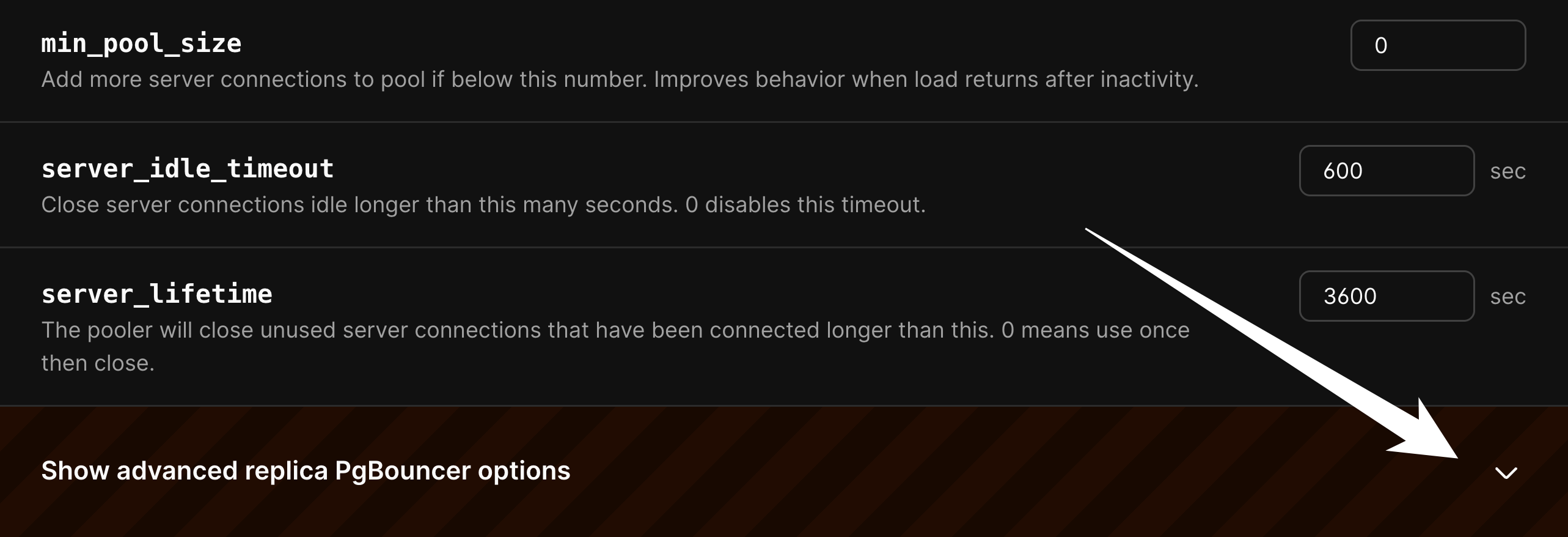 The basic settings are at the top, with advanced settings available as an option. Adjusting advanced settings is not recommended unless there is a good understanding of how PgBouncer works.
### Applying configuration changes
When you save a PgBouncer configuration change, PlanetScale applies it with a live reload. PgBouncer re-reads the updated configuration without a process restart.
In normal operation, existing client connections are preserved during this reload, so applying configuration changes does not introduce downtime or a connection reset event.
### Configurable parameters
The following parameters can be configured for both the local and dedicated replica PgBouncers.
#### Basic settings
| Parameter | Description |
| --------------------- | ----------------------------------------------------------------------------------------------------------------------------------------------- |
| default\_pool\_size | How many server connections to allow per user/database pair. Default: `20` |
| min\_pool\_size | Add more server connections to pool if below this number. Improves behavior when load returns after inactivity. Default: `0` |
| max\_client\_conn | Maximum number of client connections allowed, per PgBouncer. Default: `100` |
| server\_lifetime | The pooler will close unused server connections that have been connected longer than this. 0 means use once then close. Default: `3600` seconds |
| server\_idle\_timeout | Close server connections idle longer than this many seconds. 0 disables this timeout. Default: `600` seconds |
#### Advanced settings
Advanced parameters should only be adjusted with a thorough understanding of PgBouncer internals.
| Parameter | Description |
| ----------------------------------------- | ------------------------------------------------------------------------------------------------------------------------------------------------------ |
| **Connection Limits** | |
| max\_prepared\_statements | When non-zero, PgBouncer tracks protocol-level named prepared statements in transaction and statement pooling mode. Default: `200` |
| max\_db\_connections | Do not allow more than this many server connections per database (regardless of user). 0 is unlimited. Default: `0` |
| max\_db\_client\_connections | Do not allow more than this many client connections per database (regardless of user). 0 is unlimited. Default: `0` |
| max\_user\_connections | Do not allow more than this many server connections per user (regardless of database). 0 is unlimited. Default: `0` |
| max\_user\_client\_connections | Do not allow more than this many client connections per user (regardless of database). 0 is unlimited. Default: `0` |
| reserve\_pool\_size | How many additional connections to allow to a pool. 0 disables. Default: `0` |
| reserve\_pool\_timeout | If a client has not been serviced in this time, use additional connections from the reserve pool. 0 disables. Default: `5` seconds |
| **Timeouts** | |
| query\_timeout | Cancel queries running longer than this. Use with smaller server-side statement\_timeout for network problems. Default: `0` seconds |
| query\_wait\_timeout | Maximum time queries wait for execution. Client disconnected if query not assigned to server in time. 0 disables. Default: `120` seconds |
| client\_idle\_timeout | Close client connections idle longer than this. Should be larger than client-side lifetime settings. Default: `0` seconds |
| client\_login\_timeout | Disconnect clients that don't log in within this time. Prevents dead connections stalling SUSPEND and restart. Default: `60` seconds |
| idle\_transaction\_timeout | If a client has been in "idle in transaction" state longer, it will be disconnected. Default: `0` seconds |
| cancel\_wait\_timeout | Maximum time cancel requests wait for execution. Client disconnected if not assigned to server in time. 0 disables. Default: `10` seconds |
| autodb\_idle\_timeout | How long database pools stay cached after last use. After timeout, unused pools are freed and stats reset. Default: `3600` seconds |
| suspend\_timeout | How long to wait for buffer flush during SUSPEND or reboot (-R). Connection dropped if flush fails. Default: `10` seconds |
| **Server Health** | |
| server\_check\_query | Simple query to check if server connection is alive. Empty string disables sanity checking. Default: `select 1` |
| server\_check\_delay | How long to keep released connections available for immediate re-use without running server\_check\_query. 0 always runs check. Default: `30` seconds |
| **Logging** | |
| log\_connections | Log successful logins. Default: `1` (enabled) |
| log\_disconnections | Log disconnections with reasons. Default: `1` (enabled) |
| log\_pooler\_errors | Log error messages the pooler sends to clients. Default: `1` (enabled) |
| **Parameter Handling** | |
| ignore\_startup\_parameters | Allow additional startup parameters that PgBouncer normally rejects. Specify here so PgBouncer knows admin handles them. Default: `extra_float_digits` |
| track\_extra\_parameters | Additional parameters to track per client beyond the defaults. Maintained in client cache and restored when client active. Default: `IntervalStyle` |
| **Low-Level Performance** | |
| pkt\_buf | Internal buffer size for packets. Affects TCP packet size and memory usage. No need to set large for libpq packets. Default: `4096` bytes |
| sbuf\_loopcnt | How many times to process data on one connection before proceeding. Prevents big result sets stalling PgBouncer. 0 = no limit. Default: `5` |
| disable\_pqexec | Disable Simple Query protocol (PQexec). Improves security by preventing some SQL injection attacks. 0 = enabled, 1 = disabled. Default: `0` |
| **Infrastructure (Local PgBouncer only)** | |
| Number of processes | Sets the number of PgBouncer processes that will run on each node in this branch's cluster. Default: `1` |
Learn more about PgBouncer configuration [on their official website](https://www.pgbouncer.org/features.html).
## How PgBouncer works
Connection reuse is the key mechanism that makes PgBouncer effective. When a client completes a transaction, PgBouncer returns the server connection to the pool rather than closing it. The next client transaction can immediately reuse that existing connection without incurring the overhead of spawning a new Postgres process. This allows a single pooled connection to serve hundreds or thousands of client connections over its lifetime, enabling applications to scale far beyond the constraints of direct connections.
### Pooling modes
PgBouncer supports three pooling modes, but PlanetScale-managed PgBouncers operate in transaction pooling mode only.
* **Transaction pooling**: Assigns client connections to pooled server connections on a per-transaction level and allows multi-statement transactions. This mode provides the multiplexing benefits PlanetScale optimizes for and is the default on every PgBouncer we run.
* **Statement pooling**: Assigns client connections to pooled server connections on a per-query basis. This mode does not allow multi-statement transactions, which is unsuitable for most use cases.
* **Session pooling**: Each client connection is given a dedicated connection from the PgBouncer pool for its entire duration. Because the mapping stays 1:1, Postgres connection counts do not decrease, connection limits are reached at the same rate, and PgBouncer adds another proxy layer that introduces latency. If your workload needs persistent sessions, connect directly to Postgres on port `5432` instead of adding a PgBouncer hop.
If you are worried about exhausting connection limits by connecting directly, switching to session pooling reaches the same limit while still adding another proxy layer.
### Limitations of transaction pooling
PgBouncer's transaction pooling mode provides excellent performance for OLTP workloads but limits certain PostgreSQL features that require persistent connections:
* Prepared statements that persist across transactions (protocol-level prepared statements work with `max_prepared_statements` configured)
* Temporary tables
* `LISTEN`/`NOTIFY`
* Session-level advisory locks
* `SET` commands that persist beyond a transaction
For operations requiring these features, use a direct connection instead (see the [connections overview](/postgres/connecting#direct-primary-connections)).
### Benefits during maintenance operations
Using PgBouncer provides improved availability during configuration changes. When modifying Postgres Parameters, some changes require the server to be restarted. When these restarts happen, any direct connections to Postgres will be terminated. However, when using PgBouncer, client connections are maintained and PgBouncer handles reconnecting to Postgres after it restarts. The [operations philosophy documentation](/postgres/operations-philosophy) covers more details on how connections are managed during various database lifecycle operations.
### Scaling PgBouncer
PgBouncer itself is a lightweight process, but high connection volumes or high query throughput can eventually exhaust its capacity. PlanetScale offers multiple PgBouncer sizes to handle different workload demands. Each size provides increased CPU and memory resources, allowing PgBouncer to handle more concurrent client connections and higher query throughput without becoming a bottleneck. See [PgBouncer pricing](/postgres/pricing#pgbouncer-pricing) for available sizes.
### PgBouncer error messages
PgBouncer has custom error messages that may be encountered in addition to standard Postgres errors. The [PgBouncer config documentation](https://www.pgbouncer.org/config.html) describes these errors and can be a helpful resource for troubleshooting connection issues.
## Need help?
Get help from [the PlanetScale Support team](https://planetscale.com/contact?initial=support), or join our [Discord community](https://pscale.link/community) to see how others are using PlanetScale.
The basic settings are at the top, with advanced settings available as an option. Adjusting advanced settings is not recommended unless there is a good understanding of how PgBouncer works.
### Applying configuration changes
When you save a PgBouncer configuration change, PlanetScale applies it with a live reload. PgBouncer re-reads the updated configuration without a process restart.
In normal operation, existing client connections are preserved during this reload, so applying configuration changes does not introduce downtime or a connection reset event.
### Configurable parameters
The following parameters can be configured for both the local and dedicated replica PgBouncers.
#### Basic settings
| Parameter | Description |
| --------------------- | ----------------------------------------------------------------------------------------------------------------------------------------------- |
| default\_pool\_size | How many server connections to allow per user/database pair. Default: `20` |
| min\_pool\_size | Add more server connections to pool if below this number. Improves behavior when load returns after inactivity. Default: `0` |
| max\_client\_conn | Maximum number of client connections allowed, per PgBouncer. Default: `100` |
| server\_lifetime | The pooler will close unused server connections that have been connected longer than this. 0 means use once then close. Default: `3600` seconds |
| server\_idle\_timeout | Close server connections idle longer than this many seconds. 0 disables this timeout. Default: `600` seconds |
#### Advanced settings
Advanced parameters should only be adjusted with a thorough understanding of PgBouncer internals.
| Parameter | Description |
| ----------------------------------------- | ------------------------------------------------------------------------------------------------------------------------------------------------------ |
| **Connection Limits** | |
| max\_prepared\_statements | When non-zero, PgBouncer tracks protocol-level named prepared statements in transaction and statement pooling mode. Default: `200` |
| max\_db\_connections | Do not allow more than this many server connections per database (regardless of user). 0 is unlimited. Default: `0` |
| max\_db\_client\_connections | Do not allow more than this many client connections per database (regardless of user). 0 is unlimited. Default: `0` |
| max\_user\_connections | Do not allow more than this many server connections per user (regardless of database). 0 is unlimited. Default: `0` |
| max\_user\_client\_connections | Do not allow more than this many client connections per user (regardless of database). 0 is unlimited. Default: `0` |
| reserve\_pool\_size | How many additional connections to allow to a pool. 0 disables. Default: `0` |
| reserve\_pool\_timeout | If a client has not been serviced in this time, use additional connections from the reserve pool. 0 disables. Default: `5` seconds |
| **Timeouts** | |
| query\_timeout | Cancel queries running longer than this. Use with smaller server-side statement\_timeout for network problems. Default: `0` seconds |
| query\_wait\_timeout | Maximum time queries wait for execution. Client disconnected if query not assigned to server in time. 0 disables. Default: `120` seconds |
| client\_idle\_timeout | Close client connections idle longer than this. Should be larger than client-side lifetime settings. Default: `0` seconds |
| client\_login\_timeout | Disconnect clients that don't log in within this time. Prevents dead connections stalling SUSPEND and restart. Default: `60` seconds |
| idle\_transaction\_timeout | If a client has been in "idle in transaction" state longer, it will be disconnected. Default: `0` seconds |
| cancel\_wait\_timeout | Maximum time cancel requests wait for execution. Client disconnected if not assigned to server in time. 0 disables. Default: `10` seconds |
| autodb\_idle\_timeout | How long database pools stay cached after last use. After timeout, unused pools are freed and stats reset. Default: `3600` seconds |
| suspend\_timeout | How long to wait for buffer flush during SUSPEND or reboot (-R). Connection dropped if flush fails. Default: `10` seconds |
| **Server Health** | |
| server\_check\_query | Simple query to check if server connection is alive. Empty string disables sanity checking. Default: `select 1` |
| server\_check\_delay | How long to keep released connections available for immediate re-use without running server\_check\_query. 0 always runs check. Default: `30` seconds |
| **Logging** | |
| log\_connections | Log successful logins. Default: `1` (enabled) |
| log\_disconnections | Log disconnections with reasons. Default: `1` (enabled) |
| log\_pooler\_errors | Log error messages the pooler sends to clients. Default: `1` (enabled) |
| **Parameter Handling** | |
| ignore\_startup\_parameters | Allow additional startup parameters that PgBouncer normally rejects. Specify here so PgBouncer knows admin handles them. Default: `extra_float_digits` |
| track\_extra\_parameters | Additional parameters to track per client beyond the defaults. Maintained in client cache and restored when client active. Default: `IntervalStyle` |
| **Low-Level Performance** | |
| pkt\_buf | Internal buffer size for packets. Affects TCP packet size and memory usage. No need to set large for libpq packets. Default: `4096` bytes |
| sbuf\_loopcnt | How many times to process data on one connection before proceeding. Prevents big result sets stalling PgBouncer. 0 = no limit. Default: `5` |
| disable\_pqexec | Disable Simple Query protocol (PQexec). Improves security by preventing some SQL injection attacks. 0 = enabled, 1 = disabled. Default: `0` |
| **Infrastructure (Local PgBouncer only)** | |
| Number of processes | Sets the number of PgBouncer processes that will run on each node in this branch's cluster. Default: `1` |
Learn more about PgBouncer configuration [on their official website](https://www.pgbouncer.org/features.html).
## How PgBouncer works
Connection reuse is the key mechanism that makes PgBouncer effective. When a client completes a transaction, PgBouncer returns the server connection to the pool rather than closing it. The next client transaction can immediately reuse that existing connection without incurring the overhead of spawning a new Postgres process. This allows a single pooled connection to serve hundreds or thousands of client connections over its lifetime, enabling applications to scale far beyond the constraints of direct connections.
### Pooling modes
PgBouncer supports three pooling modes, but PlanetScale-managed PgBouncers operate in transaction pooling mode only.
* **Transaction pooling**: Assigns client connections to pooled server connections on a per-transaction level and allows multi-statement transactions. This mode provides the multiplexing benefits PlanetScale optimizes for and is the default on every PgBouncer we run.
* **Statement pooling**: Assigns client connections to pooled server connections on a per-query basis. This mode does not allow multi-statement transactions, which is unsuitable for most use cases.
* **Session pooling**: Each client connection is given a dedicated connection from the PgBouncer pool for its entire duration. Because the mapping stays 1:1, Postgres connection counts do not decrease, connection limits are reached at the same rate, and PgBouncer adds another proxy layer that introduces latency. If your workload needs persistent sessions, connect directly to Postgres on port `5432` instead of adding a PgBouncer hop.
If you are worried about exhausting connection limits by connecting directly, switching to session pooling reaches the same limit while still adding another proxy layer.
### Limitations of transaction pooling
PgBouncer's transaction pooling mode provides excellent performance for OLTP workloads but limits certain PostgreSQL features that require persistent connections:
* Prepared statements that persist across transactions (protocol-level prepared statements work with `max_prepared_statements` configured)
* Temporary tables
* `LISTEN`/`NOTIFY`
* Session-level advisory locks
* `SET` commands that persist beyond a transaction
For operations requiring these features, use a direct connection instead (see the [connections overview](/postgres/connecting#direct-primary-connections)).
### Benefits during maintenance operations
Using PgBouncer provides improved availability during configuration changes. When modifying Postgres Parameters, some changes require the server to be restarted. When these restarts happen, any direct connections to Postgres will be terminated. However, when using PgBouncer, client connections are maintained and PgBouncer handles reconnecting to Postgres after it restarts. The [operations philosophy documentation](/postgres/operations-philosophy) covers more details on how connections are managed during various database lifecycle operations.
### Scaling PgBouncer
PgBouncer itself is a lightweight process, but high connection volumes or high query throughput can eventually exhaust its capacity. PlanetScale offers multiple PgBouncer sizes to handle different workload demands. Each size provides increased CPU and memory resources, allowing PgBouncer to handle more concurrent client connections and higher query throughput without becoming a bottleneck. See [PgBouncer pricing](/postgres/pricing#pgbouncer-pricing) for available sizes.
### PgBouncer error messages
PgBouncer has custom error messages that may be encountered in addition to standard Postgres errors. The [PgBouncer config documentation](https://www.pgbouncer.org/config.html) describes these errors and can be a helpful resource for troubleshooting connection issues.
## Need help?
Get help from [the PlanetScale Support team](https://planetscale.com/contact?initial=support), or join our [Discord community](https://pscale.link/community) to see how others are using PlanetScale.