> ## Documentation Index
> Fetch the complete documentation index at: https://planetscale.com/docs/llms.txt
> Use this file to discover all available pages before exploring further.
# Overview
> The components of a Neki deployment and how they fit together
Neki provides sharding, zero-downtime operations, and sophisticated cluster observability and management for Postgres.
To make this work and scale well, we build a number of components that work closely with real Postgres nodes.
Let's walk through the architecture of a Neki database cluster.
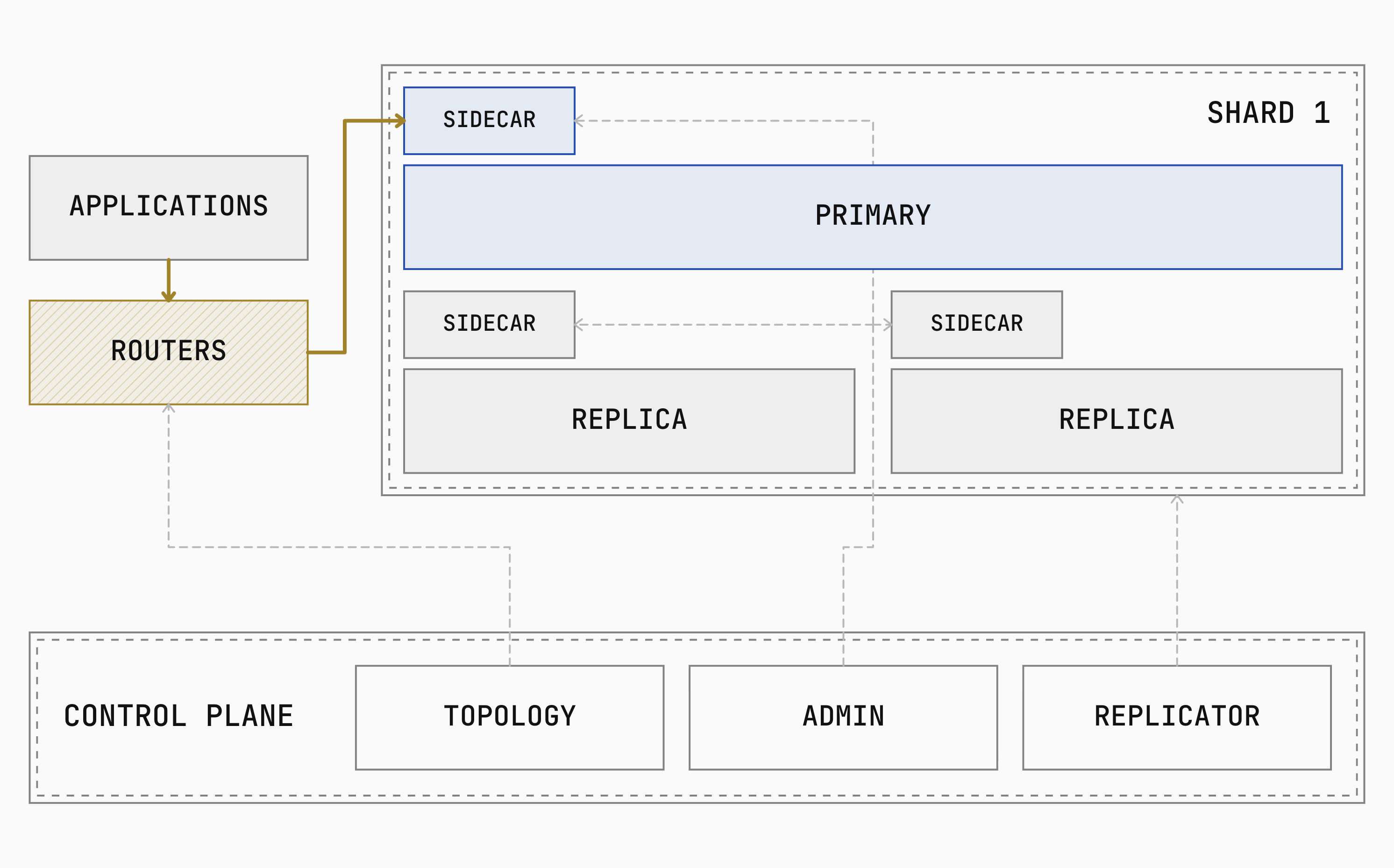
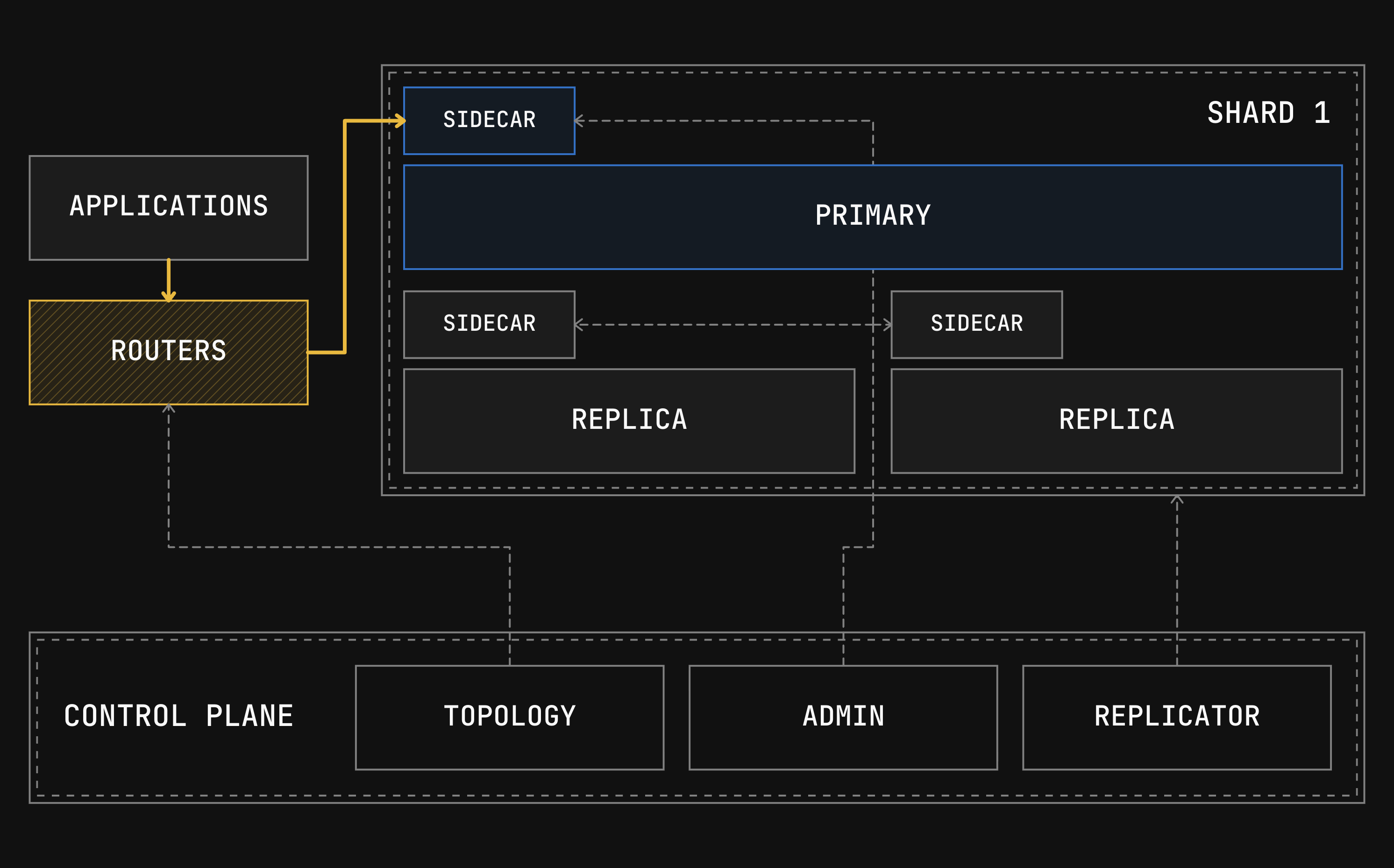
The first component that a client of a Neki cluster will interact with is a Neki router.
These routers then connect to either the primary or replicas in a shard, but do so via an intermediary sidecar component, which helps with connection pooling and managing the Postgres nodes.
The topology service holds the data topology, the admin watches shard health, and the Replicator runs data-movement workflows.
 Let's take a closer look at each component.
## Routers
A router is the Neki service that accepts Postgres connections and decides which shard or shards should run each statement.
It uses the [data topology](/docs/neki/data-topology) and table definitions to build plans for and route incoming queries.
When a query touches multiple shards, the router can combine their results before returning one result to the client.
Applications connect through the Postgres wire protocol, so they can continue to use standard Postgres clients and ORMs.
See [Query planning](/docs/neki/query-planning#how-a-statement-becomes-a-plan) for how Neki builds and reuses query plans.
Routers are stateless, in that they are not responsible for durably storing information about the cluster, data topology, or database schema.
The data topology and database schema are stored elsewhere, and locally cached and kept in sync on all routers.
Because of this, routers can be easily scaled both vertically and horizontally to meet traffic demands.
A single Neki cluster can have anywhere from one router to hundreds of routers.
Learn more about how to manage routers in our [cluster configuration](/docs/neki/cluster-configuration) documentation.
There is no primary router and no leader election.
Any router can serve any connection.
If a router fails, the connections it was holding at the time are dropped.
To a client, this looks like any other lost Postgres connection, and it can reconnect to a different router node.
This lends Neki to being highly-available by default.
Every Neki cluster on PlanetScale comes with a minimum of 3 routers spread across three availability zones.
## What runs alongside Postgres
A shard consists of one Postgres primary and its replicas.
Each shard is its own failure domain.
It handles switchovers and failovers independently from any other shard in the cluster.
Every Postgres instance within a shard has two Neki components running alongside it: a **Sidecar** and a **PostgresManager**.
The **Sidecar** is the per-instance endpoint for router queries and admin operations.
All communication from a Neki Router to a Postgres node happens via a sidecar.
The Neki admin service also queries it during health checks.
Each sidecar streams its serving status to the routers, which use the latest status when selecting an instance.
The **PostgresManager** manages the startup, teardown, and data directory of it's attached Postgres instance.
When a replica promotion happens due to a planned switchover, the sidecar and PostgresManager on each instance keep running throughout.
## The control plane
The control plane stores topology, monitors managed shards, repairs failures, and runs workflows that move data.
### The admin
**Admin** is a service that manages the health of all other components of the Neki cluster.
For Neki-managed shards, it health-checks each Postgres instance through that instance's sidecar and acts on what it finds.
More than one admin can run at once.
One of them holds recovery leadership, and only the leader performs node repairs.
One of Admin's main roles is handling planned switchover and unexpected failovers within the Postgres primary and replicas within a shard.
An **unplanned failover** replaces a primary that is no longer available.
This could be due to a Postgres-level software crash, or the failure of underlying hardware.
When choosing a replica to replace the primary with, Neki checks how much write-ahead log (WAL) each reachable replica has received.
It prefers a replica that has already replayed all available WAL and waits briefly for one to catch up if needed.
If none is ready, Neki promotes the replica that has received the most WAL.
When using synchronous or semi-sync durability, there should always be at least one replica candidate with a fully caught up LSN.
After promotion, Neki points the other replicas at the new primary.
If it cannot update a replica, a later health check finds and repairs it.
A **planned switchover** moves the primary role while the old primary is still healthy.
Neki does this before maintenance on the primary, before taking that node out of service, or during a Neki rolling upgrade.
Neki makes the old primary read-only and waits for the selected replica to catch up before promoting it.
A completed switchover preserves the commits made on the old primary.
If the switchover fails before promotion, Neki makes the old primary writable again.
A **durability policy** decides whether the primary waits for a replica before confirming a commit.
New shards start with `sync` as their configured policy.
With `sync`, the primary normally waits for one replica to receive the write.
### The Replicator
The Replicator is the service that runs data-movement workflows.
It reads changes out of the source Postgres instances and applies them to the targets while the deployment keeps serving traffic.
It connects to Postgres directly rather than going through the routers.
For example, both [Moving tables amongst shards and resharding](/docs/neki/data-migration#what-a-migration-workflow-moves) use Replicator workflows.
[Online schema changes](/docs/neki/schema-changes#one-workflow-across-all-shards) use the same copy-and-stream process.
### The topology service
The topology service stores the data topology and service-discovery records for routers, admins, replicators, and sidecars, including each sidecar's Postgres endpoint.
Routers and sidecars communicate with the topology service regularly, so when they pick up new versions of the topology without restarting.
## How failure looks to a client
Neki routers support query buffering, which is key to maintaing connections and high-availability during switchovers and failovers within shards.
When buffering is enabled, Neki can hold queries that target a primary or replica during these times.
For a planned switchover, the admin publishes a buffering signal to routers before it takes place, so the breif period of query buffering can be tightly controlled.
To a client, this would be observed as a short period of elevated query latency.
During an unplanned failure, a qualifying query error can cause buffering to initiate.
Neki will buffer queries for a bounded time.
If the failover replacement completes within that time, clients will again only observe this event as a short period of elevated query latency.
If it takes too long, the router will begin sending errors back to the client.
After buffering ends, Neki replans queued statements against the current topology and selects targets using the current health state.
If a shard reports that disk space is low, the router treats it as read-only and rejects writes from this until the issue is remidiated with a disk or node resize.
## Need help?
Get help from [the PlanetScale Support team](https://planetscale.com/contact?initial=support), or join our [Discord community](https://pscale.link/community) to see how others are using PlanetScale.
Let's take a closer look at each component.
## Routers
A router is the Neki service that accepts Postgres connections and decides which shard or shards should run each statement.
It uses the [data topology](/docs/neki/data-topology) and table definitions to build plans for and route incoming queries.
When a query touches multiple shards, the router can combine their results before returning one result to the client.
Applications connect through the Postgres wire protocol, so they can continue to use standard Postgres clients and ORMs.
See [Query planning](/docs/neki/query-planning#how-a-statement-becomes-a-plan) for how Neki builds and reuses query plans.
Routers are stateless, in that they are not responsible for durably storing information about the cluster, data topology, or database schema.
The data topology and database schema are stored elsewhere, and locally cached and kept in sync on all routers.
Because of this, routers can be easily scaled both vertically and horizontally to meet traffic demands.
A single Neki cluster can have anywhere from one router to hundreds of routers.
Learn more about how to manage routers in our [cluster configuration](/docs/neki/cluster-configuration) documentation.
There is no primary router and no leader election.
Any router can serve any connection.
If a router fails, the connections it was holding at the time are dropped.
To a client, this looks like any other lost Postgres connection, and it can reconnect to a different router node.
This lends Neki to being highly-available by default.
Every Neki cluster on PlanetScale comes with a minimum of 3 routers spread across three availability zones.
## What runs alongside Postgres
A shard consists of one Postgres primary and its replicas.
Each shard is its own failure domain.
It handles switchovers and failovers independently from any other shard in the cluster.
Every Postgres instance within a shard has two Neki components running alongside it: a **Sidecar** and a **PostgresManager**.
The **Sidecar** is the per-instance endpoint for router queries and admin operations.
All communication from a Neki Router to a Postgres node happens via a sidecar.
The Neki admin service also queries it during health checks.
Each sidecar streams its serving status to the routers, which use the latest status when selecting an instance.
The **PostgresManager** manages the startup, teardown, and data directory of it's attached Postgres instance.
When a replica promotion happens due to a planned switchover, the sidecar and PostgresManager on each instance keep running throughout.
## The control plane
The control plane stores topology, monitors managed shards, repairs failures, and runs workflows that move data.
### The admin
**Admin** is a service that manages the health of all other components of the Neki cluster.
For Neki-managed shards, it health-checks each Postgres instance through that instance's sidecar and acts on what it finds.
More than one admin can run at once.
One of them holds recovery leadership, and only the leader performs node repairs.
One of Admin's main roles is handling planned switchover and unexpected failovers within the Postgres primary and replicas within a shard.
An **unplanned failover** replaces a primary that is no longer available.
This could be due to a Postgres-level software crash, or the failure of underlying hardware.
When choosing a replica to replace the primary with, Neki checks how much write-ahead log (WAL) each reachable replica has received.
It prefers a replica that has already replayed all available WAL and waits briefly for one to catch up if needed.
If none is ready, Neki promotes the replica that has received the most WAL.
When using synchronous or semi-sync durability, there should always be at least one replica candidate with a fully caught up LSN.
After promotion, Neki points the other replicas at the new primary.
If it cannot update a replica, a later health check finds and repairs it.
A **planned switchover** moves the primary role while the old primary is still healthy.
Neki does this before maintenance on the primary, before taking that node out of service, or during a Neki rolling upgrade.
Neki makes the old primary read-only and waits for the selected replica to catch up before promoting it.
A completed switchover preserves the commits made on the old primary.
If the switchover fails before promotion, Neki makes the old primary writable again.
A **durability policy** decides whether the primary waits for a replica before confirming a commit.
New shards start with `sync` as their configured policy.
With `sync`, the primary normally waits for one replica to receive the write.
### The Replicator
The Replicator is the service that runs data-movement workflows.
It reads changes out of the source Postgres instances and applies them to the targets while the deployment keeps serving traffic.
It connects to Postgres directly rather than going through the routers.
For example, both [Moving tables amongst shards and resharding](/docs/neki/data-migration#what-a-migration-workflow-moves) use Replicator workflows.
[Online schema changes](/docs/neki/schema-changes#one-workflow-across-all-shards) use the same copy-and-stream process.
### The topology service
The topology service stores the data topology and service-discovery records for routers, admins, replicators, and sidecars, including each sidecar's Postgres endpoint.
Routers and sidecars communicate with the topology service regularly, so when they pick up new versions of the topology without restarting.
## How failure looks to a client
Neki routers support query buffering, which is key to maintaing connections and high-availability during switchovers and failovers within shards.
When buffering is enabled, Neki can hold queries that target a primary or replica during these times.
For a planned switchover, the admin publishes a buffering signal to routers before it takes place, so the breif period of query buffering can be tightly controlled.
To a client, this would be observed as a short period of elevated query latency.
During an unplanned failure, a qualifying query error can cause buffering to initiate.
Neki will buffer queries for a bounded time.
If the failover replacement completes within that time, clients will again only observe this event as a short period of elevated query latency.
If it takes too long, the router will begin sending errors back to the client.
After buffering ends, Neki replans queued statements against the current topology and selects targets using the current health state.
If a shard reports that disk space is low, the router treats it as read-only and rejects writes from this until the issue is remidiated with a disk or node resize.
## Need help?
Get help from [the PlanetScale Support team](https://planetscale.com/contact?initial=support), or join our [Discord community](https://pscale.link/community) to see how others are using PlanetScale.