> ## Documentation Index
> Fetch the complete documentation index at: https://planetscale.com/docs/llms.txt
> Use this file to discover all available pages before exploring further.

# Neki database dashboard

> Cluster topology, summary statistics, and query performance for a Neki database

export const PlatformAvailability = ({current, vitess, postgres, neki}) => {
  const docsHref = path => {
    if (!path) return path;
    const normalized = path.startsWith('/') ? path : `/${path}`;
    return normalized;
  };
  const labels = {
    vitess: 'Vitess',
    postgres: 'Postgres',
    neki: 'Neki'
  };
  const combinedLabels = {
    both: 'Vitess and Postgres',
    all: 'Vitess, Neki, and Postgres',
    'postgres-neki': 'Postgres and Neki'
  };
  if (combinedLabels[current]) {
    return <div className="not-prose mb-5 flex flex-wrap items-center gap-2" role="group" aria-label="Platform availability">
        <span data-engine="both" data-state="current" aria-current="true" className="inline-flex items-center gap-1.5 whitespace-nowrap rounded-full border px-2.5 py-1 text-[13px] font-semibold leading-tight no-underline data-[engine=vitess]:data-[state=current]:border-[#ffc59b] data-[engine=vitess]:data-[state=current]:bg-[#ffe8d8] data-[engine=vitess]:data-[state=current]:text-[#672002] dark:data-[engine=vitess]:data-[state=current]:border-[#962d00] dark:data-[engine=vitess]:data-[state=current]:bg-[#3c1403] dark:data-[engine=vitess]:data-[state=current]:text-[#ffe8d8] data-[engine=vitess]:data-[state=link]:border-[#ffc59b] data-[engine=vitess]:data-[state=link]:bg-transparent data-[engine=vitess]:data-[state=link]:text-[#b83a05] dark:data-[engine=vitess]:data-[state=link]:border-[#962d00] dark:data-[engine=vitess]:data-[state=link]:bg-transparent dark:data-[engine=vitess]:data-[state=link]:text-[#ffc59b] data-[engine=postgres]:data-[state=current]:border-[#a9dffe] data-[engine=postgres]:data-[state=current]:bg-[#ddf2ff] data-[engine=postgres]:data-[state=current]:text-[#0e3682] dark:data-[engine=postgres]:data-[state=current]:border-[#144eb6] dark:data-[engine=postgres]:data-[state=current]:bg-[#08204e] dark:data-[engine=postgres]:data-[state=current]:text-[#ddf2ff] data-[engine=postgres]:data-[state=link]:border-[#a9dffe] data-[engine=postgres]:data-[state=link]:bg-transparent data-[engine=postgres]:data-[state=link]:text-[#0b6ec5] dark:data-[engine=postgres]:data-[state=link]:border-[#144eb6] dark:data-[engine=postgres]:data-[state=link]:bg-transparent dark:data-[engine=postgres]:data-[state=link]:text-[#73c7f9] data-[engine=neki]:data-[state=current]:border-[#fbca00] data-[engine=neki]:data-[state=current]:bg-[#fbca00] data-[engine=neki]:data-[state=current]:text-[#1a1a1a] dark:data-[engine=neki]:data-[state=current]:border-[#fbca00] dark:data-[engine=neki]:data-[state=current]:bg-[#fbca00] dark:data-[engine=neki]:data-[state=current]:text-[#1a1a1a] data-[engine=neki]:data-[state=link]:border-[#fbca00] data-[engine=neki]:data-[state=link]:bg-transparent data-[engine=neki]:data-[state=link]:text-[#8f7200] dark:data-[engine=neki]:data-[state=link]:border-[#fbca00] dark:data-[engine=neki]:data-[state=link]:bg-transparent dark:data-[engine=neki]:data-[state=link]:text-[#fbca00] data-[engine=both]:data-[state=current]:border-[#d4d4d4] data-[engine=both]:data-[state=current]:bg-[#f0f0f0] data-[engine=both]:data-[state=current]:text-[#3d3d3d] dark:data-[engine=both]:data-[state=current]:border-[#525252] dark:data-[engine=both]:data-[state=current]:bg-[#2a2a2a] dark:data-[engine=both]:data-[state=current]:text-[#e5e5e5]">
          {combinedLabels[current]}
        </span>
      </div>;
  }
  const hasVitess = current === 'vitess' || Boolean(vitess);
  const hasPostgres = current === 'postgres' || Boolean(postgres);
  const hasNeki = current === 'neki' || Boolean(neki);
  const only = [hasVitess, hasPostgres, hasNeki].filter(Boolean).length === 1;
  const engines = [];
  if (current === 'vitess' || current === 'postgres' || current === 'neki') engines.push(current);
  if (hasVitess && current !== 'vitess') engines.push('vitess');
  if (hasNeki && current !== 'neki') engines.push('neki');
  if (hasPostgres && current !== 'postgres') engines.push('postgres');
  return <div className="not-prose mb-5 flex flex-wrap items-center gap-2" role="group" aria-label="Platform availability">
      {engines.map(engine => {
    const isCurrent = current === engine;
    const href = docsHref(engine === 'vitess' ? vitess : engine === 'postgres' ? postgres : neki);
    const label = only ? `${labels[engine]} only` : labels[engine];
    const state = isCurrent || !href ? 'current' : 'link';
    if (isCurrent || !href) {
      return <span key={engine} data-engine={engine} data-state={state} aria-current={isCurrent ? 'true' : undefined} className="inline-flex items-center gap-1.5 whitespace-nowrap rounded-full border px-2.5 py-1 text-[13px] font-semibold leading-tight no-underline data-[engine=vitess]:data-[state=current]:border-[#ffc59b] data-[engine=vitess]:data-[state=current]:bg-[#ffe8d8] data-[engine=vitess]:data-[state=current]:text-[#672002] dark:data-[engine=vitess]:data-[state=current]:border-[#962d00] dark:data-[engine=vitess]:data-[state=current]:bg-[#3c1403] dark:data-[engine=vitess]:data-[state=current]:text-[#ffe8d8] data-[engine=vitess]:data-[state=link]:border-[#ffc59b] data-[engine=vitess]:data-[state=link]:bg-transparent data-[engine=vitess]:data-[state=link]:text-[#b83a05] dark:data-[engine=vitess]:data-[state=link]:border-[#962d00] dark:data-[engine=vitess]:data-[state=link]:bg-transparent dark:data-[engine=vitess]:data-[state=link]:text-[#ffc59b] data-[engine=postgres]:data-[state=current]:border-[#a9dffe] data-[engine=postgres]:data-[state=current]:bg-[#ddf2ff] data-[engine=postgres]:data-[state=current]:text-[#0e3682] dark:data-[engine=postgres]:data-[state=current]:border-[#144eb6] dark:data-[engine=postgres]:data-[state=current]:bg-[#08204e] dark:data-[engine=postgres]:data-[state=current]:text-[#ddf2ff] data-[engine=postgres]:data-[state=link]:border-[#a9dffe] data-[engine=postgres]:data-[state=link]:bg-transparent data-[engine=postgres]:data-[state=link]:text-[#0b6ec5] dark:data-[engine=postgres]:data-[state=link]:border-[#144eb6] dark:data-[engine=postgres]:data-[state=link]:bg-transparent dark:data-[engine=postgres]:data-[state=link]:text-[#73c7f9] data-[engine=neki]:data-[state=current]:border-[#fbca00] data-[engine=neki]:data-[state=current]:bg-[#fbca00] data-[engine=neki]:data-[state=current]:text-[#1a1a1a] dark:data-[engine=neki]:data-[state=current]:border-[#fbca00] dark:data-[engine=neki]:data-[state=current]:bg-[#fbca00] dark:data-[engine=neki]:data-[state=current]:text-[#1a1a1a] data-[engine=neki]:data-[state=link]:border-[#fbca00] data-[engine=neki]:data-[state=link]:bg-transparent data-[engine=neki]:data-[state=link]:text-[#8f7200] dark:data-[engine=neki]:data-[state=link]:border-[#fbca00] dark:data-[engine=neki]:data-[state=link]:bg-transparent dark:data-[engine=neki]:data-[state=link]:text-[#fbca00] data-[engine=both]:data-[state=current]:border-[#d4d4d4] data-[engine=both]:data-[state=current]:bg-[#f0f0f0] data-[engine=both]:data-[state=current]:text-[#3d3d3d] dark:data-[engine=both]:data-[state=current]:border-[#525252] dark:data-[engine=both]:data-[state=current]:bg-[#2a2a2a] dark:data-[engine=both]:data-[state=current]:text-[#e5e5e5]">
              {label}
            </span>;
    }
    return <a key={engine} href={href} data-engine={engine} data-state={state} title={`View ${labels[engine]} documentation`} className="inline-flex items-center gap-1.5 whitespace-nowrap rounded-full border px-2.5 py-1 text-[13px] font-semibold leading-tight no-underline data-[engine=vitess]:data-[state=current]:border-[#ffc59b] data-[engine=vitess]:data-[state=current]:bg-[#ffe8d8] data-[engine=vitess]:data-[state=current]:text-[#672002] dark:data-[engine=vitess]:data-[state=current]:border-[#962d00] dark:data-[engine=vitess]:data-[state=current]:bg-[#3c1403] dark:data-[engine=vitess]:data-[state=current]:text-[#ffe8d8] data-[engine=vitess]:data-[state=link]:border-[#ffc59b] data-[engine=vitess]:data-[state=link]:bg-transparent data-[engine=vitess]:data-[state=link]:text-[#b83a05] dark:data-[engine=vitess]:data-[state=link]:border-[#962d00] dark:data-[engine=vitess]:data-[state=link]:bg-transparent dark:data-[engine=vitess]:data-[state=link]:text-[#ffc59b] data-[engine=postgres]:data-[state=current]:border-[#a9dffe] data-[engine=postgres]:data-[state=current]:bg-[#ddf2ff] data-[engine=postgres]:data-[state=current]:text-[#0e3682] dark:data-[engine=postgres]:data-[state=current]:border-[#144eb6] dark:data-[engine=postgres]:data-[state=current]:bg-[#08204e] dark:data-[engine=postgres]:data-[state=current]:text-[#ddf2ff] data-[engine=postgres]:data-[state=link]:border-[#a9dffe] data-[engine=postgres]:data-[state=link]:bg-transparent data-[engine=postgres]:data-[state=link]:text-[#0b6ec5] dark:data-[engine=postgres]:data-[state=link]:border-[#144eb6] dark:data-[engine=postgres]:data-[state=link]:bg-transparent dark:data-[engine=postgres]:data-[state=link]:text-[#73c7f9] data-[engine=neki]:data-[state=current]:border-[#fbca00] data-[engine=neki]:data-[state=current]:bg-[#fbca00] data-[engine=neki]:data-[state=current]:text-[#1a1a1a] dark:data-[engine=neki]:data-[state=current]:border-[#fbca00] dark:data-[engine=neki]:data-[state=current]:bg-[#fbca00] dark:data-[engine=neki]:data-[state=current]:text-[#1a1a1a] data-[engine=neki]:data-[state=link]:border-[#fbca00] data-[engine=neki]:data-[state=link]:bg-transparent data-[engine=neki]:data-[state=link]:text-[#8f7200] dark:data-[engine=neki]:data-[state=link]:border-[#fbca00] dark:data-[engine=neki]:data-[state=link]:bg-transparent dark:data-[engine=neki]:data-[state=link]:text-[#fbca00] data-[engine=both]:data-[state=current]:border-[#d4d4d4] data-[engine=both]:data-[state=current]:bg-[#f0f0f0] data-[engine=both]:data-[state=current]:text-[#3d3d3d] dark:data-[engine=both]:data-[state=current]:border-[#525252] dark:data-[engine=both]:data-[state=current]:bg-[#2a2a2a] dark:data-[engine=both]:data-[state=current]:text-[#e5e5e5]">
            {label}
            <svg aria-hidden="true" width="12" height="12" viewBox="0 0 12 12" fill="none" className="shrink-0">
              <path d="M2.5 6h7M6.5 3l3 3-3 3" stroke="currentColor" strokeWidth="1.5" strokeLinecap="round" strokeLinejoin="round" />
            </svg>
          </a>;
  })}
    </div>;
};

<PlatformAvailability current="neki" postgres="/postgres/dashboard" />

Open a Neki database to see the selected [branch](/docs/neki/branching): its cluster topology, summary statistics, and recent query performance.

Each branch in Neki is a distinct instance. Switch branches from the dropdown at the top right.

From the dashboard you can review:

* The [routers](/docs/neki/terminology#router) and the Postgres instances in each [shard](/docs/neki/terminology#shard)
* Live CPU and memory usage on the routers, primary, and replicas
* Database summary statistics
* Query performance for the branch
* Connection details and a new-branch action

## Cluster topology

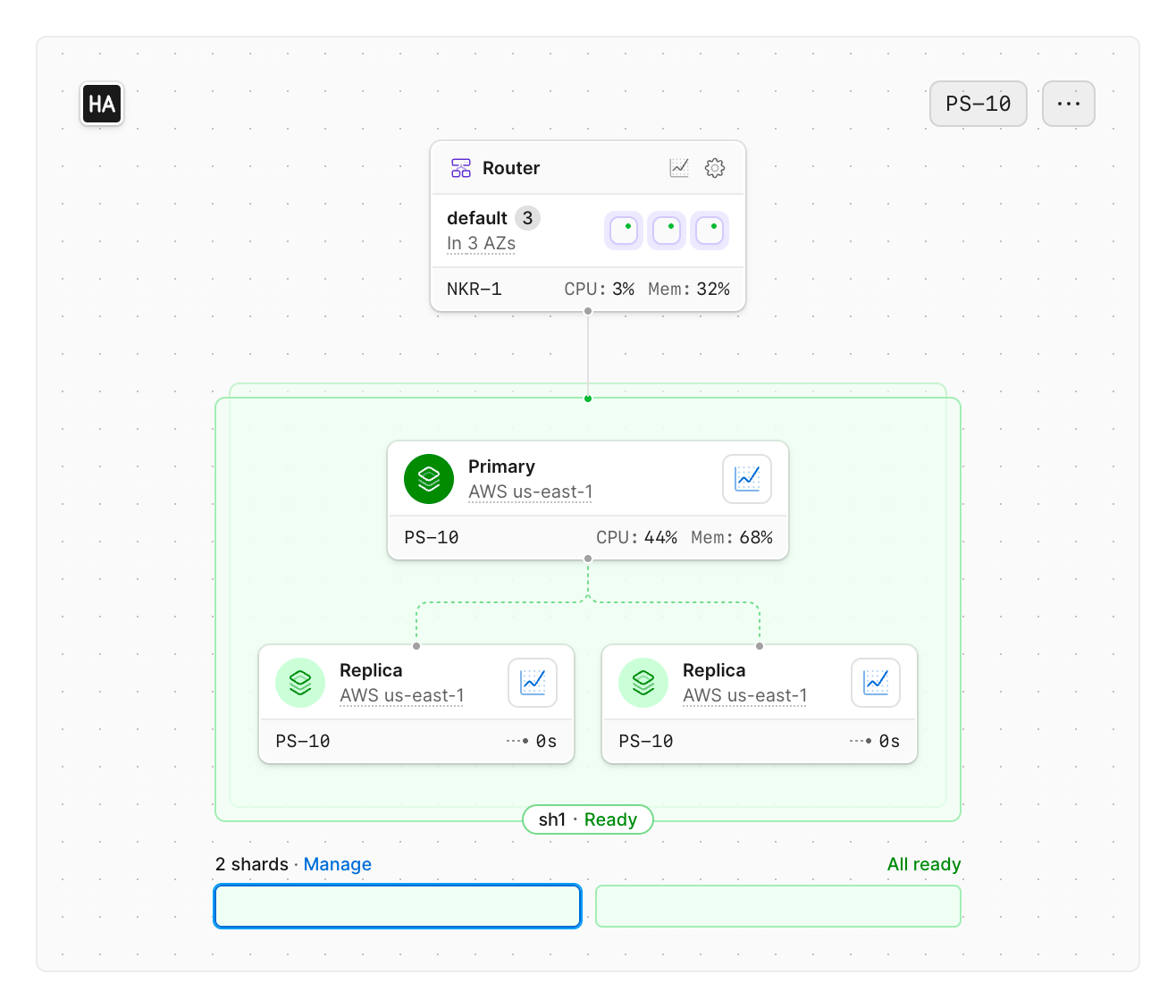
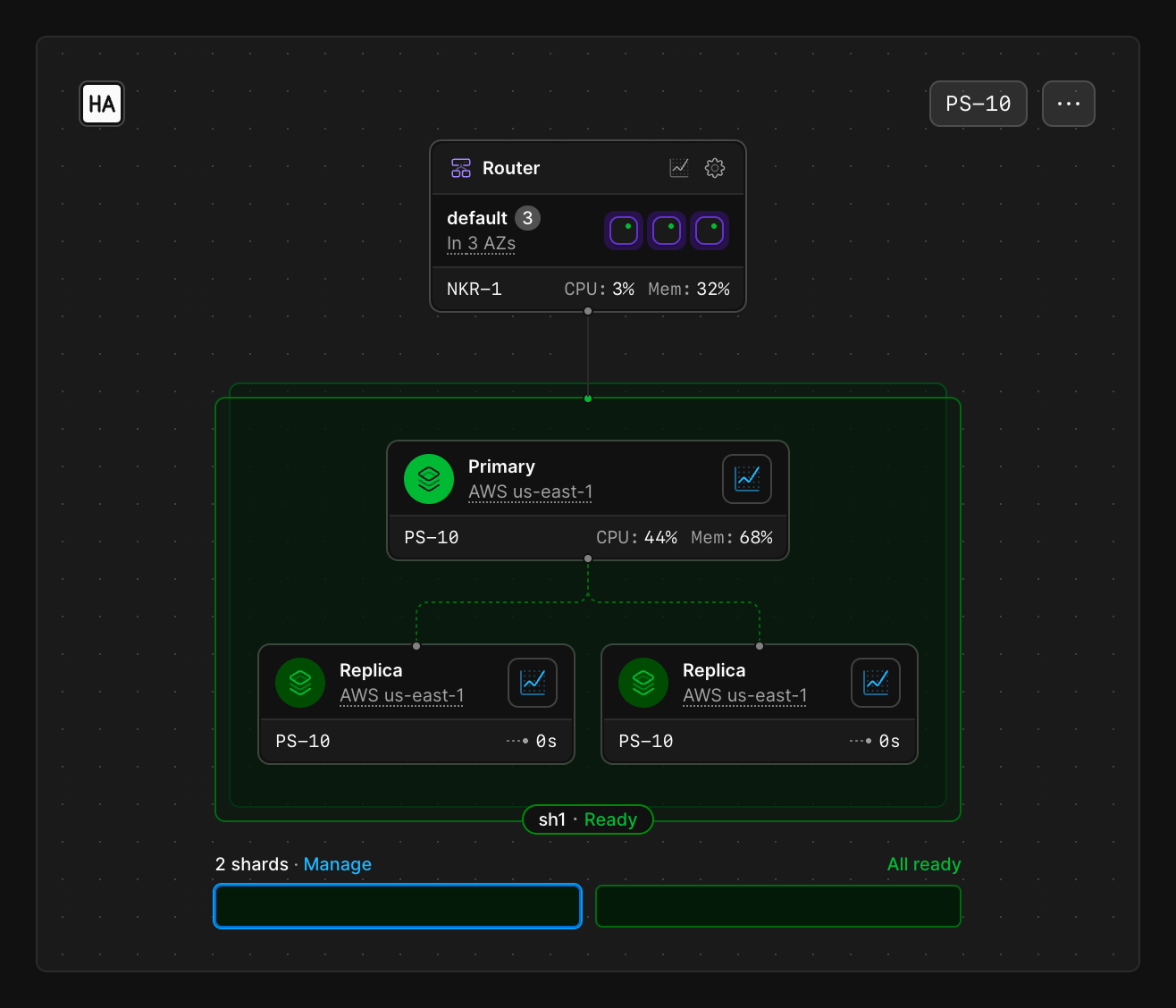
The diagram in the center of the dashboard shows the infrastructure that serves the selected branch.

<Frame>
  <img src="https://mintcdn.com/planetscale-2/6i1lJ6cNfB-VSsaH/neki/neki-dashboard/infrastructure-diagram.png?fit=max&auto=format&n=6i1lJ6cNfB-VSsaH&q=85&s=b28585fecdce842dcd1c641a0bc7d229" className="block dark:hidden" alt="Dashboard infrastructure diagram for a Neki production branch: a router in three availability zones above shard sh1, which has one primary and two replicas in AWS us-east-1" width="1316" height="1128" data-path="neki/neki-dashboard/infrastructure-diagram.png" />

  <img src="https://mintcdn.com/planetscale-2/6i1lJ6cNfB-VSsaH/neki/neki-dashboard/infrastructure-diagram-darkmode.png?fit=max&auto=format&n=6i1lJ6cNfB-VSsaH&q=85&s=27d88d4ecc9b24c487f49da694a6389e" className="hidden dark:block" alt="Dashboard infrastructure diagram for a Neki production branch: a router in three availability zones above shard sh1, which has one primary and two replicas in AWS us-east-1" width="1316" height="1128" data-path="neki/neki-dashboard/infrastructure-diagram-darkmode.png" />
</Frame>

[Routers](/docs/neki/terminology#router) sit above the Postgres instances. A branch can have more than one router. Each router card in the diagram shows how many instances run across availability zones, its size, live CPU, and memory.

Below the routers, the diagram shows each shard:

* **Primary**: the writable Postgres instance for that shard, with region, cluster size, and live CPU and memory
* **Replicas**: read-only Postgres instances that copy from the primary. Each replica shows region, cluster size, and replication lag

A production branch is marked **HA**. Development branches contain a primary database with no replicas.

If the branch has more than one shard, the control under the diagram lists them and their readiness. Select a shard to show its primary and replicas.
**Manage** opens [cluster configuration](/docs/neki/cluster-configuration) to add, assign, or resize shards.

How data arrives into shards is configured by the database's [data topology](/docs/neki/data-topology).

## Database summary

The panel on the right shows:

* **Postgres version** and CPU architecture
* **Tables**, **Branches**, **Region**, and **Next backup**
* **Egress bandwidth**, **Provisioned IOPS**, and **Total storage** for the selected branch
* The current billing cycle
* The next [maintenance window](/docs/neki/cluster-configuration/maintenance-windows), with a **Manage** link

## Performance metrics

Below the diagram, a dropdown selects a time-series graph for the branch.
Available metrics include:

* Query latency (p50, p95, p99, p99.9, and max)
* Queries per second
* Rows read
* Rows written
* Query errors

**View all query insights** opens [Query Insights](/docs/neki/monitoring/query-insights) for query-pattern detail.
Historical router, shard, and storage graphs live on the [Metrics](/docs/neki/monitoring/metrics) page.

## Connecting to your database

**Connect** generates credentials for a router on the selected branch.
See [Connect to Neki](/docs/neki/connecting).

## Need help?

Get help from [the PlanetScale Support team](https://planetscale.com/contact?initial=support), or join our [Discord community](https://pscale.link/community) to see how others are using PlanetScale.
