> ## Documentation Index
> Fetch the complete documentation index at: https://planetscale.com/docs/llms.txt
> Use this file to discover all available pages before exploring further.
# Data topology
> How Neki maps tables and shard keys to shards
The data topology is the document that describes a Neki cluster. It declares four kinds of object:
* Databases — the logical schema (databases, schemas, tables, sequences). The same shape as a Postgres catalog.
* Shards — the units of physical storage. Each one is a Postgres primary plus its replicas, holding bytes on disk. Failover, lag, and disk capacity are properties of shards.
* Shard groups — named key-range layouts. Each one is a list of key ranges, each pointing at a shard. Tables attach to a shard group.
* Shard indexes — named hashing recipes (type, columns, params). Shard groups and tables reference them by name.
The data topology is what we use to manage which tables are sharded, which are not, and how the data is spread across shards.
Having a good data topology is critical for a Neki database that has good performance.
Below is an example of a small, albeit complete, data topology that shards an `events` table by `tenant_id`:
```json theme={null}
{
"databases": {
"analytics": {
"schemas": {
"public": {
"tables": {
"events": {
"shard_group": "tenant_data"
}
}
}
}
}
},
"shard_groups": [
{
"uid": "tenant_data",
"default_shard_index": "xxhash_tenant_id",
"key_ranges": [
{ "shard_uid": "shard-a", "end": "40" },
{ "shard_uid": "shard-b", "start": "40", "end": "80" },
{ "shard_uid": "shard-c", "start": "80", "end": "c0" },
{ "shard_uid": "shard-d", "start": "c0" }
]
},
{
"uid": "authoritative",
"key_ranges": [
{
"shard_uid": "shard-z"
}
]
}
],
"shard_indexes": {
"xxhash_tenant_id": {
"type": "xxhash",
"columns": ["tenant_id"]
}
},
"authoritative_shard_group": "authoritative"
}
```
This is a lot to take in, so let's review section by section.
## Databases
The databases section is where we specify which Postgres logical databases and schemas this Neki cluster will contain.
In this example, we are only specifying a single `events` table:
```json theme={null}
"databases": {
"analytics": {
"schemas": {
"public": {
"tables": {
"events": {
"shard_group": "tenant_data"
}
}
}
}
}
}
```
It may seem unnecessarily nested, but all of this is for good reason.
Using this level of detail in the hierarchy allows us to precisely specify the names of the logical databases, schemas, and tables.
The one table listed here is `events` within the default `public` schema inside of the `analytics` logical database.
The primary thing that needs to be specified for a table is the `shard_group`.
This file tells Neki to put this in the `tenant_data` group.
## Shards
Every Neki cluster is made up of one or more shards.
However, shards are not specified or created here in the data topology.
Instead, new shards are created on the [cluster configuration page](/docs/neki/cluster-configuration) of your Neki database.
Each shard is assigned to a configuration profile, which is how you specify the size, extensions, and Postgres configuration for that set of shards.
Each of these shards has a `shard_uid` which will be needed when setting up shard groups here in the data topology.
## Shard groups
After having created one or more shards, shards are assigned to one or more shard groups.
Our example from earlier contained two groups:
```json theme={null}
"shard_groups": [
{
"uid": "tenant_data",
"default_shard_index": "xxhash_tenant_id",
"key_ranges": [
{ "shard_uid": "shard-a", "end": "40" },
{ "shard_uid": "shard-b", "start": "40", "end": "80" },
{ "shard_uid": "shard-c", "start": "80", "end": "c0" },
{ "shard_uid": "shard-d", "start": "c0" }
]
},
{
"uid": "authoritative",
"key_ranges": [
{
"shard_uid": "shard-z"
}
]
}
]
```
The first one, `tenant_id`, is where we will store the `orders` table data, since we assigned that table to this shard group.
This group has four shards, `shard-a`, `shard-b`, `shard-c`, and `shard-d`, and uses the `xxhash_tenant_id` shard index (more on that soon).
Any table assigned to this shard group will be distributed across these shards.
The way in which the row distribution happens depends on the shard index.
Here, we use `shard-?` labels as the shard id, but on a real Neki cluster in your PlanetScale dashboard, you will see these as longer, unique hashed values (e.g., `sh57wz7p7tblk2`).
The second shard group is named `authoritative`.
Every Neki cluster must specify an [authoritative shard](/docs/neki/terminology#authoritative-shard-group).
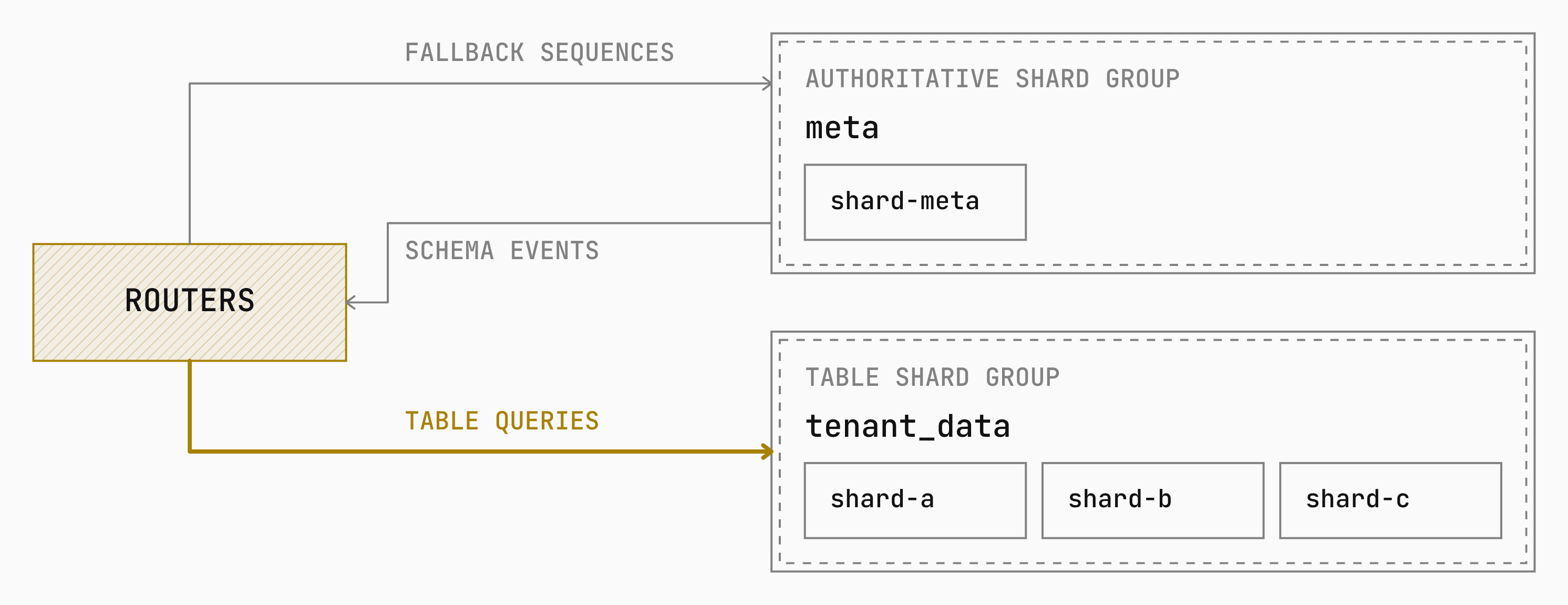
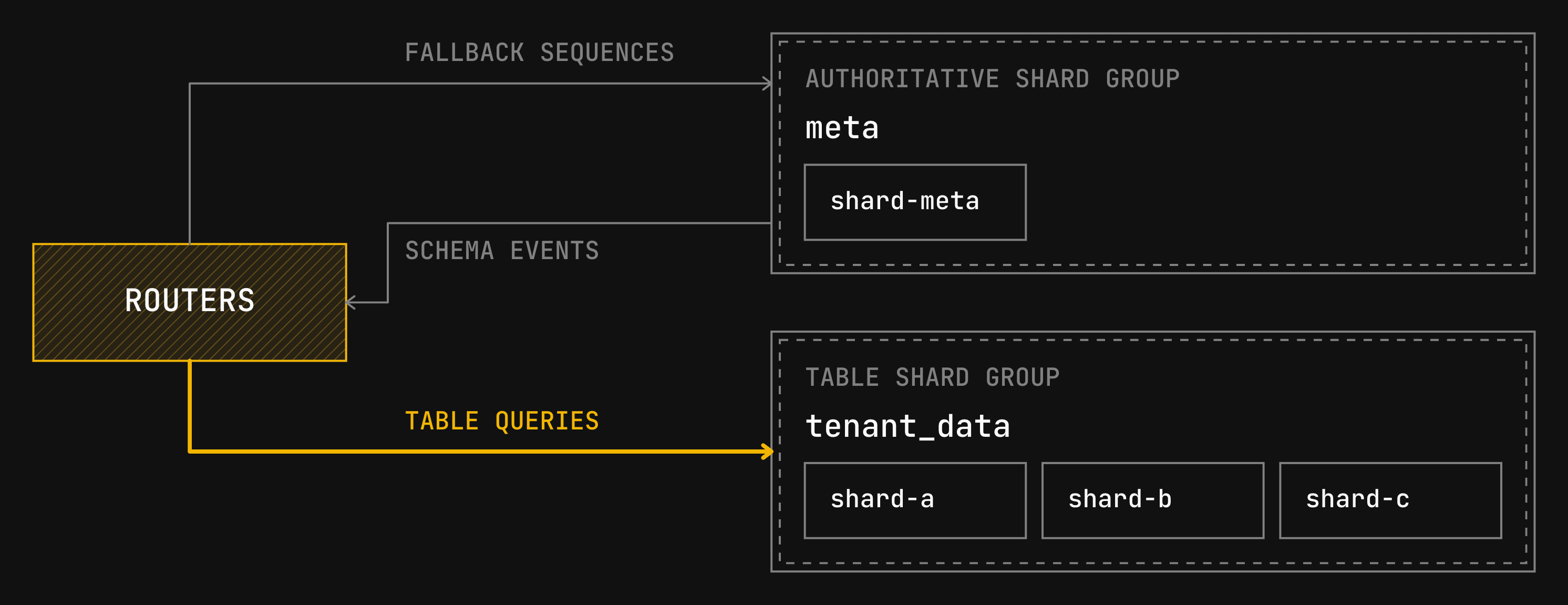
The authoritative shard group provides the canonical Postgres object identifiers (OIDs) and schema events for a database.
We tell the cluster that this is the authoritative shard with this extra line in the data topology JSON:
```json theme={null}
"authoritative_shard_group": "authoritative"
```
A Postgres table can name the shard group or inherit a default.
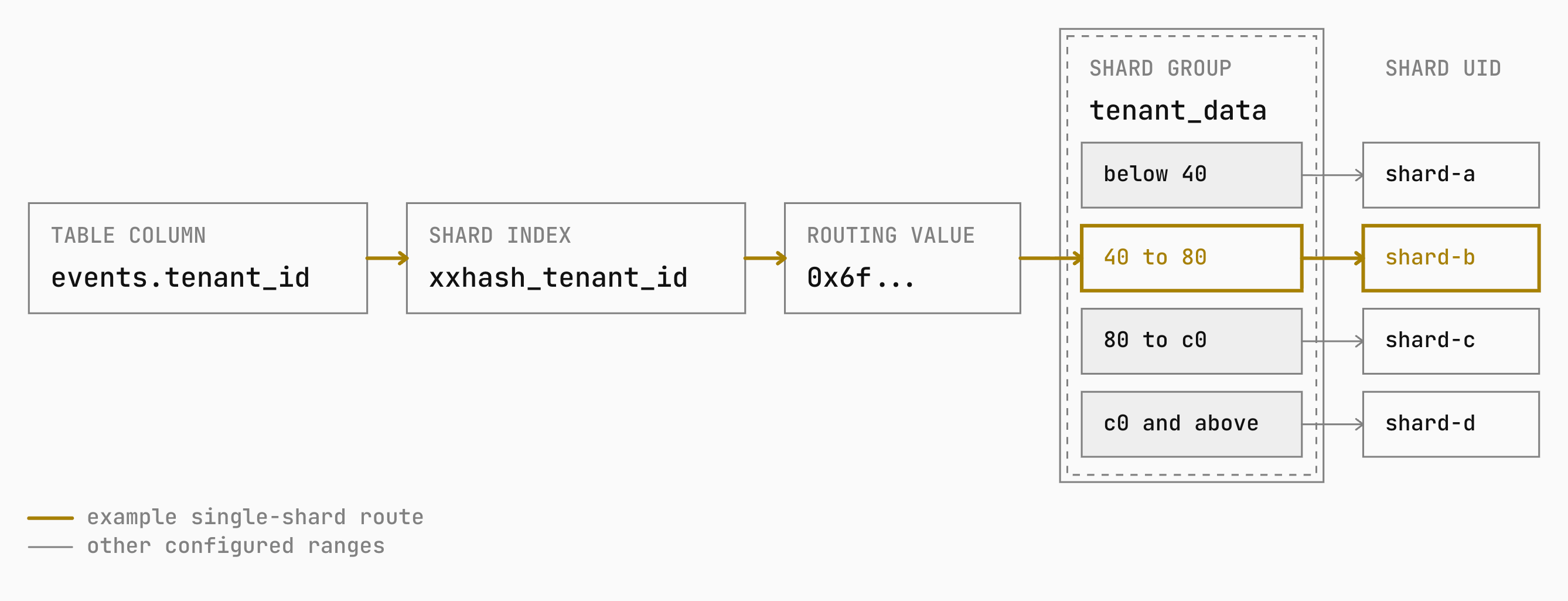
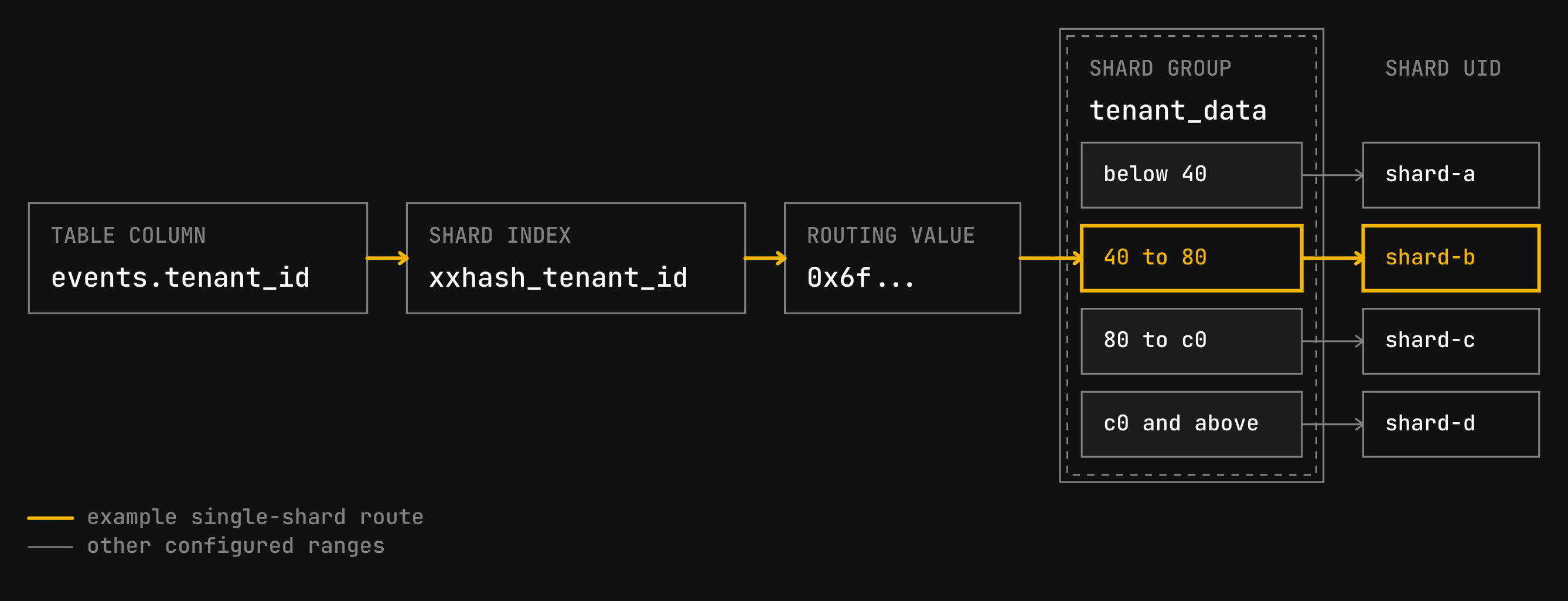 The final piece, shard indexes, will control how all of the rows from `orders` get placed onto shards A-D, and in turn determine how queries will be routed from the Neki Router.
## Shard indexes
A shard index is a named routing function that converts a table's shard key (the columns that will be used to determine shard placement) into a routing key (how the Router distributes the rows).
Neki supports three shard-index types.
```json theme={null}
"shard_indexes": {
"xxhash_tenant_id": {
"type": "xxhash",
"columns": ["tenant_id"]
}
}
```
This shard index is named `xxhash_tenant_id`.
Any table using this will shard rows based on an `xxhash` of all the columns listed in the array (in this case, just the `tenant_id` column, but you can specify multiple).
Every time the cluster receives a new row for a table using this hash index, Neki will:
1. Extract the `tenant_id` column
2. Run this value through the deterministic `xxhash` function (specifically `XXH3-64`).
3. Using the `start` and `end` values from the corresponding `shard_group`, determine which shard this row must be routed to.
4. Send the row to the correct shard for storage.
## Choosing a shard index
Neki supports three shard-index types. A topology that attempts to name another type is rejected.
| Type | Use |
| -------- | ------------------------------------------------------------------- |
| `xxhash` | Distribute supported shard-key values across a hexadecimal keyspace |
| `modulo` | Map an integer key into a fixed number of buckets |
| `range` | Route an integer key by its value |
`modulo` requires a positive `modulus` in `index_params`. Both `modulo` and
`range` accept Postgres `int2`, `int4`, and `int8` values.
`xxhash` accepts `text`, `varchar`, `bpchar`, `bytea`, `int2`, `int4`, `int8`,
`float4`, `float8`, `numeric`, `date`, `timestamp`, `timestamptz`, and `uuid` column types.
It hashes enum values by label.
Arrays, `json`, `jsonb`, and anonymous records are not supported.
Neki rejects a shard-key definition whose Postgres type does not have a
routing rule.
It does not wait for the first row or query to discover an unsupported type.
After defaults and table overrides are resolved, the `columns` list contains
exactly one entry.
That entry can be a column name or a deterministic expression over one or more unqualified columns:
```json theme={null}
{
"type": "xxhash",
"columns": ["tenant_id * 1000 + user_id"]
}
```
Shard indexes live in the top-level `shard_indexes` catalog.
Multiple shard groups can contain the same shard.
A table-level primary index must produce values that fit the shard group's
range layout. Changing the index type without changing the ranges can
concentrate rows on one shard or leave some values without a matching
destination.
## Single-shard and multi-shard queries
When the Neki router receives a query, it uses the database schema and topology to determine which shard(s) requests will get passed along to fulfill the query.
For example, a predicate on `events.tenant_id` can narrow it to be able to execute on a single shard:
```sql theme={null}
SELECT *
FROM events
WHERE tenant_id = 4821;
```
Neki uses `tenant_id = 4821` to route this query.
It maps `4821` through `xxhash_tenant_id` and finds the matching key range in `tenant_data`.
It then sends the query to that range's shard.
Co-location means that related rows from different tables are stored on the same shard.
To co-locate, say, the `events` and `event_metadata` tables, bind both tables to `tenant_data` and route both through `xxhash_tenant_id`.
Rows with the same `tenant_id` then map to the same shard while the topology is unchanged.
If Neki cannot narrow the scope of a query using a shard-key predicate, it sends the query to every shard in the table's group.
Each shard calculates its part of an aggregate such as `COUNT(*)`, and Neki combines those results before returning the answer.
More about inspecting a statement's routing reach in [Query planning](/docs/neki/query-planning#controlling-fanout).
## Schema and database defaults
Neki resolves an application table's shard group in this order:
1. The table's `shard_group`.
2. The schema's `default_shard_group`.
3. The database's `default_shard_group`.
4. The topology's `default_shard_group`.
Use a default when tables share one placement and an explicit binding for exceptions.
A table does not need an entry in `tables` to inherit a default: Neki applies the effective schema, database, or cluster default to unlisted application tables as their schemas are loaded.
If no binding or default resolves, the table is not routable.
## Sequence placement
A sequence is a Postgres object that returns numeric values, such as values used by `nextval()`.
In Neki, each sequence resolves to a shard group that must contain exactly one shard.
A sequence owned only by columns of unsharded tables follows those tables when they all resolve to the same single-shard group.
This includes the ownership link created for `SERIAL` and identity columns.
A sequence falls back to its database's authoritative shard group when it has no owner, has a sharded owner, or has owners in different groups.
A sequence entry in the data topology can set an explicit `shard_group`, which overrides the derived placement.
Changing a sequence's placement in the topology does not copy or synchronize
its current value. Coordinate sequence placement changes with PlanetScale
Support as part of a migration plan.
When the router's local range is empty, it reserves another batch from the sequence shard's primary.
Neki uses the router's configured reservation size, or the Postgres sequence's `CACHE` size when it is larger, and then returns values from that cached range.
A larger `CACHE` reduces how often routers return to the sequence shard.
Routers reserve a new range when they start or exhaust a batch, so adding or removing routers does not require moving the sequence.
## Authoritative shard group
An authoritative shard group identifies the single shard Neki uses as the
source of truth for database metadata. That shard publishes schema changes to
routers. It is also the fallback for sequences that do not derive their
placement from an owned unsharded table and do not name another shard group. It
does not control where application table data is stored.
Postgres assigns object identifiers (OIDs) independently on each shard. Custom
types and other catalog objects expose those OIDs over the wire protocol, so
clients see them. Separate shards do not agree on those numbers. The
authoritative shard decides the catalog clients see. Neki rewrites type
identifiers in result sets so every client receives the authoritative OIDs.
Every topology must name a default authoritative shard group.
An authoritative group must contain one key range with
no start or end bound. This keeps the metadata source on one shard.
A new Neki cluster starts with one shard that is both the default and the
authoritative group. After application data is sharded, that original shard
remains the authoritative group. Leave it there as a standalone shard.
Size that shard for catalog work, sequence reservations, and any unsharded
tables that stay on it, not for large application tables.
At the cluster level, `default_shard_group` must be omitted or match
`authoritative_shard_group`. To give application tables a different default,
set `default_shard_group` on the database or schema instead.
After authority is established, it is currently not possible to move it to a
different physical shard. Renaming the authoritative group is allowed only
when the renamed group still resolves to the same shard.
The final piece, shard indexes, will control how all of the rows from `orders` get placed onto shards A-D, and in turn determine how queries will be routed from the Neki Router.
## Shard indexes
A shard index is a named routing function that converts a table's shard key (the columns that will be used to determine shard placement) into a routing key (how the Router distributes the rows).
Neki supports three shard-index types.
```json theme={null}
"shard_indexes": {
"xxhash_tenant_id": {
"type": "xxhash",
"columns": ["tenant_id"]
}
}
```
This shard index is named `xxhash_tenant_id`.
Any table using this will shard rows based on an `xxhash` of all the columns listed in the array (in this case, just the `tenant_id` column, but you can specify multiple).
Every time the cluster receives a new row for a table using this hash index, Neki will:
1. Extract the `tenant_id` column
2. Run this value through the deterministic `xxhash` function (specifically `XXH3-64`).
3. Using the `start` and `end` values from the corresponding `shard_group`, determine which shard this row must be routed to.
4. Send the row to the correct shard for storage.
## Choosing a shard index
Neki supports three shard-index types. A topology that attempts to name another type is rejected.
| Type | Use |
| -------- | ------------------------------------------------------------------- |
| `xxhash` | Distribute supported shard-key values across a hexadecimal keyspace |
| `modulo` | Map an integer key into a fixed number of buckets |
| `range` | Route an integer key by its value |
`modulo` requires a positive `modulus` in `index_params`. Both `modulo` and
`range` accept Postgres `int2`, `int4`, and `int8` values.
`xxhash` accepts `text`, `varchar`, `bpchar`, `bytea`, `int2`, `int4`, `int8`,
`float4`, `float8`, `numeric`, `date`, `timestamp`, `timestamptz`, and `uuid` column types.
It hashes enum values by label.
Arrays, `json`, `jsonb`, and anonymous records are not supported.
Neki rejects a shard-key definition whose Postgres type does not have a
routing rule.
It does not wait for the first row or query to discover an unsupported type.
After defaults and table overrides are resolved, the `columns` list contains
exactly one entry.
That entry can be a column name or a deterministic expression over one or more unqualified columns:
```json theme={null}
{
"type": "xxhash",
"columns": ["tenant_id * 1000 + user_id"]
}
```
Shard indexes live in the top-level `shard_indexes` catalog.
Multiple shard groups can contain the same shard.
A table-level primary index must produce values that fit the shard group's
range layout. Changing the index type without changing the ranges can
concentrate rows on one shard or leave some values without a matching
destination.
## Single-shard and multi-shard queries
When the Neki router receives a query, it uses the database schema and topology to determine which shard(s) requests will get passed along to fulfill the query.
For example, a predicate on `events.tenant_id` can narrow it to be able to execute on a single shard:
```sql theme={null}
SELECT *
FROM events
WHERE tenant_id = 4821;
```
Neki uses `tenant_id = 4821` to route this query.
It maps `4821` through `xxhash_tenant_id` and finds the matching key range in `tenant_data`.
It then sends the query to that range's shard.
Co-location means that related rows from different tables are stored on the same shard.
To co-locate, say, the `events` and `event_metadata` tables, bind both tables to `tenant_data` and route both through `xxhash_tenant_id`.
Rows with the same `tenant_id` then map to the same shard while the topology is unchanged.
If Neki cannot narrow the scope of a query using a shard-key predicate, it sends the query to every shard in the table's group.
Each shard calculates its part of an aggregate such as `COUNT(*)`, and Neki combines those results before returning the answer.
More about inspecting a statement's routing reach in [Query planning](/docs/neki/query-planning#controlling-fanout).
## Schema and database defaults
Neki resolves an application table's shard group in this order:
1. The table's `shard_group`.
2. The schema's `default_shard_group`.
3. The database's `default_shard_group`.
4. The topology's `default_shard_group`.
Use a default when tables share one placement and an explicit binding for exceptions.
A table does not need an entry in `tables` to inherit a default: Neki applies the effective schema, database, or cluster default to unlisted application tables as their schemas are loaded.
If no binding or default resolves, the table is not routable.
## Sequence placement
A sequence is a Postgres object that returns numeric values, such as values used by `nextval()`.
In Neki, each sequence resolves to a shard group that must contain exactly one shard.
A sequence owned only by columns of unsharded tables follows those tables when they all resolve to the same single-shard group.
This includes the ownership link created for `SERIAL` and identity columns.
A sequence falls back to its database's authoritative shard group when it has no owner, has a sharded owner, or has owners in different groups.
A sequence entry in the data topology can set an explicit `shard_group`, which overrides the derived placement.
Changing a sequence's placement in the topology does not copy or synchronize
its current value. Coordinate sequence placement changes with PlanetScale
Support as part of a migration plan.
When the router's local range is empty, it reserves another batch from the sequence shard's primary.
Neki uses the router's configured reservation size, or the Postgres sequence's `CACHE` size when it is larger, and then returns values from that cached range.
A larger `CACHE` reduces how often routers return to the sequence shard.
Routers reserve a new range when they start or exhaust a batch, so adding or removing routers does not require moving the sequence.
## Authoritative shard group
An authoritative shard group identifies the single shard Neki uses as the
source of truth for database metadata. That shard publishes schema changes to
routers. It is also the fallback for sequences that do not derive their
placement from an owned unsharded table and do not name another shard group. It
does not control where application table data is stored.
Postgres assigns object identifiers (OIDs) independently on each shard. Custom
types and other catalog objects expose those OIDs over the wire protocol, so
clients see them. Separate shards do not agree on those numbers. The
authoritative shard decides the catalog clients see. Neki rewrites type
identifiers in result sets so every client receives the authoritative OIDs.
Every topology must name a default authoritative shard group.
An authoritative group must contain one key range with
no start or end bound. This keeps the metadata source on one shard.
A new Neki cluster starts with one shard that is both the default and the
authoritative group. After application data is sharded, that original shard
remains the authoritative group. Leave it there as a standalone shard.
Size that shard for catalog work, sequence reservations, and any unsharded
tables that stay on it, not for large application tables.
At the cluster level, `default_shard_group` must be omitted or match
`authoritative_shard_group`. To give application tables a different default,
set `default_shard_group` on the database or schema instead.
After authority is established, it is currently not possible to move it to a
different physical shard. Renaming the authoritative group is allowed only
when the renamed group still resolves to the same shard.
 ## View and update the topology
You can view and replace the topology in the PlanetScale dashboard, with the
CLI, or with the `__neki.set_data_topology` metafunction. An update is a
complete replacement, not a partial patch. Retrieve and save the current
document before preparing a replacement.
Open the database, go to **Clusters**, then **Data topology**. The page
shows the current JSON document. Edit it there and select **Save
changes**.
Retrieve the complete document or view its resolved relationships:
```bash theme={null}
pscale branch data-topology get --org
pscale branch data-topology ls --org
```
To replace the topology, pass the complete JSON document through standard
input:
```bash theme={null}
pscale branch data-topology update \
--org \
--format json < data-topology.json
```
### Replace the topology with SQL
The SQL signature is:
```sql theme={null}
__neki.set_data_topology(
data_topology_json text,
overwrite boolean,
options text DEFAULT NULL
) RETURNS record(success boolean, revision bigint)
```
Use `overwrite => false` only to create the first topology. It fails when a
topology already exists. Use `overwrite => true` to replace an existing
topology:
```sql theme={null}
SELECT *
FROM __neki.set_data_topology(
$topology$
{
"authoritative_shard_group": "meta",
"shard_groups": [
{
"uid": "meta",
"key_ranges": [{ "shard_uid": "shard-meta" }]
}
],
"databases": {
"analytics": {
"default_shard_group": "meta"
}
}
}
$topology$,
true,
'{
"comment": "Route analytics tables to meta",
"expected_revision": 42
}'
);
```
The optional JSON object accepts:
| Option | Effect |
| ------------------- | -------------------------------------------------------------------------------------------------------------------------------------------------------------------- |
| `comment` | Records why the topology changed. |
| `expected_revision` | Applies the replacement only if the stored revision still matches the revision you read. This prevents one editor from silently overwriting another editor's change. |
| `force` | Applies a change despite validation problems introduced by that change and records the suppressed findings. Existing problems do not require this option. |
Unknown and misspelled options are rejected. `overwrite` controls create
versus replace; it is not a concurrency check. Use `expected_revision` for
concurrent edits. Use `force` only with PlanetScale Support because it can
persist routing problems.
### Wait for router visibility after a SQL update
When you apply a topology with the `__neki.set_data_topology` metafunction, it
returns `success` and the stored topology `revision`. The change is visible on
the router that accepts it before that router reports the normal success
notice, but other routers may still have the previous topology in memory.
Use the returned revision to wait until every router can see the replacement:
```sql theme={null}
SELECT __neki.wait_for_data_topology();
```
If the original call warns that the topology was stored but did not become
visible on that router in time, the stored update was not rolled back. Use the
same wait function before running queries that depend on the new topology.
## Need help?
Get help from [the PlanetScale Support team](https://planetscale.com/contact?initial=support), or join our [Discord community](https://pscale.link/community) to see how others are using PlanetScale.
## View and update the topology
You can view and replace the topology in the PlanetScale dashboard, with the
CLI, or with the `__neki.set_data_topology` metafunction. An update is a
complete replacement, not a partial patch. Retrieve and save the current
document before preparing a replacement.
Open the database, go to **Clusters**, then **Data topology**. The page
shows the current JSON document. Edit it there and select **Save
changes**.
Retrieve the complete document or view its resolved relationships:
```bash theme={null}
pscale branch data-topology get --org
pscale branch data-topology ls --org
```
To replace the topology, pass the complete JSON document through standard
input:
```bash theme={null}
pscale branch data-topology update \
--org \
--format json < data-topology.json
```
### Replace the topology with SQL
The SQL signature is:
```sql theme={null}
__neki.set_data_topology(
data_topology_json text,
overwrite boolean,
options text DEFAULT NULL
) RETURNS record(success boolean, revision bigint)
```
Use `overwrite => false` only to create the first topology. It fails when a
topology already exists. Use `overwrite => true` to replace an existing
topology:
```sql theme={null}
SELECT *
FROM __neki.set_data_topology(
$topology$
{
"authoritative_shard_group": "meta",
"shard_groups": [
{
"uid": "meta",
"key_ranges": [{ "shard_uid": "shard-meta" }]
}
],
"databases": {
"analytics": {
"default_shard_group": "meta"
}
}
}
$topology$,
true,
'{
"comment": "Route analytics tables to meta",
"expected_revision": 42
}'
);
```
The optional JSON object accepts:
| Option | Effect |
| ------------------- | -------------------------------------------------------------------------------------------------------------------------------------------------------------------- |
| `comment` | Records why the topology changed. |
| `expected_revision` | Applies the replacement only if the stored revision still matches the revision you read. This prevents one editor from silently overwriting another editor's change. |
| `force` | Applies a change despite validation problems introduced by that change and records the suppressed findings. Existing problems do not require this option. |
Unknown and misspelled options are rejected. `overwrite` controls create
versus replace; it is not a concurrency check. Use `expected_revision` for
concurrent edits. Use `force` only with PlanetScale Support because it can
persist routing problems.
### Wait for router visibility after a SQL update
When you apply a topology with the `__neki.set_data_topology` metafunction, it
returns `success` and the stored topology `revision`. The change is visible on
the router that accepts it before that router reports the normal success
notice, but other routers may still have the previous topology in memory.
Use the returned revision to wait until every router can see the replacement:
```sql theme={null}
SELECT __neki.wait_for_data_topology();
```
If the original call warns that the topology was stored but did not become
visible on that router in time, the stored update was not rolled back. Use the
same wait function before running queries that depend on the new topology.
## Need help?
Get help from [the PlanetScale Support team](https://planetscale.com/contact?initial=support), or join our [Discord community](https://pscale.link/community) to see how others are using PlanetScale.