> ## Documentation Index
> Fetch the complete documentation index at: https://planetscale.com/docs/llms.txt
> Use this file to discover all available pages before exploring further.
# Service tokens
> Using service tokens with the PlanetScale API.
## Overview
This document will show you how to create a service token for the API in PlanetScale. All PlanetScale API endpoints require one. You can read more about using service tokens outside of the API in the [PlanetScale service token documentation](/api/reference/service-tokens).
## Authorization header
To make requests to the API, add the service token values in the `Authorization` header in your HTTP API request using the following format:
```text Text theme={null}
Authorization: :
```
Here is a cURL example:
```curl cURL theme={null}
curl --request GET 'https://api.planetscale.com/v1/organizations' \
--header 'Authorization: :'
```
## Creating a service token
To create a service token using the dashboard, log into your organization and click **Settings > Service tokens > New service token**.
Give the token a descriptive name (this is used for your reference only) and click **Create service token**.
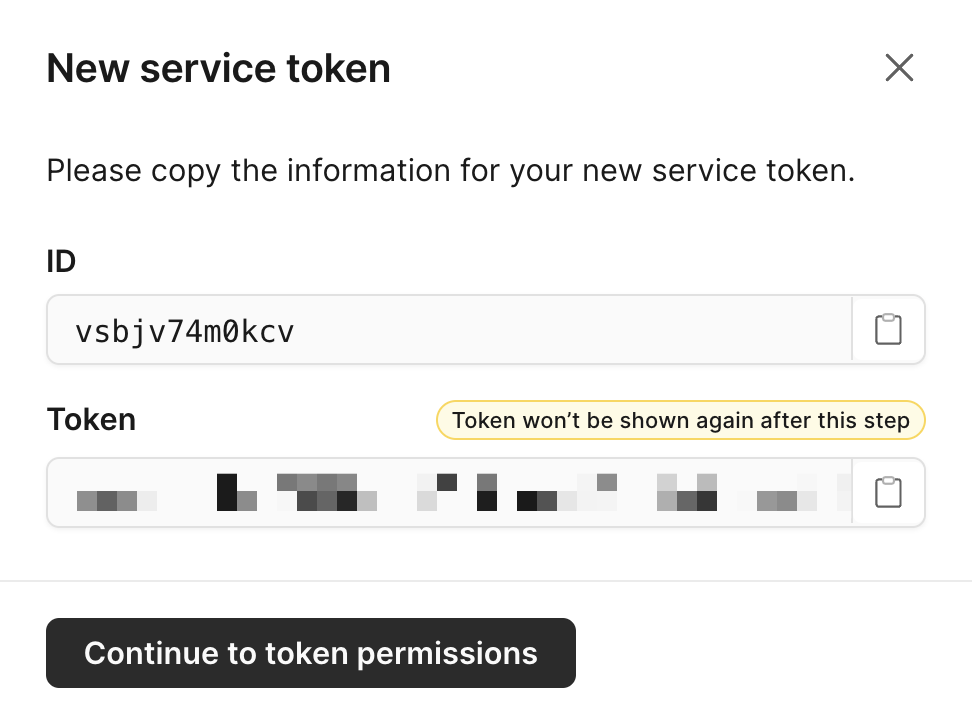
### Service token ID
Copy this value to use as `SERVICE_TOKEN_ID`.
The ID is also visible on the service token page after you continue to token permissions.
### Service token
The token is generated immediately after the service token is created.
Copy this value to use as `SERVICE_TOKEN`.
 ## Access permissions
You can access your specific service token page from your organization's **Settings > Service token** page.
Service tokens are configured with granular permissions for both organizations and databases access. On the page for your specific service token you can add one or many of the following permissions.
## Access permissions
You can access your specific service token page from your organization's **Settings > Service token** page.
Service tokens are configured with granular permissions for both organizations and databases access. On the page for your specific service token you can add one or many of the following permissions.
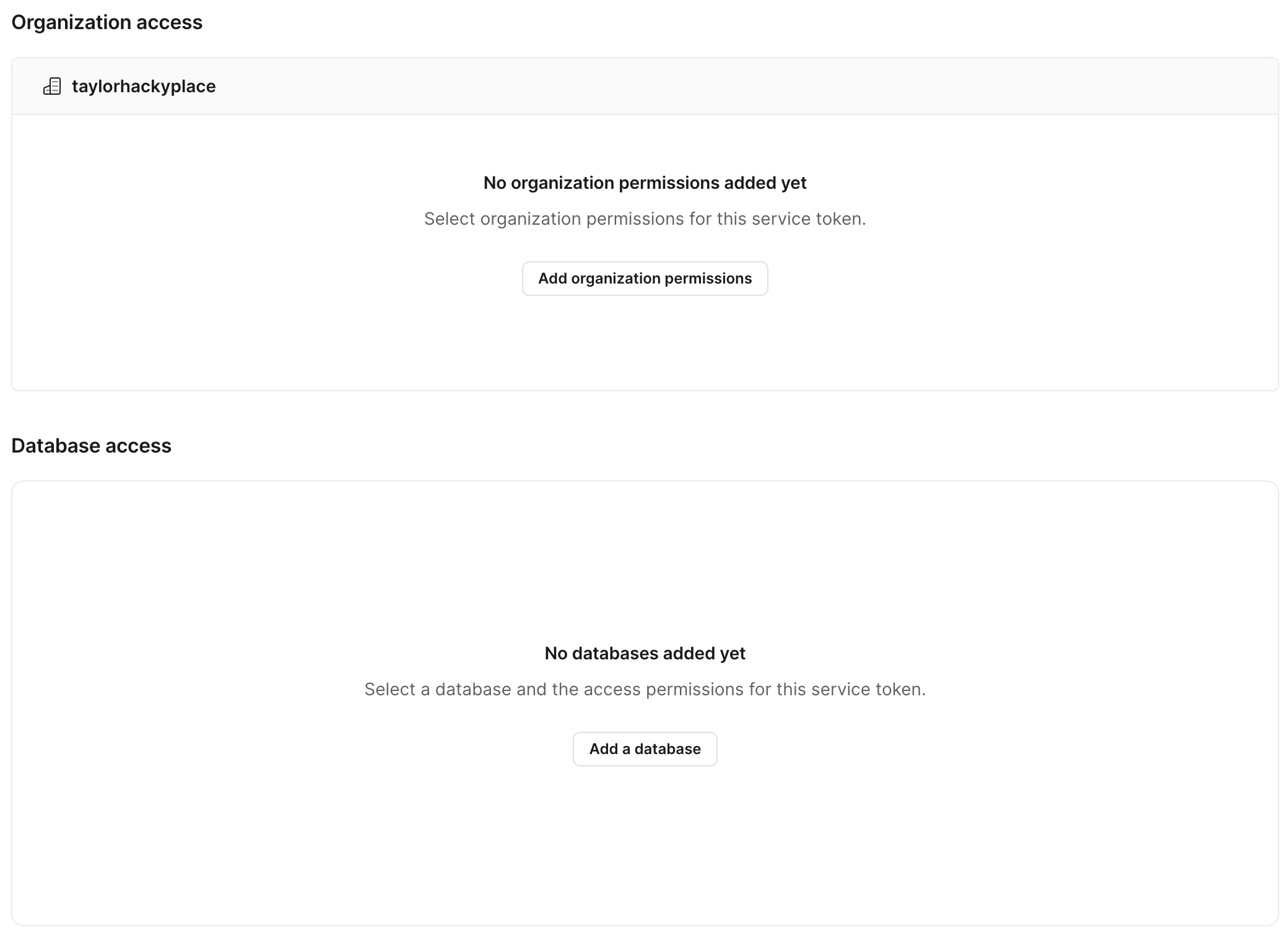 Please note that you may only add service token accesses that you are also authorized to do. For example, as an organization member, you can't create a service token with `create_databases` access.
### Organization access permissions
A service token can have granular permissions across an organization with one or multiple of the following access permissions.
Check the box next to each permission option you need to grant. Once you are done, click **Save permissions**.
| Access permissions | Description |
| :------------------------ | :-------------------------------------------------------------------------- |
| read\_organization | Get information about an organization |
| read\_invoices | Get invoices for an organization |
| read\_audit\_logs | Get audit logs for an organization |
| read\_databases | Get information about an organization's databases |
| create\_databases | Create organization databases |
| delete\_databases | Delete organization databases |
| read\_oauth\_applications | Get information about an organization's OAuth applications and their tokens |
| read\_oauth\_tokens | Get OAuth tokens for an OAuth application |
| write\_oauth\_tokens | Create and refresh OAuth grants and tokens for an OAuth application |
| delete\_oauth\_tokens | Delete OAuth tokens for an OAuth application |
| read\_service\_tokens | Get information about service tokens |
| write\_service\_tokens | Create and update service tokens |
| delete\_service\_tokens | Delete service tokens |
| write\_teams | Create and update teams |
| read\_metrics\_endpoints | Get information about branch metrics endpoints |
### Database access permissions
A service token can have granular permissions across a database with one or multiple of the following access permissions.
Select the database you want to grant access for and check the box next to each permission option you need to grant. Once you are done, click **Save permissions**.
| Access permissions | Description |
| :----------------------------------- | :-------------------------------------------------- |
| read\_database | Get information about a database |
| write\_database | Update information about a database |
| delete\_database | Delete a database |
| create\_branch | Create a database branch |
| read\_branch | Read a database branch |
| delete\_branch | Delete a database branch |
| delete\_production\_branch | Delete a production database branch |
| connect\_branch | Connect to a database branch |
| connect\_production\_branch | Connect to a production database branch |
| delete\_branch\_password | Delete a password for a non-production branch |
| delete\_production\_branch\_password | Delete a password for a production branch |
| create\_deploy\_request | Create a deploy request |
| read\_deploy\_request | Read a deploy request |
| approve\_deploy\_request | Approve a deploy request |
| create\_comment | Create a deploy request comment |
| read\_comment | Read a deploy request comment |
| read\_backups | List backups |
| write\_backups | Create and update backups |
| delete\_backups | Delete development branch backups |
| delete\_production\_branch\_backups | Delete production branch backups |
| restore\_backup | Restore a development branch backup |
| restore\_production\_branch\_backup | Restore a production branch backup |
| write\_branch\_vschema | Update the VSchema for a database branch |
| write\_production\_branch\_vschema | Update the VSchema for a production database branch |
When a service token with `create_databases` organization access creates a database, it is automatically granted database access permissions for that database. See [Creating databases with service tokens](/api/service-tokens#creating-databases-with-service-tokens) for more information.
## Service tokens and deploy requests approvals
When a database requires administrator approval for deploy requests (located in your database's Settings page), a service token cannot approve a deploy request created by the same service token. Also, users can't approve a deploy request created by a service token that they created.
## Example
### Creating a PlanetScale branch with service tokens
Creating a database branch is one of the many API endpoints documented in our [PlanetScale API docs](/api/reference/create_branch).
The following steps are required to make a successful API request:
Create a service token as described at the top of this page. Make sure to copy and paste the service token ID and service token somewhere safe.
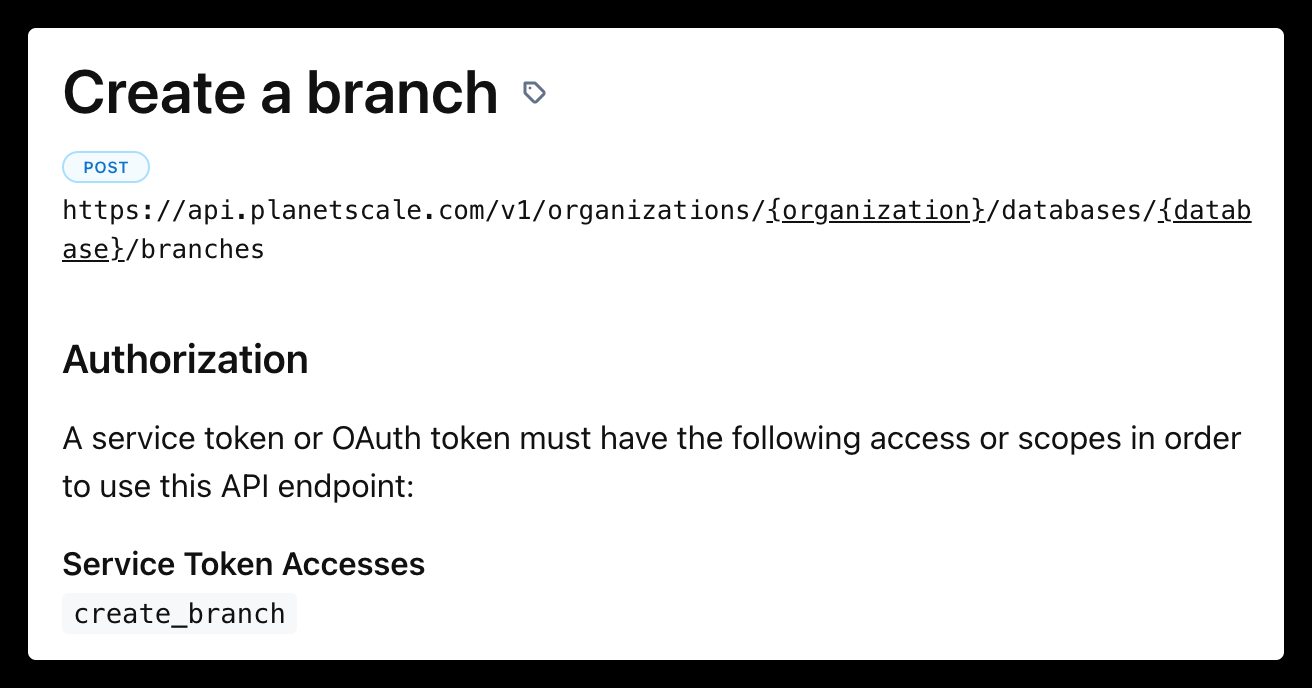
You need to make sure your service token has the correct access permissions. Each endpoint documentation describes the service token access permissions it needs in the `Authorization` section. For example, in the create a branch endpoint you will need to grant the service token the `create_branch` access for your database:
Please note that you may only add service token accesses that you are also authorized to do. For example, as an organization member, you can't create a service token with `create_databases` access.
### Organization access permissions
A service token can have granular permissions across an organization with one or multiple of the following access permissions.
Check the box next to each permission option you need to grant. Once you are done, click **Save permissions**.
| Access permissions | Description |
| :------------------------ | :-------------------------------------------------------------------------- |
| read\_organization | Get information about an organization |
| read\_invoices | Get invoices for an organization |
| read\_audit\_logs | Get audit logs for an organization |
| read\_databases | Get information about an organization's databases |
| create\_databases | Create organization databases |
| delete\_databases | Delete organization databases |
| read\_oauth\_applications | Get information about an organization's OAuth applications and their tokens |
| read\_oauth\_tokens | Get OAuth tokens for an OAuth application |
| write\_oauth\_tokens | Create and refresh OAuth grants and tokens for an OAuth application |
| delete\_oauth\_tokens | Delete OAuth tokens for an OAuth application |
| read\_service\_tokens | Get information about service tokens |
| write\_service\_tokens | Create and update service tokens |
| delete\_service\_tokens | Delete service tokens |
| write\_teams | Create and update teams |
| read\_metrics\_endpoints | Get information about branch metrics endpoints |
### Database access permissions
A service token can have granular permissions across a database with one or multiple of the following access permissions.
Select the database you want to grant access for and check the box next to each permission option you need to grant. Once you are done, click **Save permissions**.
| Access permissions | Description |
| :----------------------------------- | :-------------------------------------------------- |
| read\_database | Get information about a database |
| write\_database | Update information about a database |
| delete\_database | Delete a database |
| create\_branch | Create a database branch |
| read\_branch | Read a database branch |
| delete\_branch | Delete a database branch |
| delete\_production\_branch | Delete a production database branch |
| connect\_branch | Connect to a database branch |
| connect\_production\_branch | Connect to a production database branch |
| delete\_branch\_password | Delete a password for a non-production branch |
| delete\_production\_branch\_password | Delete a password for a production branch |
| create\_deploy\_request | Create a deploy request |
| read\_deploy\_request | Read a deploy request |
| approve\_deploy\_request | Approve a deploy request |
| create\_comment | Create a deploy request comment |
| read\_comment | Read a deploy request comment |
| read\_backups | List backups |
| write\_backups | Create and update backups |
| delete\_backups | Delete development branch backups |
| delete\_production\_branch\_backups | Delete production branch backups |
| restore\_backup | Restore a development branch backup |
| restore\_production\_branch\_backup | Restore a production branch backup |
| write\_branch\_vschema | Update the VSchema for a database branch |
| write\_production\_branch\_vschema | Update the VSchema for a production database branch |
When a service token with `create_databases` organization access creates a database, it is automatically granted database access permissions for that database. See [Creating databases with service tokens](/api/service-tokens#creating-databases-with-service-tokens) for more information.
## Service tokens and deploy requests approvals
When a database requires administrator approval for deploy requests (located in your database's Settings page), a service token cannot approve a deploy request created by the same service token. Also, users can't approve a deploy request created by a service token that they created.
## Example
### Creating a PlanetScale branch with service tokens
Creating a database branch is one of the many API endpoints documented in our [PlanetScale API docs](/api/reference/create_branch).
The following steps are required to make a successful API request:
Create a service token as described at the top of this page. Make sure to copy and paste the service token ID and service token somewhere safe.
You need to make sure your service token has the correct access permissions. Each endpoint documentation describes the service token access permissions it needs in the `Authorization` section. For example, in the create a branch endpoint you will need to grant the service token the `create_branch` access for your database:
 After your permissions are set, you can now use the service token in a cURL request:
```curl cURL theme={null}
curl --request POST \
--url https://api.planetscale.com/v1/organizations/ORGANIZATION_NAME/databases/DATABASE_NAME/branches \
--header 'Authorization: SERVICE_TOKEN_ID:SERVICE_TOKEN' \
--header 'accept: application/json' \
--header 'content-type: application/json'
--data '{"name": "BRANCH_NAME","parent_branch": "PARENT_BRANCH_NAME"}'
```
Make sure to fill in the `ORGANIZATION_NAME`, `DATABASE_NAME`, `BRANCH_NAME`, `PARENT_BRANCH_NAME`, `SERVICE_TOKEN_ID`, and `SERVICE_TOKEN` variables.
You will get a response with the following data, as described in the specific API endpoints documentation:
```json JSON expandable theme={null}
{
"id": "xsvewamrebwz",
"type": "Branch",
"name": "new-feature",
"created_at": "2023-01-10T23:31:01.573Z",
"updated_at": "2023-01-10T23:31:01.573Z",
"restore_checklist_completed_at": null,
"access_host_url": "xsvewamrebwz.us-east-1.psdb.cloud",
"schema_last_updated_at": "2023-01-10T23:31:01.573Z",
"mysql_address": "us-east.connect.psdb.cloud",
"mysql_provider_address": "aws.connect.psdb.cloud",
"initial_restore_id": null,
"mysql_edge_address": "aws.connect.psdb.cloud",
"ready": false,
"production": false,
"sharded": false,
"shard_count": 0,
"actor": {
"id": "g2dr4sbhz6ag",
"type": "User",
"display_name": "Taylor Barnett",
"avatar_url": "https://www.gravatar.com/avatar/2a44999e8816311f19eea3d7516d9204?d=https%3A%2F%2Fapp.planetscale.com%2Fgravatar-fallback.png&s=64"
},
"restored_from_branch": null,
"html_url": "https://app.planetscale.com/taylorhackyplace/example-test/new-feature",
"url": "https://api.planetscale.com/v1/organizations/taylorhackyplace/databases/example-test/branches/new-feature",
"region": {
"id": "kc0e1ij8juzp",
"type": "Region",
"provider": "AWS",
"enabled": true,
"public_ip_addresses": [
"23.23.187.137",
"52.6.141.108",
"52.70.2.89",
"50.17.188.76",
"52.2.251.189",
"52.72.234.74",
"35.174.68.24",
"52.5.253.172",
"54.156.81.4",
"34.200.24.255",
"35.174.79.154",
"44.199.177.24"
],
"display_name": "AWS us-east-1",
"location": "Northern Virginia",
"slug": "us-east"
},
"multiple_admins_required_for_demotion": false,
"parent_branch": "main"
}
```
### Potential errors
If you get a `{"code":"not_found","message":"Not Found"}` response, it is likely you either did not change the variables in the example cURL request or you did not set the access permissions correctly for the service token.
## Need help?
Get help from [the PlanetScale Support team](https://planetscale.com/contact?initial=support), or join our [Discord community](https://pscale.link/community) to see how others are using PlanetScale.
After your permissions are set, you can now use the service token in a cURL request:
```curl cURL theme={null}
curl --request POST \
--url https://api.planetscale.com/v1/organizations/ORGANIZATION_NAME/databases/DATABASE_NAME/branches \
--header 'Authorization: SERVICE_TOKEN_ID:SERVICE_TOKEN' \
--header 'accept: application/json' \
--header 'content-type: application/json'
--data '{"name": "BRANCH_NAME","parent_branch": "PARENT_BRANCH_NAME"}'
```
Make sure to fill in the `ORGANIZATION_NAME`, `DATABASE_NAME`, `BRANCH_NAME`, `PARENT_BRANCH_NAME`, `SERVICE_TOKEN_ID`, and `SERVICE_TOKEN` variables.
You will get a response with the following data, as described in the specific API endpoints documentation:
```json JSON expandable theme={null}
{
"id": "xsvewamrebwz",
"type": "Branch",
"name": "new-feature",
"created_at": "2023-01-10T23:31:01.573Z",
"updated_at": "2023-01-10T23:31:01.573Z",
"restore_checklist_completed_at": null,
"access_host_url": "xsvewamrebwz.us-east-1.psdb.cloud",
"schema_last_updated_at": "2023-01-10T23:31:01.573Z",
"mysql_address": "us-east.connect.psdb.cloud",
"mysql_provider_address": "aws.connect.psdb.cloud",
"initial_restore_id": null,
"mysql_edge_address": "aws.connect.psdb.cloud",
"ready": false,
"production": false,
"sharded": false,
"shard_count": 0,
"actor": {
"id": "g2dr4sbhz6ag",
"type": "User",
"display_name": "Taylor Barnett",
"avatar_url": "https://www.gravatar.com/avatar/2a44999e8816311f19eea3d7516d9204?d=https%3A%2F%2Fapp.planetscale.com%2Fgravatar-fallback.png&s=64"
},
"restored_from_branch": null,
"html_url": "https://app.planetscale.com/taylorhackyplace/example-test/new-feature",
"url": "https://api.planetscale.com/v1/organizations/taylorhackyplace/databases/example-test/branches/new-feature",
"region": {
"id": "kc0e1ij8juzp",
"type": "Region",
"provider": "AWS",
"enabled": true,
"public_ip_addresses": [
"23.23.187.137",
"52.6.141.108",
"52.70.2.89",
"50.17.188.76",
"52.2.251.189",
"52.72.234.74",
"35.174.68.24",
"52.5.253.172",
"54.156.81.4",
"34.200.24.255",
"35.174.79.154",
"44.199.177.24"
],
"display_name": "AWS us-east-1",
"location": "Northern Virginia",
"slug": "us-east"
},
"multiple_admins_required_for_demotion": false,
"parent_branch": "main"
}
```
### Potential errors
If you get a `{"code":"not_found","message":"Not Found"}` response, it is likely you either did not change the variables in the example cURL request or you did not set the access permissions correctly for the service token.
## Need help?
Get help from [the PlanetScale Support team](https://planetscale.com/contact?initial=support), or join our [Discord community](https://pscale.link/community) to see how others are using PlanetScale.